
Q3 Limited-Time Deal. Find verified B2B leads at half the cost. Get 50% Off with Coupon Code PROSPECT50. First 200 Users Only.
Unlimited Data.
Infinite Possibilities.
Looking for B2B data? Download Unlimited data using our Chrome extension at just $79/month.
The Complete Guide to Email List Hygiene
Written by:
Abdul Kareem

Email List Hygiene: Best Practices Guide 

> Email List Hygiene

How to Evaluate B2B Data Vendors for Accuracy and Compliance

TL;DR

Introduction

Somewhere in your database right now, there’s a contact who left their job eight months ago, a role account that never reads anything you send, and a handful of addresses with a typo in the domain. None of that is unusual. It’s what happens to every list that isn’t actively maintained. Teams that clean email lists proactively, rather than reacting after a bad send, tend to see steadier results over time. 

Email list hygiene is the practice of finding those problem contacts and dealing with them before they damage your sender reputation. It sounds like a minor operational task, but it’s one of the few things that directly affects whether your next campaign lands in the inbox or gets filtered out before anyone sees it. 

Most teams don’t think about list hygiene until something breaks: bounce rates climb, a client asks why open rate dropped, or an ESP flags the account. By then, the fix takes longer and the damage to deliverability is already done. This guide covers what email list hygiene actually involves, the warning signs to watch for, and a step by step process for cleaning your email lists and keeping them that way. 

What Email List Hygiene Actually Means

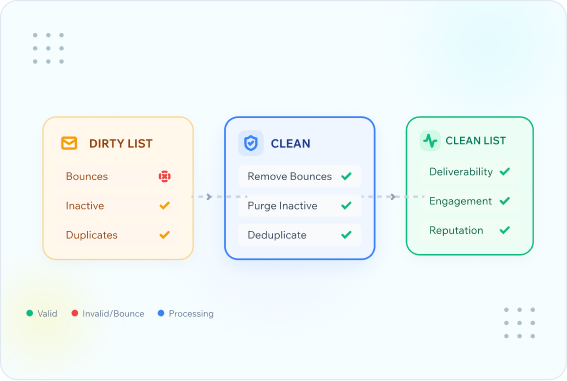
Email list hygiene is more than deleting bounced addresses after a send. It’s the combination of validation, segmentation, and maintenance that keeps a database accurate over time. A list with good hygiene reflects who’s actually there, not who signed up two years ago and never opened another email. 

Three things typically fall under list hygiene: 

Each of these needs a different response, which is why list hygiene isn’t a single action. It’s closer to a maintenance schedule than a one time cleanup. 
Tip
Set a recurring reminder to review your list quality every quarter, not just before a major campaign. Waiting until send day means you’re reacting instead of managing. 

Why a Dirty List Costs You More Than You Think

A list full of bad addresses doesn’t just waste sends. It actively works against you with mailbox providers. 

Internet service providers and inbox platforms track how recipients interact with your mail. High bounce rates, low open rates, and spam complaints all feed into a sender reputation score. Once that score drops, even your good contacts start seeing your emails land in spam, not just the risky ones. This is where email deliverability and list hygiene are directly connected: a great subject line and a relevant offer won’t matter if a meaningful share of the list is dead weight. (For a deeper look at sender reputation, see our guide on email deliverability best practices — internal link placeholder, URL to be confirmed.) 

There’s a cost on the sales side too. SDRs working a list padded with bad data spend hours chasing contacts who will never reply, and engagement rates look worse than they should because the denominator includes people who were never going to open the email. 

Expert Insight
Experienced revenue teams treat their contact database the way a sales pipeline treats stale deals. If a contact hasn’t shown any sign of life in months, it gets flagged and reviewed, not left to quietly sit in every future send. 

The Warning Signs Your Database Needs Attention

Most lists don’t announce that they need cleaning; you have to look for the signs. 
Common Mistake
Teams often look at total list size as a vanity metric and resist cleaning because the number will go down. A smaller list of engaged subscribers delivers better results than a larger list filled with inactive addresses, improving both deliverability and revenue per campaign.
 Stop Guessing Which Addresses Are Safe to Send To 
Run your first batch of contacts through ReachStream Email Verifier before your next send. 

How to Clean an Email List Step by Step 

Cleaning your email lists doesn’t need to be complicated, but it does need to be systematic. Here’s the process most B2B teams follow.

Step 1:

Run a Full Database Validation

Before you touch segmentation or engagement data, run every contact through a full validation check. This catches syntax errors, invalid domains, disposable addresses, and role accounts that manual review would miss. 

Step 2:

Separate Hard Bounces From Risky Addresses

Not every flagged address should be deleted immediately. Hard bounces (addresses that no longer exist) should be removed. Risky or catch-all addresses need a judgment call. Some teams suppress them from cold campaigns but keep them for warm, opted-in sends.

Step 3:

Identify Inactive Subscribers

Pull a report of contacts who haven’t opened or clicked in your defined inactivity window (commonly 90 to 180 days for B2B). This is your re-engagement or sunset list. 

Step 4:

Run a Re-Engagement Campaign

Before removing inactive subscribers outright, send a short, direct re-engagement email campaign. Ask if they still want to hear from you. This step alone often recovers a meaningful share of contacts who were simply overlooking your emails, not ignoring them.

Step 5:

Suppress or Remove Non-Responders

Anyone who doesn’t respond to re-engagement should be suppressed from regular sends, and eventually removed if they stay inactive. This protects your open and click metrics and keeps your sender reputation intact. 

Step 6:

Document What You Did and When

Keep a simple log of cleaning dates, validation results, and removal counts. This makes the next cleanup faster and gives you a trend line on data quality over time.

Quick Checklist: List Cleanup Steps 

Building a Repeatable List Hygiene Process

A single cleanup fixes today’s problem. A repeatable process prevents tomorrow’s. Most teams treat email list cleaning as a recurring line item on the calendar rather than a fire drill they run once a problem shows up. 

Neglecting email data hygiene rarely causes a dramatic failure overnight. It shows up gradually, as a slow decline in open rate and a slow climb in bounce rate, until someone finally asks what changed. Building it into your calendar the same way you’d schedule a CRM audit usually looks like: 

Pro Tip
Validate emails at the point of capture, whether that’s a form fill, a list import, or a data enrichment tool. It’s far cheaper to reject a bad address before it enters your database than to clean it out six months later after it’s already hurt your sender reputation. 
INDUSTRY INSIGHT 
Contact data decays continuously. People change jobs, companies merge, domains get retired. This is a widely recognized reason B2B teams treat list hygiene as ongoing maintenance rather than a project with an end date. 

Segmentation: What to Do with the Contacts You Keep

Cleaning your list isn’t only about what you remove. It’s also about how you treat what’s left. 

Once you’ve validated and reviewed your database, segment contacts by engagement level: 

Segment  Behavior  Recommended Treatment 
Highly engaged 
Opens and clicks regularly 
Full send cadence, priority for new offers 
Mailbox does not exist or domain is dead
Opens occasionally, rarely clicks 
Reduced frequency, targeted content 
Inactive 
No opens in 90+ days 
Re-engagement campaign, then suppression 
Never engaged 
Never opened since being added 
Immediate re-engagement or removal 
This kind of segmentation protects your best-performing segment from being diluted by contacts who were never going to convert. It also gives you a clearer, more honest read on how your campaigns are actually performing. 
BEST PRACTICE 
Report on engagement rates by segment, not just as a blended average across your whole list. A blended number can hide the fact that your top segment is performing well while a large inactive segment is dragging the average down. 

Common Mistakes Teams Make with List Hygiene

Even teams that understand the value of list hygiene run into the same handful of mistakes.

How ReachStream Email Verifier Fits into the Process

Manual review can catch obvious problems, but it can’t tell you which addresses are catch-all domains, which are likely to bounce, or which fall into a genuinely risky category before you send. That’s the gap an email verification service is designed to close.

ReachStream Email Verifier checks each address against five verification statuses: Valid, Invalid, Risky, Unknown, and Do Not Mail. That level of detail is designed to help teams make an informed decision about each segment rather than treating every non-bounce as safe to send to. It’s designed to support it, specifically the validation and risk-flagging steps that are hardest to do accurately by hand.

A few specifics worth knowing if you’re evaluating an email validation tool for this kind of ongoing hygiene work: 

Keep Your Email List Campaign-Ready 
Find a pricing plan that fits your verification needs and maintain a healthier email list with every send. 

Conclusion

Email list hygiene isn’t a task you finish and move on from. It’s a maintenance habit that protects everything downstream of it: deliverability, sender reputation, and the accuracy of every engagement report your team relies on. The teams that treat it as ongoing, rather than reactive, consistently see steadier open rate and click through rates because they’re sending to people who are actually there and actually paying attention. 

The process itself isn’t complicated. Validate regularly, segment by engagement, re-engage before you remove, and document what you did. Pairing that process with a reliable verification step closes the gaps that manual review can’t catch on its own. 

A Cleaner List Starts With Knowing What's Actually in It
Run your database through ReachStream Email Verifier and see exactly what needs attention. 

Frequently Asked Questions

1. How often should I clean my email list?

Most B2B teams validate their full database quarterly, while reviewing engagement rates monthly to catch decay between full cleanups.
Emails typically bounce due to invalid or misspelled addresses, expired domains, full inboxes, or contacts who’ve left the company associated with that address.
A hard bounce means the address doesn’t exist and should be removed immediately. A soft bounce is often temporary, such as a full inbox, and may resolve on its own.
Not immediately. Best practice is to run a re-engagement campaign first, since some inactive subscribers are simply not seeing your emails rather than actively disengaged.
Mailbox providers track bounce rates, spam complaints, and engagement as part of your sender reputation. Poor list hygiene raises all three, which increases the likelihood of landing in spam.
A catch-all domain accepts mail sent to any address at that domain, even ones that don’t technically exist. This makes it harder to confirm whether a real person will actually receive your message.
No validation tool can guarantee delivery, since factors like content, sender reputation, and recipient inbox rules also play a role. Validation reduces risk by identifying invalid and risky addresses before you send.
Many senders aim to keep bounce rates below 2%, though the right number can vary by industry and list source.
Rising bounce rates, declining open rate or click through rates without a clear cause, and an increase in spam complaints are all signs your list needs a hygiene pass. 
Manual review can catch obvious issues like typos, but it can’t reliably detect catch-all domains or predict deliverability risk the way a dedicated verification tool can. 
Verifying email addresses as they are collected, through forms, imports, or enrichment sources, is one of the most effective ways to maintain email hygiene from the start. 
Abdul Kareem

Author

Abdul Kareem
Abdulkareem Satarkar is Software Engineering Manager at ReachStream, leading the development of scalable software solutions for B2B sales and marketing teams.
Share
Table of Contents

Access 200M+ verified business emails and grow your sales pipeline effortlessly.

Power Your Sales with Targeted Data
Abdul Kareem
Abdul KareemAuthor
Abdul Kareem, Software Manager at ReachStream, has extensive experience in DevOps and backend technologies such as Python and PHP. He focuses on seamless project execution, maintaining optimal performance, and upholding the highest quality standards.

Don't forget to share this post!

Check out our other blogs!