

How to Set Up a New Contact in HubSpot
How to Set Up a New Contact in HubSpot Updated on: Creating a new contact in HubSpot is quick and easy. Here’s how you can do it: 1. From the top navigation menu, click on Contacts. 2. In the top right corner, click the “Create contact” button. 3. Fill in the required contact information (e.g., […]
How to Set Up a Dashboard in HubSpot
How to Set Up a Dashboard in HubSpot Updated on: Creating a dashboard in HubSpot is simple. Here’s how you can set one up: 1. From the top navigation menu, go to Reporting. 2. Select Dashboard. 3. Click the “Create Dashboard” button. 4. Choose a predefined template (Sales, Marketing, Customer Service) or start with a […]
How to Create a New Marketing Email in HubSpot
How to Create a New Marketing Email in HubSpot Updated on: Building a marketing email in HubSpot takes only a few clicks. Here’s the process: 1. From the top navigation menu, go to Marketing → Select Email. 2. Click the “Create Email” button in the top right corner or select a template. 3. Choose the […]
How to Create a New Deal in HubSpot
How to Create a New Deal in HubSpot Updated on: Creating a new deal in HubSpot is quick and easy. Here’s how you can do it: 1. From the top navigation menu, click on CRM→ Select Deals. 2. Click the “Create deal” button in the top right corner. 3. Fill in the required deal information […]
How to Create a Custom Report in HubSpot
How to Create a Custom Report in HubSpot Updated on: Want to build a custom report in HubSpot? Just follow these steps: 1. From the top menu, click Reporting → Select Reports 2. Click “Create List”. 3. Choose filters, fields, and data visualization (table, bar chart, pie chart). 4. Click “Save Report”. 5. Name your […]
How to Add a New Company in HubSpot
How to Add a New Company in HubSpot Updated on: Adding a new company in HubSpot is quick and easy. Here’s how to do it: 1. From the top menu, click CRM→ Select Companies. 2. Click the “Create company” button in the top right corner. 3. Fill in the company details. 4. Click “Create Company” […]
How to Log in to HubSpot
How to Log in to HubSpot Updated on: Ready to use HubSpot? Here’s how to log in to your account: 1. Enter your email address in the first field. This should be the email address associated with your HubSpot account. 2. Enter your password in the second field. 3. If desired, check the “Remember me” […]
How to Create a Landing Page in HubSpot
How to Create a Landing Page in HubSpot Updated on: Creating a landing page in HubSpot is simple. Here’s how you can do it: 1. From the top menu, click Content→ Select Landing Pages. 2. Click “Create Landing Page”. 3. Choose a template or start from scratch. 4. Add content blocks (Headlines, Images, Forms). 5. […]
How to Enrich Your Data in ReachStream – Step-by-Step Demo
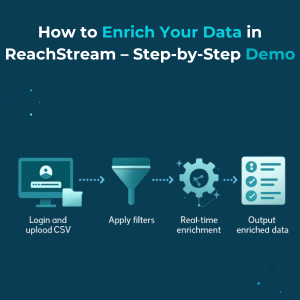
Learn how to reach dental hygienists for dental product sales using targeted email marketing and high-quality email lists. Boost ROI with expert outreach strategies and trusted data sources.
How ReachStream Helped The 100 Companies Streamline Lead Generation & Improve Deliverability
Data enrichment enhances raw data with additional details, improving accuracy, insights, and enabling smarter business decisions.