
Q3 Limited-Time Deal. Find verified B2B leads at half the cost. Get 50% Off with Coupon Code PROSPECT50. First 200 Users Only.
How Does Email Verification Work? A Step-by-Step Guide
Written by:
Junaid Hussain Khan

How Does Email Verification Work? A Complete Guide

> How Does Email

How to Evaluate B2B Data Vendors for Accuracy and Compliance

TL;DR

Introduction

Reliable contact data is the foundation of effective B2B outreach. Whether you’re generating leads, running account-based marketing campaigns, or managing customer communications, sending emails to invalid addresses increases costs and limits campaign results. 

Email verification reduces this risk by confirming that an email address meets key deliverability checks before you send. It helps businesses maintain cleaner databases, improve email performance, and make better use of every outreach opportunity. 

This guide walks through what happens during email verification, what gets checked, how bulk and real-time verification differ, and where free tools and paid tools tend to diverge in accuracy and depth. 

What Is Email Verification? 

Email verification confirms whether an email address is correctly formatted, linked to an active domain, and capable of accepting incoming messages. This process helps businesses identify undeliverable or high-risk addresses before they affect campaign results. 

To assess email quality, verification platforms perform multiple technical checks before assigning each address a verification status. These statuses help businesses identify which contacts are safe to email, which require caution, and which should be removed from future campaigns.  

Tip
If you only remember one thing about email verification, remember this: it is a pre-send filter, not a spam filter. It tells you whether mail can be delivered, not whether the recipient wants it. 

How Can You Verify an Email Address?  

There are a few ways teams verify emails, ranging from manual to fully automated. 
For anyone managing more than a small volume of contacts, a dedicated email validation tool is the only realistic option. Manual review does not scale, and test sends put your domain reputation at risk.

How Does Email Verification Actually Work? 

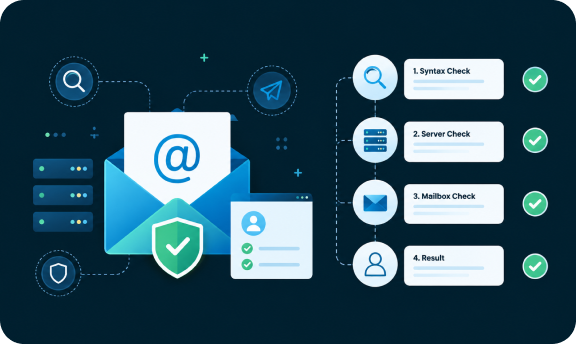
Understanding how email verification works helps explain why some tools are more accurate than others. The email verification process usually runs through a sequence of checks, each one narrowing down whether an address is deliverable. 

Step 1: Syntax Check

The first stage of email verification checks whether an address is structured correctly. It validates the email format, confirms the presence of an “@” symbol, and reviews domain formatting. This helps detect simple mistakes but does not confirm deliverability. 

Step 2: Domain and MX Record Lookup 

Next, the tool checks whether the domain itself is real and configured to receive mail. This involves looking up the domain’s MX (Mail Exchange) records, which point to the email servers responsible for that domain. No valid MX record generally means no mail can be delivered there, regardless of what the address looks like. 

Step 3: Mailbox-Level Verification 

This is where the deeper email verification work happens. The tool connects to the recipient’s email servers using the SMTP protocol and effectively asks, “does this specific mailbox exist,” without sending an actual message. The server’s response (accept, reject, or ambiguous) determines the address status. 

Step 4: Catch-All and Risk Detection 

Some domains accept mail to any address, real or not, which is known as a catch-all configuration. Good verification methods flag these separately, since a catch-all response does not confirm the mailbox actually exists, it just means the server did not reject it outright. 

Step 5: Status Assignment 

The final stage of email verification combines the results of all previous checks and assigns a verification status. These statuses typically include: 
Status What It Means
Valid
Address is confirmed deliverable
Invalid
Address does not exist or domain is unreachable
Risky
Address may bounce (catch-all, disposable, or low-confidence)
Catch-All
Domain accepts all mail; individual mailbox not confirmed
Unknown
Verification could not be completed (server timeout, greylisting)
Do Not Mail
Address is flagged (role-based, spam trap, complainer, etc.)
Common Mistake
Treating “no bounce yet” as proof an address is valid. An address can sit unverified for months and only reveal itself as dead the first time you actually send to it, usually inside a real campaign where the bounce counts against your sender reputation. 

Can Email Verification Prevent Bounces? 

Email verification substantially reduces bounce rates, though it cannot promise zero bounces. There is a meaningful difference between the two. 

Verification catches addresses that are already dead, mistyped, or nonexistent at the time of the check. What it cannot catch is an address that is valid today and abandoned next month, or a mailbox that becomes full after your list was verified. Bounce prevention is therefore an ongoing practice, not a one-time fix. 

This is the reason why teams that see the best deliverability outcomes tend to re-verify lists on a rolling basis. Particularly lists that are more than 60 to 90 days old, rather than verifying once at import and assuming the data stays clean indefinitely. 

Bulk vs. Real-Time Verification 

Most email verification services offer two verification modes, and they solve different problems. 
Bulk Verification Real-Time Verification
When it runs
On an existing list, in batches
At the moment an address is entered
Best for
Cleaning CRM data, old lists, purchased data
Signup forms, lead capture, CRM entry points
Typical use case
Quarterly list cleanup before a campaign
Preventing bad data from entering the system
Speed per address
Slower per record, optimized for volume
Near-instant, optimized for single checks
Neither mode replaces the other. Bulk verification cleans up the mess that already exists. Real-time verification, usually via an API, prevents the mess from forming in the first place. Mature outbound and RevOps teams tend to run both, bulk cleanup on existing data and real-time checks at every new entry point.

Best Practices for Email Verification

Quick Checklist
Improve Deliverability Before Every Campaign
Try ReachStream Email Verifier for free and get a clear status on every address to launch campaigns with confidence.

How ReachStream Email Verifier Works 

The platform is built to walk addresses through the same layered verification process outlined above: syntax and formatting checks, domain and MX record validation, and mailbox-level confirmation, before returning a clear status for each address. ReachStream Email Verifier is offered as a standalone tool, so teams can use it purely for list hygiene without needing to adopt a broader contact database platform. 

A few things worth knowing about email verification features: 

Free vs Paid Email Verification: Key Differences 

Free vs paid email verification tools usually differ in three areas rather than in the basic concept of verification itself: 
For a small newsletter list, a free checker may be enough. Whereas for outbound sales, cold email, or any campaign where sender reputation is on the line, the more detailed reporting from paid email verification services is usually worth the cost.

Conclusion 

Email verification is not a single check, it is a layered process that moves from syntax, to domain, to mailbox-level confirmation, before assigning a status you can actually act on. Teams that treat verification as an ongoing habit, not a one-time cleanup, consistently see lower bounce rates and steadier deliverability over time. 

Whether you are cleaning an old CRM export or validating new leads in real time, the goal is the same: know an address is reachable before you rely on it. 

Turn Your Email List into a Campaign-Ready Asset
Try ReachStream Email Verifier and strengthen your outreach with cleaner, more accurate contact data.

Frequently Asked Questions

1. Does ReachStream verify single emails or bulk lists? 

ReachStream Email Verifier is designed to handle both, supporting batch uploads of up to 25,000 emails as well as checks on individual addresses. 
ReachStream Email Verifier performs multiple verification checks, including syntax validation, domain and MX record lookup, SMTP-level mailbox verification, catch-all detection, role-based email detection, and disposable email identification. These checks help determine whether an email address is safe for outreach. 
Our platform delivers 99.8% verification accuracy on verified email addresses. Its multi-step verification process helps businesses identify invalid and high-risk contacts before they impact campaign performance. 
Yes. ReachStream Email Verifier identifies invalid, inactive, and risky email addresses before you send campaigns. Removing these contacts helps reduce hard bounces, improve deliverability, and protect your sender reputation. 
ReachStream email verifier API allows businesses to verify email addresses within their workflows. It supports real-time validation, helping applications maintain cleaner contact data and improving email deliverability. 
ReachStream Email Verifier classifies email addresses into five verification statuses: Valid, Invalid, Risky, Unknown, and Do Not Mail. These results help you decide which contacts to send, review, or suppress before launching a campaign.  
Yes. ReachStream Email Verifier supports bulk verification of up to 25,000 email addresses per batch, making it easy to clean CRM exports, marketing lists, and prospect databases before outreach.  
Verify your email list before every major email campaign and re-verify databases that are more than 60 to 90 days old. Regular verification helps maintain accurate contact data and improves campaign performance. 
Junaid Hussain Khan

Author

Junaid Hussain Khan
Junaid is Senior Manager – Brand Growth & Strategy at ReachStream, where he drives content, SEO, and growth strategy for B2B sales and marketing teams.
Share
Table of Contents

Access 200M+ verified business emails and grow your sales pipeline effortlessly.

Power Your Sales with Targeted Data
Junaid Hussain Khan
Junaid Hussain KhanAuthor
Junaid Hussain Khan is the Business Development Manager at ReachStream, adept at forging strategic partnerships and identifying new market opportunities to propel ReachStream's growth and strengthen its position in the B2B ecosystem.

Don't forget to share this post!

Check out our other blogs!