
How to Evaluate B2B Data Vendors for Accuracy and Compliance
Written by:

Junaid Hussain Khan
How to Clean an Email List: Step-by-Step Guide
>How to Clean

TL;DR
- Knowing how to clean an email list starts with removing duplicates and invalid email formats before you ever run a verification check.
- A clean email list is one of the most effective ways teams can reduce bounce rate and increase inbox placement.
- Real-time verification at signup and batch verification before sends cover the two moments where bad data enters a list.
- Not every flagged address should be deleted. Risky and catch all results deserve a separate, lower volume sending track.
- Email marketing databases decay by an estimated 20 to 30 percent a year, so cleaning is a recurring task, not a one-time fix.
- Manual cleaning catches obvious typos, but only an automated email verification service can confirm whether a mailbox actually exists.
- Suppressing Do Not Mail and chronic non-responders protects sender reputation even when those addresses are technically valid.
- The teams with the cleanest lists treat list hygiene as part of their regular workflow, tied to a campaign calendar rather than a one off project.
Introduction
At some point, every marketing team opens their sending platform to find a bounce rate that makes no sense. The list looked fine a few months ago. Nothing was imported recently. And yet emails bounce, open rates drift down, and a campaign that should have performed well quietly underdelivers. This is what an aging list looks like from the outside, and it is almost always a data problem, not a messaging one.
Learning how to clean an email list is one of the most valuable skills a sales or marketing team can build. It is not glamorous work, but it is the difference between campaigns that reach real inboxes and campaigns that gradually damage your sending domain’s reputation. This guide walks through the exact process, step by step, along with the mistakes to avoid and how to decide between manual effort and an automated tool.
Not Sure How Accurate Your Email List Actually Is?
Use ReachStream Email Verifier to run a free check in minutes and identify valid, risky, and invalid addresses before your next campaign.
Why Email List Quality Matters
Every invalid address sitting in a marketing database is a small risk waiting to surface at send time. Mailbox providers like Gmail and Yahoo now weigh sending behavior heavily when deciding whether a message reaches the inbox or the spam folder. A pattern of sending emails to invalid addresses signals exactly the kind of behavior those filters are
designed to catch.
INDUSTRY INSIGHT
Deliverability practitioners commonly treat a bounce rate above 2 percent as worth investigating, with rates above 5 percent considered high enough to actively damage sender reputation. These are not official platform thresholds, but they reflect widely accepted practice among email marketers.
Reducing bounce rates is not just about protecting one campaign. A damaged sender reputation follows the sending domain into future email campaigns, which means the cost of a dirty list is rarely limited to the day it was used.
How to Clean an Email List: The Core Process
There is no single trick to cleaning your email list well. It is a sequence of checks, each catching a different kind of bad data. Here is how to clean an email list from start to finish.
Step 1:
Remove Duplicate and Malformed Email Addresses
Start with the basics. Export your list and strip out exact duplicates, obviously malformed entries, and addresses missing an @ symbol or domain entirely. This step alone often removes a surprising percentage of a database that has been fed by multiple forms, imports, and manual entry over time.
Step 2:
Run Syntax and Domain Checks
Next, confirm that each remaining address is formatted correctly and that its domain is registered and configured to receive email. An address with no valid MX record is dead on arrival, regardless of how correct the formatting looks.
Step 3:
Verify Every Address
This is where email verification does the real work. A mailbox level check confirms whether a specific address exists on the receiving server, without actually sending it a message. You can verify email this way, whether it came in through a form, a purchased list, or a manual entry, and get back a clear result rather than a guess.
TIP
Use real–time verification on forms and signups, so bad data never enters your database in the first place, and save bulk email cleaning passes for lists that have been sitting for a while or were imported from an outside source.
Step 4:
Segment Risky and Catch All Results
Not every result from an email validation check is a clean valid or invalid. Risky addresses, often tied to role based inboxes, and catch all domains, which accept mail for any address, need their own lower volume sending track instead of being deleted outright or blended in with confirmed valid contacts.
Step 5:
Suppress Do Not Mail and Chronic Non-Responders
Finally, suppress anything flagged Do Not Mail, along with addresses that have never opened or clicked after repeated sends. These addresses may be technically valid, but continuing to send to them drags down engagement metrics that inbox providers use to judge sender reputation.
COMMON MISTAKE
Treating this as a single pass that ends once email list verification is done. The step most teams skip is engagement based suppression, which catches contacts that pass technical checks but still hurt deliverability because they never interact with your emails.
Skip the Manual Work and Try ReachStream Email Verifier for Free
Upload your email list and get a full breakdown of valid, risky, and invalid addresses in minutes.
Manual vs. Automated Email List Cleaning Methods
Some smaller teams still clean email lists manually. It works, up to a point. Here is how the two approaches actually compare.
| Factor | Manual Cleaning | Automated Verification |
|---|---|---|
|
Catches typos and formatting errors |
Yes, with careful review |
Yes, instantly |
|
Confirms a mailbox actually exists |
No, not reliably |
Yes, through mailbox level checks |
|
Scales to thousands of addresses |
Slow and error prone |
Built for bulk email cleaning |
|
Best suited for |
Very small, low volume lists |
Marketing campaigns and B2B prospecting at scale |
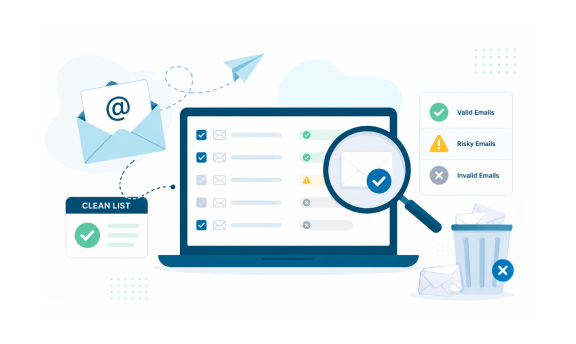
ReachStream Email Verifier handles the automated side of this comparison. It categorizes email addresses into five statuses: Valid, Invalid, Risky, Unknown, and Do Not Mail. Independent testing reports an accuracy rate of 99.8%, and the platform supports batch uploads of up to 25,000 email addresses at a time. New accounts receive 100 free credits to test the service with a real list.
EXPERT INSIGHT
Experienced RevOps teams rarely choose one method exclusively. A common pattern is automated verification for anything over a few hundred contacts, paired with a quick manual glance at anything flagged risky before deciding whether to include it in a campaign.
How Often Your List Needs Re-Verification
Contact lists do not stay clean on their own. People change jobs, companies merge, domains get retired, and a list that was verified in January can already be meaningfully stale by the following quarter, which is exactly what erodes email deliverability over time.
- New signups and manually entered leads: verify in real-time, at the point of capture.
- Purchased or imported lists: run a full batch verification before the first send, no exceptions.
- Existing marketing lists: re-verify every 60 to 90 days, or before any major campaign.
- Dormant segments that have not been emailed in 6 months or more: treat as high risk and re-verify before reactivating.
BEST PRACTICE
Tie list cleaning to your campaign calendar rather than leaving it to memory. A quick verification pass scheduled a few days before every major send catches decay before it becomes a bounce rate problem.
Common Mistakes When Cleaning a Contact List
- Cleaning your list only once instead of verifying it before every major email campaign.
- Keeping invalid or outdated email addresses, leading to higher bounce rates and lower deliverability.
- Ignoring risky or catch-all addresses instead of segmenting them for cautious outreach.
- Failing to remove duplicate contacts, which can result in multiple emails being sent to the same person.
- Using unverified purchased or old contact lists without checking their accuracy first.
- Not removing unsubscribed or unverified contacts, increasing compliance and sender reputation risks.
Quick Checklist for a Cleaner Email List
- Remove exact duplicates and obviously malformed addresses first.
- Run domain and MX record checks before mailbox level verification.
- Verify every address rather than sampling a portion of the list.
- Segment risky and catch all results instead of deleting them outright.
- Suppress do not mail addresses and chronic non-responders separately.
- Re-verify lists older than 60 to 90 days before sending again.
- Track bounce rate after every send to catch decay early.
How to Choose the Right Email Verification Provider
Not every verification provider is built the same way. Before choosing one, check how it classifies uncertain results, what its published accuracy figure is, whether its batch limits match your list sizes, and what compliance certifications it holds.
Here are the key features to look for:
- Accurate Email Verification: Choose a platform such as ReachStream Email Verifier that checks email syntax, domain validity, MX records, and mailbox status to identify valid, risky, catch-all, unknown, and invalid addresses.
- Bulk Verification at Scale: Make sure the platform can process large email lists quickly without compromising accuracy, so you can clean entire databases before campaigns.
- Clear Verification Results: Look for detailed status categories and actionable insights that make it easy to decide which contacts to send to, review, or remove.
- Built-In Data Security and Compliance: Select a provider that follows privacy regulations and protects your contact data with secure processing practices.
- Easy Integration with Your Workflow: A good solution should fit seamlessly into your existing sales and marketing process, with CSV uploads, exports, and API support when needed.
- Reliable Performance and Support: Choose a provider with dependable verification technology, responsive customer support, and transparent reporting so you can maintain a healthy email database over time.
Improve Deliverability with Verified Data
Discover how ReachStream Email Verifier classifies valid, risky, and invalid email addresses to help improve deliverability.
Conclusion
Knowing how to clean an email list is not a one time skill you use once and forget. It is a repeatable process: remove the obvious junk, verify what remains, segment the uncertain results, and suppress what is dragging down engagement. Teams that build this into a regular rhythm consistently protect their sender reputation and get more of their messages into the inbox where they belong.
The fastest way to put this into practice is to run your current list through a real verification pass and see exactly where it stands.
Ready to Clean Your Email List?
Try ReachStream Email Verifier free and get a clear breakdown of every address on your list.
Frequently Asked Questions
Does cleaning an email list improve open rates?
Yes. Removing invalid addresses lowers your bounce rate, protects your sender reputation, and improves inbox placement. ReachStream Email Verifier offers a 30-day free trial with 100 credits, allowing you to verify your email list and experience the benefits firsthand.
How is email verification and email validation different?
The terms are often used interchangeably. Both describe the process of confirming an address is properly formatted, tied to a real domain, and associated with an active mailbox before it is used in a campaign.
How often should I clean my email list?
Re-verify any list older than 60 to 90 days before a new send, and always verify new lists in full before their first campaign, since email marketing databases decay continuously.
Can I clean an email list manually without software?
You can catch obvious typos and duplicates manually, but manual review cannot confirm whether a mailbox actually exists on the receiving server. That level of confirmation requires an automated verification tool.
Is real-time verification necessary to run bulk checks?
Mailboxes get deactivated, employees leave companies, and domains get retired constantly. A list that was clean a few months ago can already contain addresses that no longer exist.
Is bulk email cleaning safe for large B2B lists?
Yes, when done through a verification platform built for scale such as ReachStream Email Verifier. Batch verification is standard practice for B2B prospecting and marketing campaigns, and it is significantly more reliable than manual review at that volume.
Junaid Hussain Khan
Author
Junaid Hussain Khan

Brand Growth & Strategy at ReachStream, where he drives content, SEO, and growth strategy for B2B sales and marketing teams.
Share
Table of Contents
Access 500M+ verified business emails and grow your sales pipeline effortlessly.
Power Your Sales
with Targeted Data
Junaid Hussain Khan is a Senior Manager, Business Development at ReachStream. He leads strategic partnerships, uncovers new market opportunities, and helps drive ReachStream's growth and its position in the B2B ecosystem.
Don't forget to share this post!















Check out our other blogs!
Year-End CRM Cleanup Checklist
October 29, 2026

Apollo.io Pricing 2026: $0-$149/User Plans + Hidden Costs
October 28, 2026

Wiza Pricing 2026: Plans from $0 to $199/mo + Hidden Costs
October 27, 2026