Written by:

Abdul Hafeez
Email Deliverability: How Clean Contact Data Affects Results
> Sales
How to Evaluate B2B Data Vendors for Accuracy and Compliance

TL;DR
- Email delivery means a recipient’s mail server accepted a message; email deliverability is about whether it reaches the inbox instead of spam.
- Clean business contact data reduces avoidable bounces caused by invalid, outdated, duplicate, or mistyped addresses.
- A high bounce rate can weaken sender reputation and increase the chance that spam filters treat future campaigns with suspicion.
- Email authentication through SPF, DKIM, and DMARC helps receiving servers confirm that your domain is authorized to send.
- Verification, segmentation, list hygiene, and regular monitoring work together to support healthier campaigns.
- No single tactic guarantees inbox placement, so teams should improve data quality and sending practices as an ongoing process.
A B2B email campaign can have a clear audience, useful content, and a strong subject line, yet still produce disappointing results. The problem may begin before the message is written: the contact list contains invalid addresses, former employees, duplicate records, or people who no longer engage with the company.
That is why email deliverability depends on more than sending infrastructure. The quality of the contacts you send to affects bounces, engagement, sender reputation, and the chance that future messages reach the inbox. Clean contact data gives every other deliverability measure a stronger starting point.
What Is Email Deliverability?
Email deliverability describes the likelihood that a sent message reaches the recipient’s primary inbox. It is different from email delivery, which usually means the recipient’s mail server accepted the message. An accepted message can still go to spam, a promotions folder, quarantine, or another filtered location.
Open rate is different again. It measures how recipients interact with messages that were delivered, while deliverability focuses on whether the message gets a fair chance to be seen. A useful deliverability guide can help teams understand why inbox placement should be reviewed before open and click metrics.
The email deliverability rate is the share of sent messages that reach the intended inboxes, although providers may calculate and report it in different ways. Treat it as a performance signal rather than a promise that every message will avoid filtering.
Why Does Email Deliverability Matter for B2B Campaigns?
Poor deliverability reduces the number of legitimate prospects who see a campaign. It can create higher bounce rates, fewer replies, weaker engagement, and wasted work for marketing and sales teams. If messages consistently fail or receive negative signals, the sender’s reputation may also suffer.
Sender reputation is the trust signal associated with a sending domain or IP address. Receiving providers consider factors such as bounces, spam complaints, sending behavior, authentication, and engagement. A B2B contact platform may help teams work from better records, but it cannot replace responsible sending, clear consent practices, or technical setup.
The practical lesson is simple: a campaign cannot perform well when a significant portion of its audience is unreachable or no longer relevant. Better data protects the time invested in strategy, writing, testing, and follow-up.
How Clean Contact Data Affects Email Deliverability
Clean contact data includes accurate, current, relevant records with business email addresses that have been checked before sending. It excludes invalid addresses, obvious typographical errors, duplicate entries, disposable addresses, and contacts who have left the company. A B2B list builder can support list creation, but each record still needs review and appropriate verification.
Contact quality affects deliverability through a straightforward chain:
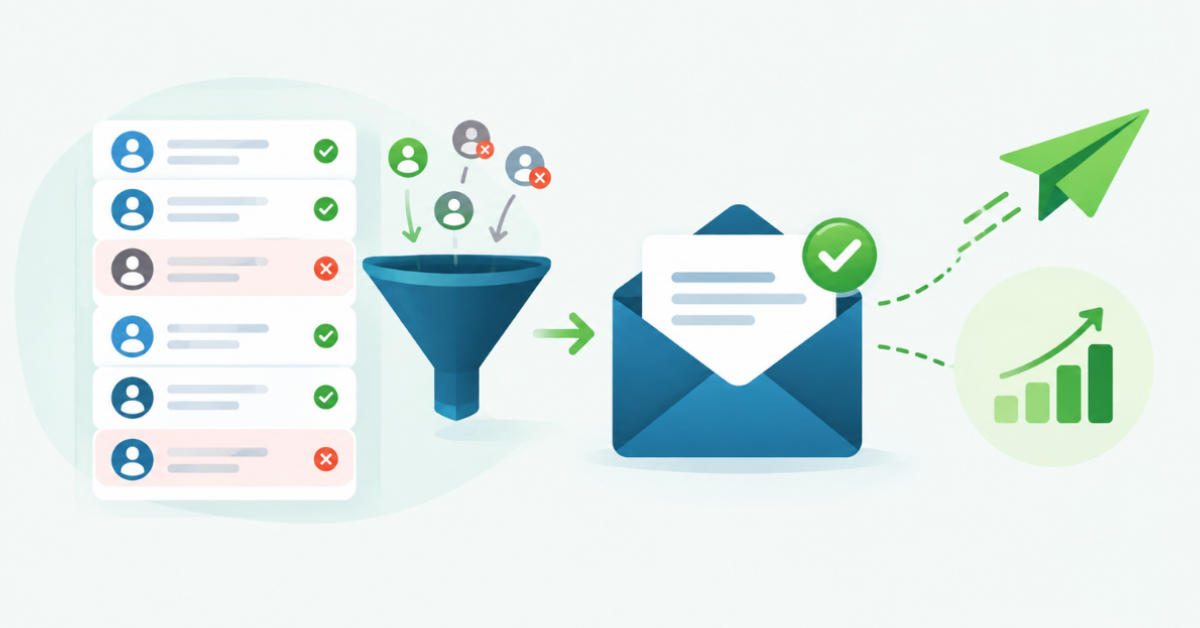
Poor contact data → more invalid emails → higher bounce rate → weaker sender reputation → greater spam-filtering risk → lower deliverability.
Consider a demand generation team preparing a campaign for 1,000 business contacts. If the list includes former employees, misspelled addresses, and old company domains, a portion of the messages will fail before the content can create any response. Removing those records and validating the remaining addresses gives the campaign a cleaner audience and reduces avoidable delivery problems.
Useful data checks include current company, role, domain, email status, duplicate status, and the source and date of the record. Role-based addresses such as info@ or support@ may be valid, but they often need separate treatment because they do not identify one individual decision-maker.
How Bad Contact Data Increases Email Bounce Rate
A hard bounce happens when an email cannot be delivered permanently, such as when an address does not exist or a domain is invalid. A soft bounce is usually temporary and may result from a full mailbox, a server problem, or a message that is too large.
Repeatedly sending to hard-bounced addresses raises your email bounce rate and creates a record of poor list quality. A high bounce rate is one of the email deliverability issues that should trigger a pause, investigation, and list cleanup rather than another large send.
Why Contact Data Becomes Outdated
B2B records change for ordinary business reasons. Employees change companies or roles, companies change domains, businesses close, and email accounts are deactivated. A database record can also become outdated when a team copies an old list into a new campaign without checking it first.
For that reason, list quality is a process rather than a one-time project. Review older records before using them, record important data changes, and avoid treating an old “valid” result as permanent proof that an address is still appropriate for a new campaign.
Email Authentication and Email Deliverability
Email authentication helps receiving servers check whether a message is authorized to use your sending domain. It does not make a poor list safe, but it gives mailbox providers stronger evidence that legitimate messages come from an authorized source. The core standards are SPF, DKIM, and DMARC.
- SPF identifies the servers and services allowed to send email for your domain.
- DKIM adds a digital signature that helps the receiving server check that the message came from an authorized source and was not changed in transit.
- DMARC tells receiving providers how to handle messages that fail authentication checks and gives domain owners reporting options.
Teams do not need to become DNS specialists to understand the principle. Proper email authentication and aligned sending domains support trust, while clean contact data reduces the number of messages that create negative delivery signals. Review the records with an authentication checker or a comparable technical tool before increasing volume.
What Affects Email Deliverability?
Email deliverability is shaped by several connected factors:
- Contact data quality: Accurate addresses reduce avoidable failures.
- Email authentication: SPF, DKIM, and DMARC help verify the sending domain.
- Sender reputation: Receiving providers assess the history of your domain and sending infrastructure.
- Bounce rate: Frequent hard bounces suggest that a list is not being maintained.
- Spam complaints: Complaints are a strong negative signal and may affect future placement.
- Engagement: Relevant replies, clicks, and other positive interactions can support healthy sending signals.
- Sending volume and consistency: Sudden, unexplained spikes can look unusual compared with an established pattern.
- Email content: Misleading subjects, excessive formatting, or risky links can attract filtering.
- List hygiene: Removing invalid and persistently unengaged contacts keeps the audience useful.
- Spam filtering: Each provider applies its own systems, so placement can vary by recipient and mailbox.
These factors interact. Strong authentication cannot compensate for a list full of invalid addresses, and a clean list cannot fix misleading content or a misconfigured domain.
Email Deliverability Best Practices
Use these practices as a working routine rather than a one-time fix:
- Verify addresses before adding them to a campaign.
- Remove invalid, disposable, and risky records.
- Monitor bounce rates after every significant send.
- Keep SPF, DKIM, and DMARC configured and reviewed.
- Maintain a single process for updating contact records.
- Segment audiences by role, company, source, and engagement.
- Avoid sending to old or inactive contacts without a fresh review.
- Watch spam complaints and investigate the messages that caused them.
- Keep volume and sending patterns consistent where possible.
- Test content and links before sending to a larger audience.
A contact data checklist can help teams evaluate the source and condition of a list. For address-level checks, use an email verification tool before the campaign enters the sending queue. These steps improve the odds of good inbox placement, but no provider can guarantee it.
How to Improve Email Deliverability With Better Contact Data
A practical workflow can make data quality part of campaign planning:
- Build a targeted contact list: Define the companies, roles, and markets that fit the campaign.
- Validate email addresses: Check whether each address is deliverable and identify risky results.
- Remove invalid records: Suppress hard bounces, duplicates, and addresses that do not fit the campaign.
- Segment contacts: Separate audiences, so each group receives relevant content and an appropriate frequency.
- Authenticate the sending domain: Confirm that SPF, DKIM, and DMARC are aligned.
- Run a small test: Review delivery, content rendering, links, and early engagement.
- Monitor bounce and engagement rates: Look for unusual changes after the send.
- Remove problematic contacts: Suppress repeated bounces, complaints, and contacts who remain
- Continue monitoring list quality: Update records as roles, domains, and account status change.
This workflow helps teams improve email deliverability without treating one metric as the whole answer. It also makes it easier to identify whether a problem comes from data, authentication, content, volume, or audience fit.
Email Deliverability Tools: What Should You Monitor?
Different tools answer different questions. Email verification tools check whether an address appears valid and safe to send to. An email deliverability checker may assess domain configuration, inbox placement signals, or message risk. Spam testing tools show how content may be interpreted by filtering systems.
Sender reputation monitoring tools help teams watch domain or IP signals. Authentication checkers inspect SPF, DKIM, and DMARC records. Campaign analytics platforms report bounces, complaints, opens, clicks, and replies. Together, these categories support deliverability testing before a send and deliverability monitoring after it.
Using the right tools to improve email deliverability can help identify inbox placement issues, monitor sender reputation, and keep email campaigns performing effectively. A small team may start with verification, authentication checks, and campaign analytics. A larger operation may add inbox placement tests, reputation monitoring, and automated suppression rules.
A Simple Email Deliverability Checklist
Before launching a B2B email campaign, confirm:
- Contact records are current and relevant.
- Email addresses have been verified.
- Invalid, duplicate, and risky addresses have been removed.
- SPF is configured.
- DKIM is configured.
- DMARC is configured.
- Bounce rate will be monitored.
- Sender reputation will be reviewed.
- Content, links, and formatting have been tested.
- The campaign is going to a relevant audience.
- Unengaged or problematic contacts will be reviewed regularly.
A list hygiene guide is useful when deciding how to handle uncertain records. Keep the checklist with the campaign brief so data, content, and technical checks happen before scheduling.
How ReachStream Can Support Better Contact Data
A B2B data platform such as ReachStream can support campaign preparation by helping teams find business contacts, apply filters, enrich records, and review email status. ReachStream Prospect provides a starting point for verified B2B data, while its data enrichment capability can help fill gaps in company and contact records.
That support is one part of a broader process. Teams still need to authenticate the sending domain, use responsible sending practices, respect applicable communication rules, maintain list hygiene, and monitor results. ReachStream does not by itself guarantee inbox placement or a particular email deliverability rate.
If you want to explore cleaner B2B contact data, Start Free Trial is a reasonable next step. Begin with a focused audience, validate the records, and measure the results before expanding a campaign.
Common Email Deliverability Mistakes to Avoid
- Sending to unverified addresses: This creates avoidable failures and can raise the bounce rate.
- Ignoring bounce reports: A campaign report is an early warning system, not an administrative detail.
- Using a large list without checking its source: A large audience is not useful when the records are inaccurate or irrelevant.
- Skipping email authentication: Receiving servers have less evidence that the sending domain is authorized. c
- Using old contact records without review: People, roles, domains, and account status change.
- Ignoring spam complaints: Complaints can signal poor targeting, unclear expectations, or excessive frequency.
- Failing to monitor sender reputation: A problem can continue across campaigns when nobody owns the review process.
- Assuming delivery means inbox placement: Acceptance by a mail server does not confirm that the message reached the primary inbox.
Final Takeaway
Email deliverability depends on the whole sending system, including the people and addresses in the contact list. Clean contact data, email verification, authentication, responsible sending, and continuous monitoring work together to reduce avoidable bounces and support healthier campaigns.
The most useful place to start is often the list itself. Check whether the audience is current, relevant, and valid before changing your subject lines or increasing volume. Better data will not solve every deliverability problem, but it removes a preventable source of risk.
Power Your Sales
with Targeted Data
Access 400M+ verified business emails and grow your sales pipeline effortlessly.
Frequently Asked Questions
1. What is email deliverability?
Email deliverability is the likelihood that an email reaches the recipient’s inbox instead of spam, quarantine, or another filtered location. Email delivery only confirms that a recipient’s mail server accepted the message. Deliverability also reflects sender reputation, authentication, content, engagement, bounce rates, and list quality.
2. How does clean contact data improve email deliverability?
Clean contact data reduces messages sent to invalid, outdated, duplicate, or mistyped addresses. That can reduce avoidable hard bounces and help protect sender reputation. It also improves audience relevance, which supports better engagement. Data quality is one part of deliverability, so authentication and responsible sending practices still matter.
3. What causes a high email bounce rate?
A high email bounce rate can result from invalid addresses, misspelled domains, former employees, closed businesses, full mailboxes, temporary server problems, or poor list maintenance. Hard bounces are permanent failures, while soft bounces may resolve later. Separate the two and investigate repeated failures before sending again.
4. What is email authentication?
Email authentication is a set of domain checks that helps receiving servers confirm whether a message is authorized. SPF lists approved sending sources, DKIM adds a verifiable signature, and DMARC defines handling and reporting for authentication failures. Together, these standards support trust but do not replace list hygiene.
5. How can I check my email deliverability?
Start by verifying contact addresses, reviewing bounce and complaint data, and checking SPF, DKIM, and DMARC. Use an email deliverability checker or spam test where appropriate, then monitor domain reputation and campaign engagement. Review results after each send and suppress addresses that repeatedly fail or generate complaints.
Abdul Hafeez
Author
Abdul Hafeez
Marketing professional with a Master’s degree in Marketing, specializing in SEO, content strategy, social media, performance marketing, prospecting, and demand generation.
Share
Table of Contents
Access 400M+ verified business emails and grow your sales pipeline effortlessly.
Power Your Sales
with Targeted Data
Don't forget to share this post!















Check out our other blogs!
What Is Prospecting? A Beginner’s Guide for Sales Teams
November 3, 2026

RocketReach Pricing 2026: Plans, Cost per Lookup & Free Plan
November 2, 2026

12 Lead Generation Strategies That Work in 2026 + Examples
October 30, 2026