Written by:
Abdul Hafeez
B2B Data Providers: How to Compare Contact Data Platforms
> Sales
How to Evaluate B2B Data Vendors for Accuracy and Compliance

TL;DR
- B2B data providers supply contact, company, firmographic, technographic, and sometimes intent data.
- The most useful platforms combine search, verification, enrichment, list building, and workflow integrations.
- Compare providers by usable data quality, target-market coverage, freshness, filters, export options, security, and support.
- Test a realistic sample of records instead of trusting a database-size claim or a short product demo.
- B2B data provider pricing may be based on seats, credits, contacts, exports, API usage, or a custom annual plan.
- The lowest advertised price is not always the lowest cost if limits apply to exports, users, integrations, or verified records.
- Before buying, confirm update frequency, email verification, regional coverage, CRM compatibility, privacy practices, and refund or replacement policies.
A sales team can have 10,000 contacts in its CRM and still struggle to find people worth contacting. Job titles change, employees move companies, email addresses stop working, and company information becomes outdated.
B2B data providers address that problem by collecting, verifying, organizing, and enriching business contact information. The challenge is choosing the right platform: coverage, accuracy, freshness, filters, integrations, compliance, and total cost matter more than a headline contact count.
What Are B2B Data Providers?
B2B data providers are companies that collect and organize information about businesses and their employees. Their B2B data services may include searchable contacts, company profiles, business email addresses, phone numbers, job titles, industry details, and tools for exporting or enriching records.
A basic contact database may be static, while a modern platform adds filters, verification, enrichment, integrations, and refreshes. Sales teams use these tools for prospecting; marketing teams for account-based campaigns and CRM enrichment; recruiters and research teams for targeted discovery.
Providers differ in what they collect, how they source it, and how often they update it. Treat database size as one data point, not a quality score.
What Types of Data Do B2B Data Providers Offer?
The mix varies by vendor and plan, but common categories include company data and contact records, along with the categories below:
- Contact Data: This may include a person’s name, job title, seniority, business email, phone number, LinkedIn profile, and professional location. The value depends on whether the information is current and how the platform verifies it.
- Company Data: Company records can include the organization’s name, website, industry, headquarters, employee count, revenue range, location, and company size. This helps teams decide whether an account fits their ideal customer profile.
- Firmographic Data: Firmographic data describes the characteristics of a company, such as industry, employee range, revenue, funding stage, headquarters, or number of locations. ### Technographic Data
- Technographic data shows the tools or technologies a company uses. It can help a marketing team identify accounts using a competing product or help a service provider focus on companies with a specific technical setup. Coverage varies, so ask how it is collected and updated.
- Intent and Other Signals: Some B2B data vendors offer buyer-intent signals, hiring activity, funding events, website behavior, or other account-level indicators. These signals add context, but they do not replace human qualification.
Why Do Businesses Use B2B Data Providers?
Teams use these platforms to find relevant accounts faster than manual research allows. A list builder can turn a search into an organized working list. A sales development team might filter for operations leaders at logistics companies with 200–1,000 employees, while marketing may use company data for account-based segments, CRM enrichment, and industry personalization.
They can also cleanse CRM records by adding missing fields or flagging outdated emails. Measure the result in time saved, fewer unusable records, and better targeting—not a guaranteed conversion rate.
How to Compare B2B Data Providers
Start with your audience, then compare each platform against that use case. Strong North American coverage may not help a team targeting niche European industries. Also test the Chrome extension or other workflow features if your researchers work in browser-based tools.
- Data Accuracy: Look for evidence of how the provider handles inaccurate emails, outdated job titles, duplicate records, and incorrect company details. Ask whether it reports bounce rates, offers replacement credits, or lets you test records before purchase. A smaller list with a higher percentage of usable contacts can be more valuable than a large list that requires extensive cleanup.
- Data Coverage: Review countries, regions, industries, company sizes, seniority levels, and job titles. Do not assume that a provider’s total database size represents coverage of your specific audience. Request a sample using the exact filters your team expects to use.
- Data Freshness: Ask how often records are reviewed, updated, or re-verified. Also ask whether updates happen continuously, on a schedule, or only when a user requests enrichment. A clear refresh policy is more useful than a vague claim that data is “fresh.”
- Verification: Check which fields are verified and how. Email verification may classify an address as valid, risky, or undeliverable. Phone validation may be available for only certain countries or numbers. The platform should explain what its quality labels mean and what happens when a record proves inaccurate.
- Search and Filtering: Filters for industry, location, job title, seniority, company size, revenue, technology, and department can make the difference between a focused list and a spreadsheet that nobody uses.
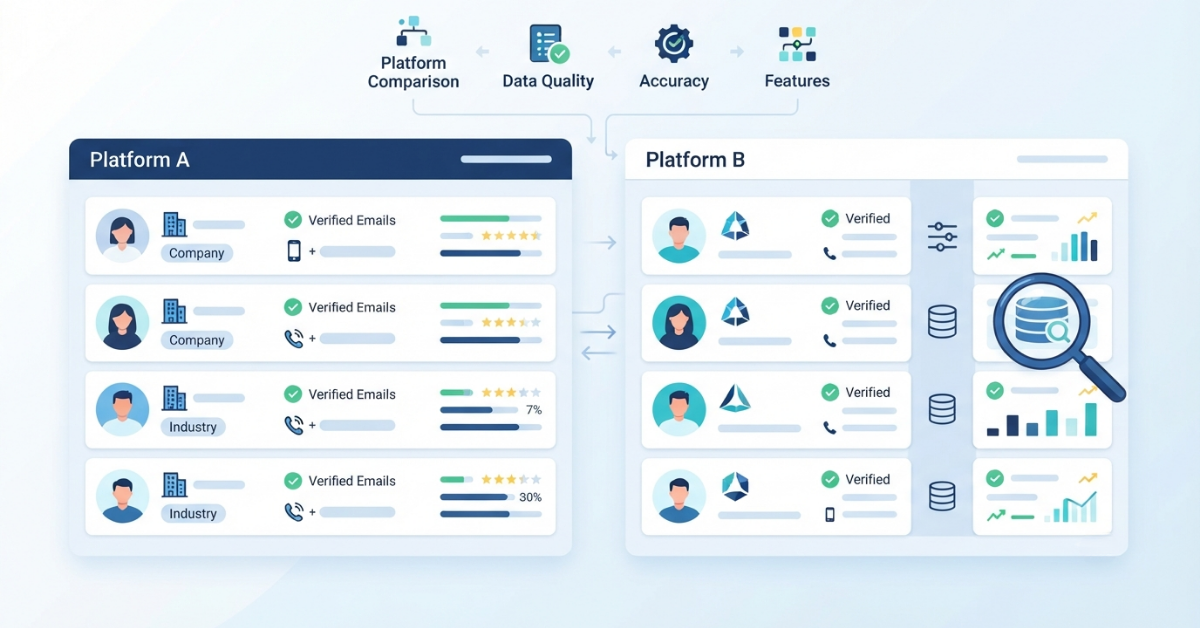
B2B Data Provider Comparison: What Should You Look At?
Score each provider against the same audience, sample size, workflow, and budget.
Factor | What to check | Why it matters |
Data accuracy | Verification and update process | Reduces unusable records |
Coverage | Industries, countries, and job titles | Determines targeting options |
Freshness | Review and refresh frequency | Helps limit outdated data |
Filters | Contact and company attributes | Makes list building easier |
Integrations | CRM, API, CSV, and sales tools | Fits existing workflows |
Pricing | Credits, seats, exports, and subscriptions | Shows likely total cost |
Compliance | Privacy and security practices | Supports responsible use |
Support | Documentation and customer service | Helps resolve issues |
Compare the records and workflow you can actually use, rather than marketing claims in isolation.
How Does B2B Data Provider Pricing Work?
B2B data provider pricing commonly uses monthly or annual subscriptions, credit-based access, per-contact charges, per-export fees, user or seat limits, API usage, or custom enterprise agreements. Some platforms combine several models, such as a subscription with a monthly credit allowance. Some platforms combine several models, such as a subscription with a monthly credit allowance.
Calculate how your team will use the platform. A low-cost plan can become expensive when it limits exports, charges separately for verified emails, restricts CRM access, or requires extra seats.
Review ReachStream pricing to see why plan details matter. Check credits, limits, expiry rules, upgrades, and cost per usable contact.
What Makes a B2B Data Provider Worth the Cost?
The strongest test is cost per usable contact. If 5,000 purchased records produce 2,000 usable contacts, calculate value from those 2,000 and include cleanup time. A data enrichment workflow can be worth assessing when manual cleanup is a major cost.
A provider may justify its cost by reducing research, improving CRM completeness, supporting segmentation, or giving sales representatives more time for qualified conversations. Track those measures during a pilot rather than assuming a guaranteed revenue result.
Best B2B Data Providers: How Should You Evaluate Them?
There is no universal best B2B data provider. The right choice depends on market, workflow, team size, budget, and tolerance for manual review. A contact provider roundup can provide comparison ideas, but your own sample should decide the fit.
Use evaluation categories instead of unsupported rankings:
- Large databases: Check relevant coverage, search speed, and duplicate controls.
- Sales prospecting: Look for decision-maker filters, direct contact fields, and list workflows.
- Data enrichment: Test how well the platform fills missing CRM fields.
- API-based workflows: Review documentation, rate limits, authentication, and field availability.
- Small teams: Prioritize simple search, transparent pricing, and low setup effort.
- Enterprise teams: Examine permissions, security, support, volume, and procurement requirements.
- Industry-specific targeting: Test the depth of titles, segments, and companies in your niche.
A free plan, sample records, clear documentation, or guided trial can be more useful than a long feature page. Teams with technical workflows should also review the Reach API.
B2B Data Provider Alternatives: When Should You Look for Another Option?
Look for B2B data provider alternatives when the current platform does not cover your target countries or industries, its data quality misses your benchmark, or required CRM and API connections are unavailable. Enterprise buyers can compare requirements against an enterprise data platform. Limited filters, weak verification, unclear privacy practices, and pricing that does not match your usage are also reasonable reasons to switch.
Before moving, document field mappings, remove duplicates, and test the replacement with the same audience definition. A platform such as ReachStream’s data platform may be worth evaluating if your team wants contact and company search, list building, filters, and verification in one workflow. Treat it as a candidate to test, not an automatic recommendation.
Common Mistakes When Choosing B2B Data Providers
Choosing based only on database size is the most common mistake. A practical data freshness guide can help teams spot warning signs. A large total count says little about coverage in your market or the accuracy of your required job titles.
Other mistakes include ignoring freshness, skipping sample tests, overlooking regional coverage, forgetting CRM or API needs, and buying more contacts than the team can use.
Calculate the cost of usable data. Ask for a sample. Run the workflow with the people who will actually use the platform. Those steps reveal more than a polished sales presentation.
How to Test a B2B Data Provider Before Buying
A structured pilot can answer the important questions quickly. Start with a data verification guide if your team has not set a quality benchmark.
- Step 1: Define Your Target Audience
Write down the industries, locations, company sizes, job titles, departments, and seniority levels you need. Be specific enough to reproduce the search across vendors - Step 2: Request or Build a Sample
Use a realistic sample rather than a tiny random dataset. Include accounts from the regions and segments your team actually sells to. - Step 3: Check Contact Accuracy
Review email validity, job titles, company information, phone numbers where available, and duplicate records. Record the number of usable contacts and the reasons other records fail. - Step 4: Test Filters and Search
- Try to recreate your ideal customer profile. Check whether the results contain the right industries, roles, locations, and company sizes without excessive manual filtering.
- Step 5: Review Pricing
- Calculate the cost based on usable records, expected exports, seats, verification, and integrations.
- Step 6: Test Integrations
Connect or simulate your CRM, API, CSV, and other workflow requirements. Confirm field mapping, permissions, duplicate handling, and error messages.
A good pilot should answer five questions: Does the sample match our audience? Are enough records usable? Can the team work efficiently? Does the total cost fit? Can we use the data responsibly?
How ReachStream Fits Into B2B Contact Data Research
ReachStream is one platform buyers may include in a comparison. Its contact data platform describes company and contact data, search, filtering, and prospecting workflows. It states coverage of 150+ countries and 400+ industries; test that against your audience.
The list builder supports saving and segmenting contacts and companies by role, industry, and location. This can reduce dependence on separate spreadsheets.
For LinkedIn research, evaluate the Chrome extension for capturing contact and company information while browsing. An email verifier can be tested before campaigns.
Teams with existing systems can review the Reach API and data enrichment tools when research must feed a CRM or repeatable data process.
ReachStream also publishes a company data comparison that can help shape trial questions. Validate the claims with sample records and your own workflow, then consider a free trial.
Final Takeaway
Choosing among B2B data providers comes down to fit and evidence. Compare data accuracy, coverage, freshness, verification, filters, integrations, pricing, compliance, and support against the work your team needs to do.
A practical trial is usually the safest path. Define your audience, test a realistic sample, measure usable records, run the integrations, and calculate the cost of maintaining the workflow. That process will help you choose a platform that supports prospecting and data quality without paying for a database your team cannot use.
Power Your Sales
with Targeted Data
Access 400M+ verified business emails and grow your sales pipeline effortlessly.
Frequently Asked Questions
1. What are B2B data providers?
B2B data providers collect, organize, verify, and supply information about companies and business contacts. Depending on the platform, buyers may receive names, job titles, business emails, phone numbers, company details, firmographic attributes, technology data, and sometimes intent signals.
2. What do B2B data providers offer?
Most providers offer searchable contact and company records. Common features include filters, list building, email verification, data enrichment, CSV exports, CRM integrations, APIs, and browser extensions. The exact fields and tools differ, so buyers should compare them against their target audience and workflow.
3. How much do B2B data providers cost?
Pricing varies by provider and may use monthly or annual subscriptions, credits, per-contact fees, exports, seats, API usage, or custom enterprise plans. Compare the total cost of the records and features you can use, including verification, integrations, additional users, and export limits.
4. How do I compare B2B data providers?
Compare providers using the same audience definition and sample size. Review accuracy, coverage, freshness, verification, filters, integrations, security, support, and pricing. Then run a pilot and calculate the cost per usable contact rather than relying on database size or advertised starting prices.
5. What should I check before buying B2B contact data?
Check how records are sourced, updated, and verified. Confirm country and industry coverage, job-title filters, export rules, CRM or API support, privacy practices, and inaccurate-data policies. Ask whether you can test realistic sample records before entering a subscription.
6. Are B2B data providers worth it?
They can be worthwhile when they reduce manual research, improve CRM quality, and help teams find relevant accounts faster. The value depends on usable data and workflow fit. Measure the time saved, accuracy of sample records, and total cost before expanding the purchase.
7. What is the difference between B2B data providers and B2B database providers?
The terms are often used interchangeably. “B2B database provider” usually emphasizes the collection of company and contact records, while “B2B data provider” can include broader services such as verification, enrichment, APIs, filtering, and workflow integrations.

Abdul Hafeez
Author
Abdul Hafeez
Marketing professional with a Master’s degree in Marketing, specializing in SEO, content strategy, social media, performance marketing, prospecting, and demand generation.
Share
Table of Contents
Access 400M+ verified business emails and grow your sales pipeline effortlessly.
Power Your Sales
with Targeted Data
Don't forget to share this post!















Check out our other blogs!
What Is Prospecting? A Beginner’s Guide for Sales Teams
November 3, 2026

RocketReach Pricing 2026: Plans, Cost per Lookup & Free Plan
November 2, 2026
12 Lead Generation Strategies That Work in 2026 + Examples
October 30, 2026