


How to Evaluate B2B Data Vendors for Accuracy and Compliance
Another invoice from ZoomInfo showed up this month. The number’s higher again, same as every quarter, and half the contacts you paid for bounce the moment you send to them. Your SDRs are working leads that went cold three weeks back, and nobody caught the domain reputation slipping until the deliverability numbers started dropping across every campaign at once.
Sound about right? You’re not alone in this, and honestly, the platform you’ve leaned on since your Series B is probably part of the problem now, not the fix. The teams pulling ahead in mid-market SaaS have mostly walked away from one giant do-everything suite. What replaces it looks more like several specialized lead gen tools stitched together, each one built for a narrow job: reading buyer intent before anyone fills out a form, keeping contact data accurate, moving inbound leads fast, and protecting sender reputation once outbound starts scaling.
Here’s how that stack breaks down across four layers, plus twelve tools worth putting on your shortlist for 2026.
There’s a familiar pattern here. A company picks one large platform early on, usually an established B2B lead generation software suite that claims to cover prospecting, enrichment, and outreach in a single subscription. For a while it works fine, and then the cracks start showing.
A handful of things tend to go wrong at once:
The alternative that’s working better for teams right now involves breaking away from that single suite and assembling several specialized tools instead, each one doing its narrow job properly rather than everything adequately. Over the course of auditing sales stacks at dozens of mid-market companies, a pattern kept showing up: teams still relying on static, unverified databases were seeing bounce rates run about 25% higher than teams that had switched to verification-at-export models.
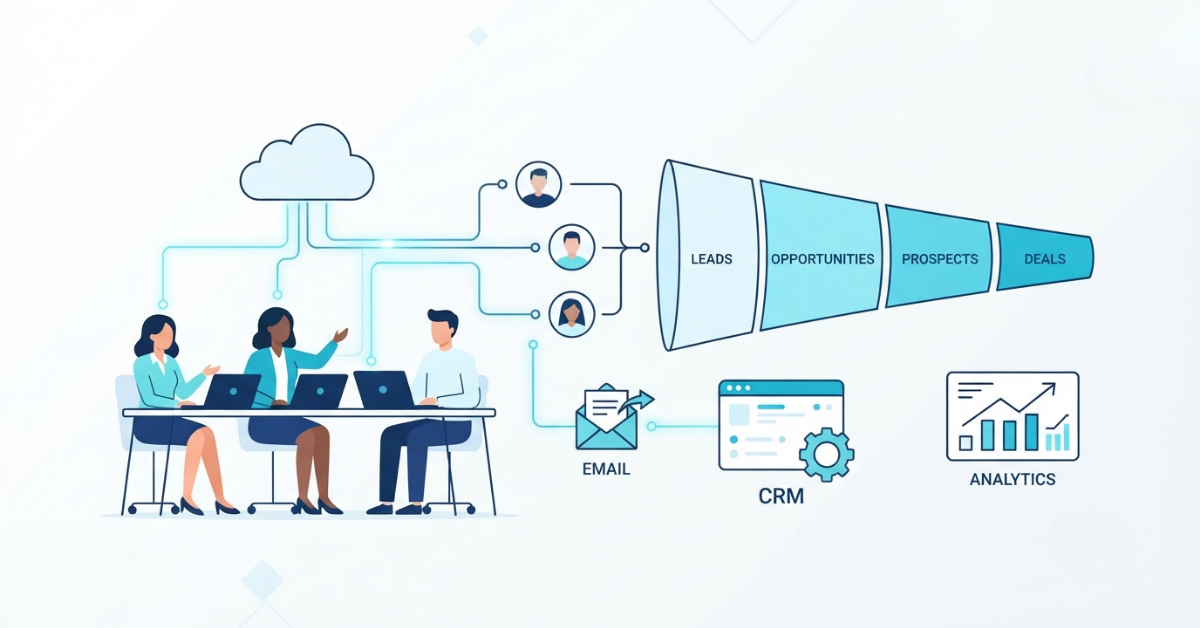
Rather than asking one platform to do everything, the mid-market SaaS teams getting the best results have organized their approach around a B2B lead gen architecture built from four connected layers.
Think of it less as four separate tools and more as a modular revenue stack, where each layer feeds into the next and no single vendor problem can take down the whole system at once. The rest of this guide walks through each layer along with the specific tools that lead it.
Buyers do a lot of research before anyone from sales ever hears from them. They’re on your pricing page, reading through your blog, comparing you against two or three competitors, all without leaving a trace unless you have the right tools watching for it.
Person-level visitor ID and anonymous web traffic tracking solve part of that problem by telling you who’s actually on your site right now rather than just which company they work for. Pair that with third-party buying intent signals pulled from content networks across the broader web, and you get a much clearer sense of who’s actively shopping, sometimes weeks before they ever reach out directly.
Picture someone spending ten minutes on your pricing page and then leaving without a trace. That’s exactly the blind spot RB2B closes. It matches anonymous US visitors to actual people, LinkedIn profile and email address included, then pings you the moment someone who fits your target profile shows up on your site.
Features:
Pricing: A free version exists, and paid tiers scale based on how many visitors you’re identifying monthly
Pros:
Cons:
Long before a prospect ever lands on your homepage, they’re usually reading up on your category somewhere else entirely. Bombora tracks that activity across a sprawling B2B content network through what it calls “Surge” scoring, flagging companies that are actively in research mode, sometimes before they’ve heard of you at all.
Features:
Pricing: Enterprise-tier, generally sold as annual contracts with pricing quoted individually
Pros:
Cons:
The instant someone starts typing into one of your forms, these tools pull in company details from their email domain or IP address automatically. Forms get shorter, and conversion rates tend to climb as a result.
Features:
Pricing: Sold in tiers, with HubSpot Breeze frequently included as part of existing HubSpot subscriptions
Pros:
Cons:
Together, these three give your sales team something to act on that’s grounded in real signal rather than guesswork. Reps end up spending their time on accounts genuinely close to buying instead of cold-calling names off a list.
Once you’ve figured out who to go after, the next problem is having a working way to actually reach them, and this is usually where B2B lead generation software budgets quietly disappear into stale, unverified contact lists.
Here’s what makes ReachStream different: a database of 400 million-plus contacts, and searching through it costs nothing. The meter only starts running once you actually export a verified record, which flips the pricing model most vendors in this space still use.
Features:
Pricing: Pay-per-export or credit-based, with no charge to search and fees only tied to actual exports
Pros:
Cons:
Juggling a separate database tool and a separate sequencing platform gets old fast. Apollo puts both under one roof instead, contacts and cold email sequences in a single subscription, which works well for SMBs and growing teams that don’t want to manage five vendors at once.
Features:
Pricing: Per-seat, ranging from a free plan up through enterprise tiers
Pros:
Cons:
ZoomInfo remains the go-to option when you need enterprise-grade org charts, executive-level contact details, and deep firmographic coverage across the US market specifically.
Features:
Pricing: Enterprise-level, typically structured as annual contracts with custom quotes
Pros:
Cons:
For most companies evaluating lead gen tools built for mid-market SaaS teams, the smarter approach isn’t settling on one provider. Using something cost-efficient like ReachStream for everyday volume, while reserving a premium tool for your highest-value enterprise targets, tends to work better than picking a single vendor for everything.
Getting someone interested is only part of the challenge, because whether that interest turns into a booked meeting or gets lost entirely often comes down to how quickly your team responds. This is exactly what speed to lead software is built for, engaging a lead within the first ten seconds after they’ve raised their hand.
Instead of showing prospects a static “thanks for reaching out” page, Chili Piper routes them immediately to book time on an available AE’s calendar, based on rules around territory, account tier, or who’s free.
Features:
Pricing: Per-seat, priced in tiers depending on which features you need, including routing, booking, and concierge add-ons
Pros:
Cons:
Qualified pairs live chat with real-time visitor tracking, so the moment a high-fit account lands on a key page, reps get an alert and can jump straight into a conversation.
Features:
Pricing: Enterprise-tier, quoted individually
Pros:
Cons:
For teams working with a tighter budget, Calendly offers basic routing and qualification logic paired with simple booking workflows that get the job done without much overhead.
Features:
Pricing: Freemium, with paid tiers unlocking routing and team-level features
Pros:
Cons:
Whichever combination fits your team, the underlying goal is the same across all three: nothing should sit waiting once a lead is ready, and routing should happen instantly.
None of your outbound work matters much if it never reaches an inbox, and sending too aggressively from too few email accounts is the fastest way to end up flagged as spam before your message even lands.
Scaling outbound volume without wrecking your primary domain used to mean rotating inboxes by hand and hoping for the best. Instantly automates all of it: unlimited inbox connections, rotation built in, and warmup running quietly in the background so secondary domains take the sending load instead.
Features:
Pricing: Tiered based on how many active email accounts and leads you’re managing
Pros:
Cons:
Teams running outbound at serious scale tend to outgrow simpler tools fast. Smartlead is built for that stage specifically, with dynamic inbox rotation, webhook support, and a centralized inbox that keeps high-volume campaigns from turning into total chaos.
Features:
Pricing: Tiered, scaling up with the number of email accounts and active leads involved
Pros:
Cons:
No single data provider ever has everything, and that’s the whole idea behind Clay. It cascades a lookup across more than 150 providers, and the moment one source comes back empty, the next one automatically takes over the search.
Features:
Pricing: Usage-based, billed according to enrichment credits consumed
Pros:
Cons:
Taken together, this layer is what keeps cold email deliverability intact as volume grows, combining inbox rotation, automated warmup, and cascading enrichment into one system that reinforces itself.
Tool | Primary Use Case | Best For | Pricing Model |
RB2B | Visitor de-anonymization | US inbound-heavy teams | Freemium/tiered |
Bombora | Third-party intent signals | ABM programs | Enterprise |
Clearbit/HubSpot Breeze | Form enrichment | Marketing ops | Tiered |
ReachStream | Verified contact sourcing | Cost-conscious mid-market | Pay-per-export |
Apollo.io | Prospecting + sequencing | SMB/scaling teams | Per-seat |
ZoomInfo | Enterprise org charts | Enterprise accounts | Enterprise |
Chili Piper | Instant meeting booking | Inbound-led sales teams | Per-seat |
Qualified | Conversational marketing | Salesforce-native orgs | Enterprise |
Calendly Routing | Lightweight qualification | Lean/early sales teams | Freemium/tiered |
Instantly.ai | Inbox rotation/warmup | High-volume outbound | Tiered |
Smartlead.ai | Campaign infrastructure | Enterprise outbound | Tiered |
Clay | Waterfall enrichment | Data-heavy GTM teams | Usage-based |
The order you roll these tools out in actually matters quite a bit, and getting the sequence wrong tends to waste time and money on tools that aren’t ready to deliver value yet.
A few things worth keeping in mind about this sequence:
A lead gen tool is software your own team runs directly, like ReachStream or Apollo, while a lead generation service typically comes with a managed team handling campaign execution on your behalf.
Not necessarily all twelve, though most mid-market teams do benefit from having at least one tool covering each layer, which helps avoid depending too heavily on a single vendor while also keeping overall costs manageable.
Industry figures generally put the B2B data decay rate somewhere between 20% and 30% annually, which is exactly why real-time verification tends to outperform static databases over time.
A verified contact source such as ReachStream, paired with basic deliverability infrastructure through Instantly.ai, covers the two biggest risk areas most teams face: inaccurate data and poor deliverability.
A layered approach tends to work best for US-based teams, combining RB2B to identify domestic website visitors, ReachStream for cost-effective and verified US contact data at scale, and Instantly.ai to handle deliverability. ReachStream in particular stands out here thanks to its 400M+ contact database and real-time verification at export, which keeps bounce rates low without requiring enterprise-level pricing.
Before committing, it’s worth comparing how each tool verifies data (static databases versus real-time verification, which is where ReachStream stands out), how pricing is structured (per-seat versus pay-per-export), what integration options exist (API access, CRM syncing), and whether the tool actually fits into your existing four-layer stack rather than trying to replace the whole thing at once.
As companies move past the SMB stage, cost-per-contact and data accuracy tend to matter more than having every possible feature bundled together. ReachStream fits well at this transition point, since its pay-per-export pricing and real-time verification scale naturally with growing outreach volume, without locking teams into the per-seat costs or long-term contracts that come with most enterprise-tier vendors.
Marketing professional, specializing in SEO, content strategy, social media, performance marketing, prospecting, and demand generation.
Access 200M+ verified business emails and grow your sales pipeline effortlessly.
Don't forget to share this post!















Check out our other blogs!
How a Medical Device Company Can Reach Hospital Decision-Makers
What Data Fields Should a Healthcare Marketing Database Include?
ReachStream Prospect vs Prospeo: Who Delivers Accurate Data?
How to Evaluate B2B Lead Generation Platforms: 7 Non-Negotiable Criteria