Written by:
Abdul Hafeez
CRM Data Enrichment: How to Improve Incomplete Contact Records
> Sales
How to Evaluate B2B Data Vendors for Accuracy and Compliance

TL;DR
- CRM data enrichment fills gaps in existing records by adding, updating, and verifying details such as job title, seniority, company size, industry, location, business email, phone number, and technology used.
- Incomplete CRM data is caused by everyday changes, including manual entry errors, short lead forms, job changes, company mergers or rebrands, outdated contact details, inconsistent formats, and duplicate records.
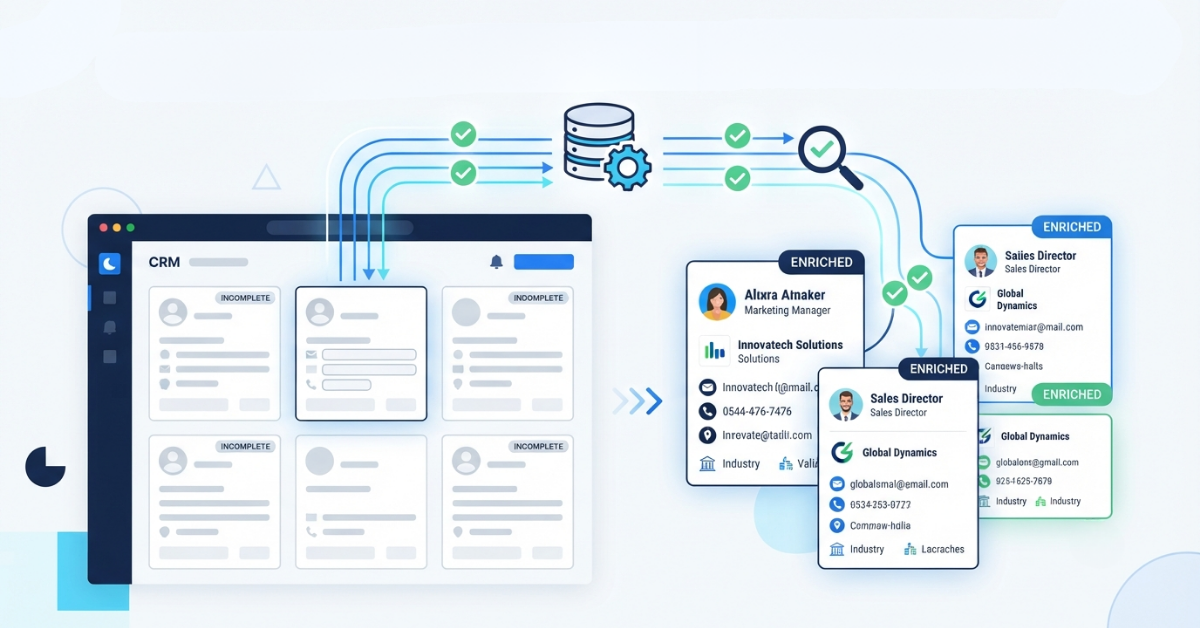
- A reliable enrichment workflow matches and verifies records before updating them. It should add approved fields, standardize data, detect duplicates, record the source and verification date, sync changes to the CRM, and continuously monitor data quality.
- Enriched data improves sales and marketing performance by enabling better segmentation, lead qualification, account prioritization, personalization, reporting, and more targeted sales conversations while reducing manual research.
- Businesses should evaluate enrichment providers using a sample of their own CRM data. Compare coverage, accuracy, verification status, integrations, API and automation options, duplicate handling, compliance, refresh frequency, and the total cost per usable record.
A CRM record can look useful at first glance: a name, an email address, and a company. Then a sales rep opens it and finds no job title, an old phone number, and a company website that no longer works. Marketing has trouble segmenting the contact, sales spends time searching for basic details, and reporting becomes less dependable.
Records lose quality for ordinary reasons. People change roles, companies update their information, leads submit short forms, and teams enter details by hand. CRM data enrichment gives revenue teams a practical way to fill those gaps, verify key fields, and add context to existing records.
This guide explains how enrichment works, what it can add, and how to compare tools and services before bringing them into your CRM workflow
What Is CRM Data Enrichment?
CRM data enrichment is the process of adding, updating, and verifying information in an existing CRM record. It uses approved data sources to improve contact information, company data, and other fields that help sales and marketing teams understand an account.
An enrichment process might add a person’s job title, seniority, department, business phone number, company size, industry, location, or technology details. For campaign planning, targeted marketing teams can use these fields to build more relevant audiences. It can also correct an outdated company domain or flag an email address that should not be used.
Enrichment differs from creating new CRM records. The goal is to improve records you already have, rather than simply increasing the number of names in the database. A larger database is not automatically a better database.
Why Do CRM Contact Records Become Incomplete?
Data quality usually declines through small changes rather than one dramatic error. Common causes include:
- Manual data entry: Names, titles, domains, and phone numbers are typed inconsistently or left blank when a rep is in a hurry.
- Short lead forms: A new contact may provide only a name and email address because the form asks for little else.
- Job changes: A contact can move to a new role, department, or employer while the old CRM record remains unchanged.
- Company changes: A merger, rebrand, acquisition, or domain change can make company information inaccurate.
- Outdated phone numbers: Direct lines and mobile numbers change, while old values remain in the record.
- Limited company context: A contact record may not include industry, revenue range, location, employee count, or technology used.
- Duplicate records: Separate imports, forms, and rep-created records can produce several profiles for the same person or account.
- Different formats: One record may use “United States,” another “US,” and a third “USA.” Job titles can have the same problem.
- Incomplete lead capture: A campaign may collect enough information to create a lead, but not enough to qualify it.
The result is familiar to sales operations teams: reps spend time researching records before they can have a useful conversation, and marketing lists need extra manual work before a campaign can be launched.
What Information Can CRM Data Enrichment Add?
The right fields depend on your sales process. A company selling enterprise software may need employee count, revenue range, technology use, and seniority. A local services firm may care more about location, company type, and a usable phone number.
Data category | Examples | Why it helps |
Contact identity | Full name, preferred name | Prevents confusion and improves personalization |
Role details | Job title, job level, department | Supports lead scoring and routing |
Company details | Name, website, industry, employee count, revenue range | Helps teams assess account fit |
Location | City, state, country, office location | Supports territory planning and regional campaigns |
Contact information | Business email, phone number, professional profile | Gives sales a better way to connect and verify identity |
Technology data | Tools or platforms used, where available | Helps reps tailor a relevant business case |
Account attributes | Parent company, subsidiaries, growth signals | Improves account planning and prioritization |
Enrichment can improve a record, but it does not make every field certain. A provider may have strong coverage for company information and limited coverage for direct phone numbers in a particular region. Treat verification status, source, and last-updated date as useful parts of the record.
How Does CRM Data Enrichment Work?
A sound enrichment workflow has eight practical stages. Teams that need a deeper review of email and contact checks can also consult this guide to data verification.
- Identify incomplete records. Start with records missing required fields, contacts in active opportunities, high-value accounts, or leads that need qualification.
- Match contacts to data sources. Use identifiers such as name, company, domain, email, and location to find the right person and account.
- Verify the match. Check that the person belongs to the company and that the proposed company or contact details fit the existing record.
- Add missing information. Append only the fields your team has approved for use.
- Standardize the data. Apply consistent formats to titles, country names, phone numbers, industries, and company names.
- Check for duplicates. Compare email addresses, domains, names, and account identifiers before creating or updating records.
- Sync changes to the CRM. Record the source, update date, and verification status when your system supports those fields.
- Monitor the database. Review results, correct conflicts, and refresh records as contacts and companies change.
Enrichment, validation, and data cleansing are related but distinct. Enrichment adds context. Validation checks whether a value follows rules or appears usable. Data cleansing corrects formats, removes defects, and handles duplicates. A good CRM program uses all three.
What Are the Benefits of CRM Data Enrichment?
The value appears in daily work, not in the number of fields added to a profile.
- More complete customer profiles: Reps see role, account, and contact context in one place.
- Better lead segmentation: Marketing can group contacts by department, company size, industry, location, or seniority.
- Improved lead qualification: A B2B software lead at a 300-person company may deserve a different route than a student or a very small business.
- More targeted sales conversations: A rep can speak to operational priorities instead of asking for information the CRM should already contain.
- Better account prioritization: Account teams can sort by fit, size, geography, or existing technology.
- Cleaner CRM records: Standardized fields and duplicate checks make reports easier to trust.
- More relevant personalization: Campaigns can reflect a contact’s role and company situation.
- Better reporting: Consistent company and lead data gives RevOps teams a stronger basis for pipeline analysis.
- Less manual research: Reps spend less time searching for basic contact information.
Consider a cybersecurity vendor with 8,000 CRM contacts. If job titles and company sizes are missing from a large part of the database, the marketing team cannot build a reliable campaign for IT leaders at mid-sized firms. Enriching those fields can make the audience possible to define, while email verification helps reduce unusable addresses before a campaign is sent.
CRM Lead Enrichment vs. CRM Contact Enrichment
- Lead enrichment: improves a new or unqualified prospect record. It is useful when a form submission contains an email address but little information about the person or company.
- Contact enrichment: updates an existing person record that already has a place in the CRM. It is useful after a role change, company move, account review, or periodic database audit.
- Company or account enrichment: adds firmographic and account-level information, such as industry, size, revenue range, website, location, parent company, or technology signals.
These processes work together. A form creates a lead, lead enrichment adds context, qualification determines its fit, and account enrichment gives the sales team a clearer view of the organization. A broader CRM prospecting workflow can then keep new and existing records connected. Later, contact enrichment keeps the profile current.
What Are CRM Data Enrichment Tools?
CRM data enrichment tools are software products that find, append, verify, standardize, or synchronize information connected to CRM records. They reduce the need for a rep or operations analyst to research each profile manually.
Common capabilities include:
- Automated and bulk enrichment
- Real-time enrichment for new form submissions or account activity
- Contact lookup and company enrichment
- Business email verification
- Data validation and duplicate detection
- CRM integrations and API access
- Rules for data synchronization and field mapping
- Export controls, verification statuses, and usage reporting
A CRM data enrichment tool should fit the way your team works. Before comparing individual enrichment tools, map the fields, triggers, and handoffs your team already uses. A small sales team may need a simple lookup and CSV workflow. A RevOps group may need API access, field-level rules, scheduled updates, and controls for duplicate handling.
CRM Data Enrichment Software vs. Manual Data Enrichment
Manual research still has a place. A rep may review a strategic account personally, or an analyst may verify a senior executive before an important meeting. For a large contact database, however, software is usually easier to repeat and measure. This matters especially when teams are building and maintaining prospect lists at a regular cadence.
Factor | Manual enrichment | CRM data enrichment software |
Speed | Slow for large record sets | Faster for batch and rule-based work |
Scalability | Limited by staff hours | Handles larger volumes with the right plan |
Data consistency | Varies by researcher | Uses shared rules and field formats |
Team effort | Requires repeated research | Reduces routine lookup work |
Automation | Low unless supported by scripts | Supports workflows, integrations, or APIs |
Best use case | Strategic accounts and edge cases | Routine enrichment across a database |
The practical choice is often a combination: automate routine work, then have a person review high-value or ambiguous records.
What Should You Look for in a CRM Data Enrichment Platform?
Use this checklist when comparing CRM data enrichment providers:
- Data coverage: Does the provider cover your target countries, industries, roles, and company sizes?
- Accuracy and verification: Can you see status labels, sources, update dates, and sample results?
- Field depth: Are both contact and company information available for your use case?
- CRM integrations: Does the platform connect to your CRM, or will you need CSV files or custom work?
- Bulk and real-time options: Can it support both database cleanup and new-lead workflows?
- API access: Is an API available if your team needs custom automation?
- Refresh frequency: How often are records reviewed or updated?
- Duplicate handling: Can the tool match records before writing new data?
- Compliance and security: Review privacy documentation, processing terms, suppression options, and access controls.
- Ease of use: Can sales operations staff manage the workflow without constant engineering support?
- Pricing: Understand credits, exports, lookups, seats, limits, and overage rules.
- Customer support: Check response channels and implementation help.
The right CRM data enrichment platform depends on database size, CRM, target market, workflow, and the fields that matter to your team. Comparing B2B platforms can help clarify differences in coverage, integrations, and pricing models. Run a sample before selecting a provider for a broad project.
CRM Data Enrichment Best Practices
- Start With Your Existing CRM Data: Audit a sample of records first. A practical data quality review makes it easier to separate missing fields from inaccurate or duplicate records. Note missing fields, duplicate patterns, conflicting values, and the fields that affect lead routing. This gives you a baseline and prevents paying to enrich records that should be archived or merged.
- Define the Fields You Actually Need: Create a short list tied to a business action. If employee count affects routing, collect it. If a field never changes a campaign, score, or sales decision, leave it out.
- Standardize Data Before and After Enrichment: Set rules for names, titles, countries, industries, domains, and phone numbers. Store a verification date and source when possible so future users understand the record.
- Verify Important Contact Information: Give special attention to business email addresses and phone numbers. A valid format does not guarantee that a person will answer, that the mailbox belongs to the intended contact, or that a number is suitable for calling.
- Remove or Merge Duplicates: Use email, company domain, and other identifiers to find duplicate people and accounts. Decide which record is the master before syncing new data.
- Create an Enrichment Schedule: Use event-based updates for new leads and active opportunities. Review high-value accounts more often, and place older records on a periodic refresh schedule.
- Track Enrichment Results: Measure changes in lead routing, qualification time, email status, duplicate volume, and sales research time. The goal is better decisions and cleaner work, not a fuller-looking database.
How Often Should CRM Data Be Enriched?
There is no single schedule for every business. New leads may need enrichment as soon as they enter the CRM. Active prospects and high-value accounts deserve refreshes when a role, company, or opportunity changes. Older records can be reviewed quarterly, twice a year, or according to their value and risk.
Three patterns are common:
- Continuous enrichment: Updates happen as records enter or move through a workflow.
- Event-based enrichment: A job change, new opportunity, form submission, or account change triggers an update.
- Periodic enrichment: The team reviews a segment or the full database on a set schedule.
A blended approach is usually practical. Apply fast checks to new leads, use event triggers for active accounts, and schedule broader maintenance for the rest of the database.
How to Choose CRM Data Enrichment Services and Providers
Compare CRM data enrichment services in a controlled sequence:
- List the CRM and integrations your team needs.
- Define the exact fields and markets to cover.
- Test the provider’s coverage with a representative sample.
- Verify sample records against information your team can confirm.
- Review automation, field mapping, duplicate handling, and API options.
- Calculate the cost per usable, verified record—not just the headline credit price.
- Review privacy, security, and data-use documentation.
- Measure the effect on qualification, segmentation, sales productivity, and data quality.
A small test can reveal regional gaps, title-matching issues, duplicate behavior, and email-status differences before a larger commitment. A side-by-side provider comparison can add context, but your own sample should guide the final decision.
Common CRM Data Enrichment Mistakes
Avoid enriching every available field without a clear purpose. Also avoid skipping duplicate checks, assuming an updated record will remain accurate forever, or selecting a provider based only on database size.
Other frequent problems include failing to verify important email and phone fields, overlooking CRM integration requirements, writing conflicting values over trusted information, and ignoring privacy obligations. Teams also miss an important final step: measuring the result. If enrichment does not improve routing, segmentation, reporting, or sales productivity, the workflow needs adjustment.
How ReachStream Can Help With CRM Data Enrichment
ReachStream describes a B2B prospecting and data-quality workflow that combines contact and company records with enrichment and verification features. Teams evaluating contact databases can use the same sample-testing approach to compare coverage. Teams can use its filters for attributes such as role, industry, company size, revenue, and location, then review or build a targeted list.
For an incomplete CRM record, a practical workflow could look like this: identify the person or company, add available contact and company details, verify the business email, and export or sync the resulting record through the supported workflow. ReachStream also describes bulk CSV verification, a Chrome extension for prospect research on LinkedIn, and API capabilities for retrieval, enrichment, asynchronous processing, and webhook-based workflows. Confirm the fit of those capabilities for your CRM and use case before implementation.
The best way to evaluate the service is to test a representative sample from your own database. Compare field coverage, verification statuses, duplicate handling, and the effort required to move clean records into your CRM.
Final Takeaway
CRM data enrichment improves incomplete records by adding useful contact, company, and verification details to information you already have. For a broader explanation, see this overview of data enrichment. It helps sales teams qualify accounts, gives marketing better segmentation, and reduces time spent researching basic facts.
A strong program begins with an audit, a defined field set, clear data rules, duplicate checks, and a sample test. The right CRM data enrichment software or service depends on your CRM, market coverage, workflow, budget, and compliance needs. Keep monitoring the results because contact and company information changes over time.
If you want to evaluate a B2B enrichment workflow, test ReachStream with a small sample before expanding it across your database.
Power Your Sales
with Targeted Data
Access 400M+ verified business emails and grow your sales pipeline effortlessly.
Frequently Asked Questions
1. What is CRM data enrichment?
CRM data enrichment adds, updates, and verifies contact or company information in existing CRM records. It can include job titles, company size, industry, phone numbers, business emails, and other fields that support sales and marketing decisions.
2. How does CRM data enrichment work?
A tool matches a CRM record with available data sources, verifies the match, adds approved fields, standardizes values, checks duplicates, and syncs the result back to the CRM. Teams should review ambiguous or high-value records.
3. What information can be added through CRM contact enrichment?
Contact enrichment may add a full name, job title, seniority, department, business email, phone number, location, professional profile details, and related company information where available.
4. What are CRM data enrichment tools?
They are software products that append, verify, standardize, and synchronize information connected to CRM records. Features often include bulk processing, contact lookup, company enrichment, email verification, integrations, APIs, and duplicate detection.
5. How often should CRM data be enriched?
New leads may be enriched immediately, while active or high-value accounts may need event-based updates. Older records can follow a periodic schedule based on account value, market change, and data risk.
6. How do I choose a CRM data enrichment provider?
Test a sample from your own database. Compare coverage, verification detail, CRM integration, duplicate handling, refresh practices, compliance documentation, support, and total cost per usable record.
7. Is CRM data enrichment worth it?
It can be worthwhile when incomplete records slow qualification, segmentation, reporting, or sales research. Measure the effect on those workflows instead of judging the project by the number of fields added.

Abdul Hafeez
Author
Abdul Hafeez
Marketing professional with a Master’s degree in Marketing, specializing in SEO, content strategy, social media, performance marketing, prospecting, and demand generation.
Share
Table of Contents
Access 400M+ verified business emails and grow your sales pipeline effortlessly.
Power Your Sales
with Targeted Data
Don't forget to share this post!















Check out our other blogs!

What Is Prospecting? A Beginner’s Guide for Sales Teams
November 3, 2026

RocketReach Pricing 2026: Plans, Cost per Lookup & Free Plan
November 2, 2026

12 Lead Generation Strategies That Work in 2026 + Examples
October 30, 2026