
Q3 Limited-Time Deal. Find verified B2B leads at half the cost. Get 50% Off with Coupon Code PROSPECT50. First 200 Users Only.
Email Verification vs. Email Validation: Key Differences Explained
Written by:
Abdul Kareem

Email Verification vs Email Validation: What's the Difference?

> Email Verification

How to Evaluate B2B Data Vendors for Accuracy and Compliance

TL;DR

Somewhere between building a prospect list and hitting send, most sales and marketing teams lose track of a distinction that quietly decides whether their campaign performs or tanks. That distinction is email verification vs validation. The two terms get used as if they mean the same thing, and most people do not learn otherwise until a campaign comes back with a bounce rate that gets flagged by their email service provider. 

This guide breaks down what separates email validation and email verification, where each fits in a typical email marketing or outreach workflow, and how to use both correctly so your emails land in inboxes instead of bounce logs.  

Why This Distinction Actually Matters

Every email campaign depends on the quality of your contact list. Even the best email copy cannot generate results if messages never reach the recipient’s inbox. 

Poor-quality email lists can lead to: 

Validation prevents simple formatting mistakes before they enter your database, while verification identifies email addresses that may no longer exist or receive mail. Together, these processes help maintain a healthier database and improve campaign performance.
INDUSTRY INSIGHT 
Most email service providers treat a bounce rate above 2 percent as a warning sign, and providers may throttle or flag sending domains that cross that threshold repeatedly. Keeping bounce rates low is not optional if you plan to keep sending email at any real volume. 

What Is Email Validation?

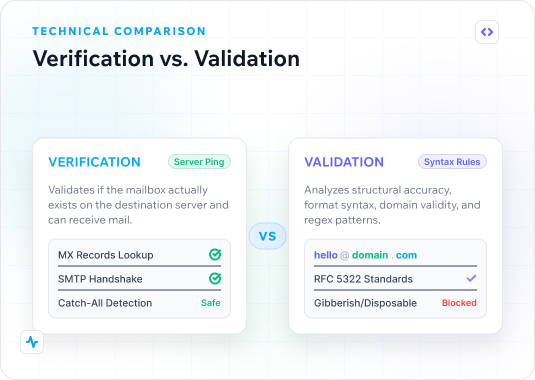
Email validation is the first, lighter checkpoint. It looks at an email address and asks one question: is this formatted the way an email address should be formatted?

A validation check typically confirms: 

  1. There is an “@” symbol and a domain
  2. The domain structure is correct, with no missing periods or illegal characters
  3. The address has no obvious typo, like a doubled character or a missing top-level domain
  4. The syntax follows standard email address formatting rules 

What Is Email Verification?

Email verification picks up where validation leaves off. Instead of checking format, it checks reality. It confirms whether the mailbox behind an address exists and can receive emails right now. This is a meaningfully deeper check than validation, and it is the step that actually protects your bounce rate

A proper email verification process typically involves: 

  1. Syntax validation
  2. Domain verification  
  3. DNS lookup  
  4. MX record lookup  
  5. SMTP-level mailbox checks
  6. Catch-all detection  
  7. Disposable email detection  
  8. Role-based email detection 
PRO TIP   
Pay attention to catch-all domains during verification. These accept mail at any address, valid or not, so a “valid” result on a catch-all deserves more scrutiny before a high-stakes send. 

Email Verification vs Validation: The Core Differences

Factor  Email Validation  Email Verification 
What it checks 
Format and syntax 
Real-world existence of the mailbox 
Speed 
Instant 
Slightly slower, checks mail servers 
Catches typos 
Yes 
Yes 
Catches dead or deleted mailboxes 
No 
Yes 
Checks MX record 
Rarely 
Yes 
Best used 
At point of entry, on forms 
Before bulk email or cold outreach 
Protects bounce rates 
Partially 
Directly 
Email validation asks “does this look like an email address.” Email verification asks “will this address actually receive emails.” That is the core of email verification vs validation, and both matter.

How the Email Verification Process Actually Works

Step 1: Format Check

The system confirms the address follows correct syntax, the same starting point as validation. 

Step 2: Domain and MX Record Lookup

The verifier checks whether the domain is active, then queries its MX record to confirm mail servers are configured to accept mail. 

Step 3: SMTP Handshake

A verification tool connects to the receiving mail server and initiates the early steps of an SMTP conversation, asking whether the mailbox exists without completing the handshake or sending a message. Most basic email checkers skip this step entirely. 

Step 4: Risk Classification

The address gets classified. A well-built process returns more than a simple valid or invalid flag, giving teams the context to decide how to treat each address. 
Expert Insight
Experienced list managers rarely treat a “risky” classification the same as “invalid.” Risky addresses often belong to real people behind spam filters or greylisting, and many teams route them into a separate, lower-volume cadence instead of discarding them outright. 

When Should You Use Email Validation?

Running verification before every major campaign helps reduce bounce rates and improve sender reputation. Validation works best during data collection. Examples include:

When Should You Use Email Verification?

Running verification before every major campaign helps reduce bounce rates and improve sender reputation.  Verification should take place before sending emails, especially when working with:

Why Using Both Delivers Better Results 

Validation and verification work best together rather than as competing processes. Validation prevents invalid email formats from entering your database. Whereas verification helps identify addresses that are inactive, undeliverable, or potentially risky before campaigns are launched.

Businesses that combine both processes typically benefit from: 

Choosing Between Validation and Verification Services

Not every tool on the market does the same job, even when marketed similarly. Some tools labeled as email checkers only validate emails, checking format and calling it done, which is really just Email Validation Services in disguise. Others run genuine verification, down to mailbox-level checks.

When comparing email verification platforms, look for features such as:

Best Practice 
Run verification as close to send time as possible. Addresses decay over time. People change jobs, mailboxes fill up, and domains lapse. A list verified six months ago is not the same list today. 
See Your List's Real Bounce Risk 
Upload a sample list on ReachStream Email Verifier and see how many contacts fall into each verification status before you commit to a full send. 

How to Build Verification Into Your Workflow

Verification works best as a habit, not a one-time cleanup project. Follow these best practices to keep your database clean and your campaigns performing well. 

Verify at the Point of Capture

Check email addresses as they are collected through website forms, landing pages, event registrations, and CRM entries. Real-time verification catches invalid formats, disposable addresses, and common typing errors before they enter your database.

Verify Before Every Campaign

Even recently collected lists can become outdated as employees change roles or organizations. Run a bulk verification before each email campaign to remove invalid, risky, and inactive addresses and improve deliverability.

Schedule Regular Database Cleaning

Business contact data naturally declines in accuracy over time. Set a recurring schedule, such as every 30 to 90 days, to verify your database and keep your contact records current. 

Use Verification Results for Better Segmentation

Don’t treat every verified result the same. Segment contacts by verification status, such as Valid, Risky, Invalid, and Do Not Mail, and adjust your sending strategy for each group to reduce unnecessary risk. 

Integrate Verification with Your Existing Tools

Connect your email verification platform with your CRM, marketing automation software, or lead capture forms. Automated verification reduces manual work, keeps your data consistent across systems, and ensures every new contact is checked before entering your workflow.

Monitor and Refine Your Process

Track key metrics such as bounce rate, deliverability, open rate, and spam complaints after each campaign. Use these insights to identify when your database needs another verification cycle and continuously improve your email marketing performance.
Industry Insight 
B2B email lists decay at a meaningfully fast pace, largely due to job changes and role turnover, which is why experienced RevOps and marketing teams treat list verification as an ongoing process rather than a single cleanup. 
Make Verification Part of Every Send 
Most teams add verification to their workflow only after a bad bounce rate. Get ahead of it instead. 

Final Thoughts

Understanding email verification vs validation is not just a vocabulary question. Email validation and email verification serve different but complementary purposes. Validation ensures an email address is correctly formatted before it enters your database, while verification provides a deeper assessment of whether that address can receive email. 

For businesses that rely on email marketing, sales outreach, or customer communications, combining both processes helps reduce bounce rates, maintain sender reputation, and improve overall deliverability.

Rather than treating validation and verification as interchangeable, make them part of your standard data quality workflow. Using a solution like ReachStream Email Verifier, which performs both checks in a single process, can help your team maintain cleaner contact data and make more informed sending decisions before every campaign. 

Stop Guessing Which Addresses Are Real
Run your next list through ReachStream Email Verifier, built to catch what format checks miss, before it costs you sender reputation.  

Frequently Asked Questions

1. Can ReachStream Email Verifier verify bulk email lists?

Yes. ReachStream Email Verifier supports bulk email verification, allowing you to upload large contact lists and validate thousands of email addresses in a single process. This makes it easier to prepare clean, campaign-ready lists.
ReachStream combines high verification accuracy, bulk processing, real-time API access, and detailed verification results in one platform. It helps sales and marketing teams maintain clean email lists, improve deliverability, and reduce the time spent managing outdated contact data.
ReachStream Email Verifier delivers up to 99.8% verification accuracy. Our multi-step process helps businesses maintain cleaner contact databases and improve email deliverability.
Our Email Verifier classifies email addresses into clear verification statuses such as Valid, Invalid, Risky, Unknown, and Do Not Mail. These categories help you decide which contacts to send, review, or suppress.
Yes. The software includes an API that allows developers to verify email addresses in real time within websites, signup forms, CRM platforms, and other business applications. This helps prevent invalid email addresses from entering your database.
Yes. The Email Verifier identifies disposable and temporary email addresses, helping you reduce low-quality signups and maintain a more reliable contact database for sales and marketing.
ReachStream Email Verifier helps sales, marketing, RevOps, and recruitment teams maintain accurate contact data, reduce bounce rates, improve deliverability, and build more effective outreach campaigns with verified email addresses.
The platform performs multiple validation checks, including email syntax verification, domain validation, MX record lookup, SMTP mailbox verification, catch-all detection, role-based email detection, and disposable email identification. These checks provide a more complete picture of email quality.
Abdul Kareem

Author

Abdul Kareem
Abdulkareem Satarkar is Software Engineering Manager at ReachStream, leading the development of scalable software solutions for B2B sales and marketing teams.
Share
Table of Contents

Access 200M+ verified business emails and grow your sales pipeline effortlessly.

Power Your Sales with Targeted Data
Abdul Kareem
Abdul KareemAuthor
Abdul Kareem, Software Manager at ReachStream, has extensive experience in DevOps and backend technologies such as Python and PHP. He focuses on seamless project execution, maintaining optimal performance, and upholding the highest quality standards.

Don't forget to share this post!

Check out our other blogs!