

How to Evaluate B2B Data Vendors for Accuracy and Compliance
Every outbound team has stared at a list that looked promising on paper and watched it fall apart in practice. Bounced emails, wrong titles, contacts who left the company months ago. The list was the problem, not the messaging.
Building a targeted B2B prospect list means starting with a clear ideal customer profile, sourcing contacts from verified data, and validating every email before it hits a sequence. This guide walks through each step, from defining filterable ICP attributes to measuring list quality after your first campaign.
A targeted B2B prospect list is a curated set of companies and contacts that match your ideal customer profile, built by defining specific firmographic criteria, sourcing accurate company and contact data, and verifying email addresses to ensure high deliverability. The word “targeted” is doing real work here. It means the list is filtered by attributes you can actually search on, like industry, headcount, revenue band, and job title, rather than being a generic export of thousands of names.
Think of it this way: a contact dump gives you volume. A targeted list gives you fit. The difference shows up in your reply rates, your bounce rates, and ultimately, whether your outreach turns into pipeline.
You will hear these terms used interchangeably, but they describe different stages. A prospect list contains contacts who fit your ICP but have not engaged with your company yet. A lead list includes contacts who have already shown interest, whether through a form fill, content download, or inbound inquiry.
| Prospect list | Lead list |
|---|---|
| Fits ICP criteria | Has shown engagement or intent |
| Outbound-focused | Inbound or signal-triggered |
| Requires qualification | Already partially qualified |
Why does this matter? Prospects require more context and personalization in your outreach because they have not raised their hand. Leads have already signaled interest, so the conversation starts further along.
If you have ever run an outbound campaign that flopped, the list was probably the problem, not the messaging. Here is what typically goes wrong:
The fix for all of these is the same: build with intention, verify before sending, and refresh regularly.
You have two paths here. Manual research offers precision but takes significant time, often days or weeks for a few hundred contacts. Buying from a data provider offers speed and scale, though you still want to vet the source for accuracy and freshness.
Most teams land on a hybrid approach. They pull initial lists from a database, then manually enrich high-value accounts with additional context. This balances efficiency with the personalization that closes deals.
Before you start building, you want to know what a complete record looks like. Missing fields slow down outreach and force reps to research mid-sequence.
Every contact record benefits from these attributes:
Firmographic data enables account-level filtering and segmentation:
Static ICP matches are a starting point. Dynamic attributes indicate timing and priority:
These signals transform a static list into a prioritized pipeline.
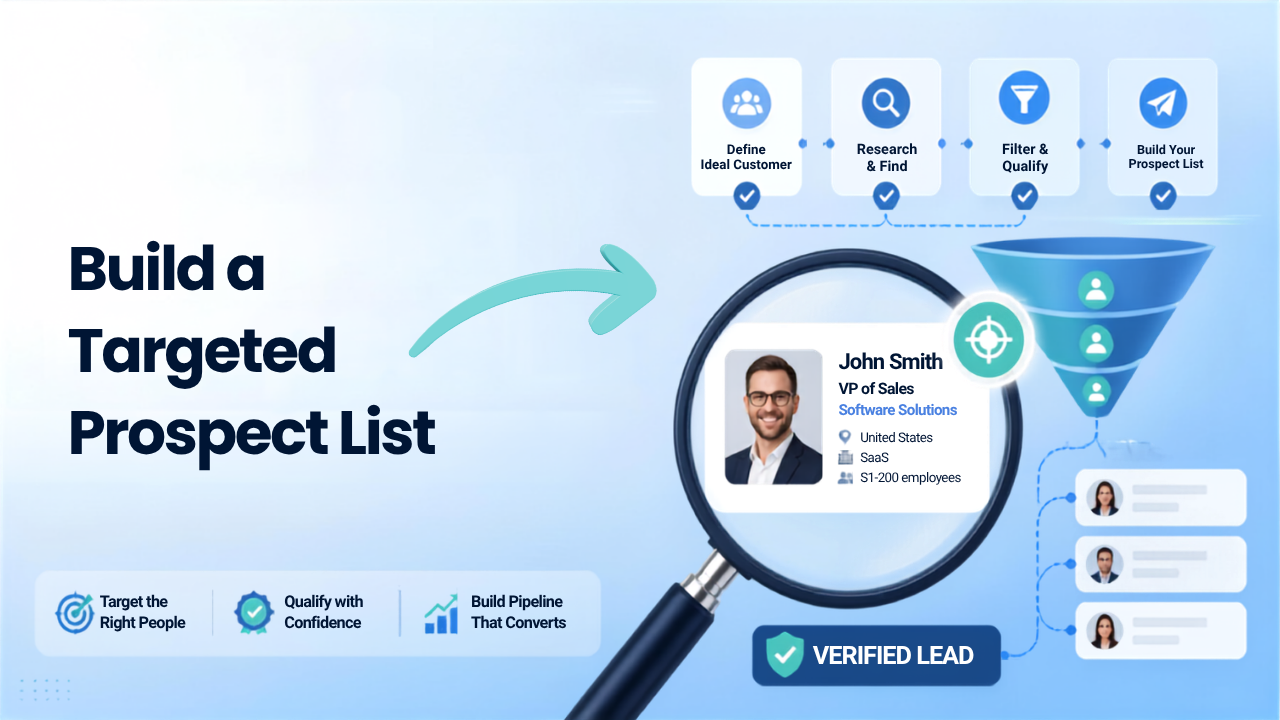
This is where the work happens. Each step follows a logical sequence from planning to execution.
An ideal customer profile is only useful if you can actually filter on its attributes in a database. Vague descriptions like “fast-growing companies” cannot be searched.
Focus on attributes you can filter:
Write these down before you touch any database. They become your search criteria.
With your ICP defined, you can run searches in a B2B database, LinkedIn Sales Navigator, or other sources. The goal at this stage is to pull an initial export that matches your criteria.
ReachStream’s Prospect tool lets you filter by 20+ attributes and export contacts with verified emails included, which saves the separate verification step that other workflows require.
Raw ICP matches tell you who fits. Buying signals tell you who is ready. After your initial export, layer in timing indicators like recent funding, executive hires, or technology changes.
A company that just raised a Series B and is hiring SDRs is more likely to buy sales tools than a company with no visible activity. Prioritize accordingly.
Even data from reputable sources can go stale. Before any outreach, run email verification to check whether the mailbox exists, whether the domain accepts all emails (catch-all detection), and whether the address is a spam trap.
Skipping this step damages deliverability. High bounce rates signal to email providers that you are sending to bad addresses, which hurts your sender reputation on future campaigns.
Tip: ReachStream’s Email Verifier validates at the SMTP level before export, so you can skip the separate verification tool.
Initial exports often have gaps. Enrichment fills in missing fields like direct dials, LinkedIn URLs, company revenue, and technographics.
Enrichment is different from verification. Verification confirms an email is deliverable. Enrichment adds data you did not have before.
Not every ICP match is worth pursuing. Before adding a contact to a sequence, check whether the contact has decision-making authority, whether the company has budget for your solution, whether there is a timing signal present, and whether there is an existing relationship or deal in your CRM.
Qualification happens before outreach, not during it. Sending to unqualified contacts wastes sequences and burns your domain.
One message to the whole list underperforms. Group prospects by persona, industry, signal type, or priority tier. Each segment gets a tailored sequence.
A VP of Sales at a funded startup responds to different messaging than a Marketing Director at an established company. Segmentation makes that personalization possible.
Push the list to your CRM or sequencing tool. Set up tracking to measure reply rates, bounces, and conversions by segment.
This data informs future list-building decisions. If one segment converts at twice the rate of another, you know where to focus next quarter.
Where you source data shapes the quality of your list.
Paid databases like ReachStream, Apollo, and ZoomInfo offer pre-verified contacts with filtering by ICP attributes. Accuracy and refresh frequency vary by provider, so ask about data freshness before committing.
LinkedIn is the largest professional network, but it does not provide verified contact data directly. Sales Navigator enables advanced filtering, though you want a separate tool for email extraction.
Browser extensions pull contact data from LinkedIn profiles in real time. ReachStream’s Chrome Extension captures verified emails and phone numbers during browsing, so you can prospect without leaving LinkedIn.
Job postings reveal company priorities. A company hiring for sales roles may be expanding pipeline, making them a fit for sales tools.
Existing customers can refer similar companies. This source is lower volume but higher conversion because of the trust transfer.
Beyond ICP match, these signals indicate active buying windows:
B2B contact data goes stale quickly. People change jobs, companies pivot, and signals expire. Re-verify your list on a regular cadence and remove bounced contacts immediately.
ReachStream refreshes its database every 45 days to reduce stale records, but even with fresh sources, verification before each campaign is worthwhile.
B2B outreach has legal requirements. Here is the quick version:
Track these metrics to know if your list is working:
Building a high-performing B2B prospect list requires more than collecting as many contacts as possible. Avoiding common list-building mistakes helps improve lead quality, email deliverability, and campaign results.
A large list of poor-fit contacts wastes outreach effort and damages domain reputation. Smaller, well-targeted lists outperform bloated generic ones.
Unverified emails lead to hard bounces. Hard bounces hurt sender reputation and deliverability on future campaigns.
Lists built once and never updated decay quickly. Contacts change jobs, companies pivot, and signals expire.
Generic messaging to an unsegmented list underperforms. Different personas and signals require tailored outreach.
ReachStream provides access to 200M+ verified B2B contacts with advanced filtering, real-time email verification, and a Chrome Extension for LinkedIn capture. You can start with a free plan that includes export credits and email verification, no credit card required.
A starter list typically includes a few hundred qualified prospects rather than thousands of unqualified names. The goal is to test your ICP hypothesis and messaging before scaling.
Building manually can take days or weeks. Using a verified database with filters can reduce the process to hours.
A well-verified list typically has a bounce rate under 2%. High bounces signal that verification was skipped or the data source is outdated.
LinkedIn’s Terms of Service prohibit scraping. Most teams use approved tools and APIs that access data through compliant methods.
Verification confirms whether an address is deliverable. Enrichment adds missing data fields like phone numbers, company size, or LinkedIn URLs.
Marketing professional, specializing in SEO, content strategy, social media, performance marketing, prospecting, and demand generation.
Access 200M+ verified business emails and grow your sales pipeline effortlessly.
Don't forget to share this post!















Check out our other blogs!
How Many Follow-Ups Should a Cold Email Sequence Have?

How a Medical Device Company Can Reach Hospital Decision-Makers
What Data Fields Should a Healthcare Marketing Database Include?
ReachStream Prospect vs Prospeo: Who Delivers Accurate Data?