How to Evaluate B2B Data Vendors for Accuracy and Compliance
Multi-channel outreach lists convert better than single-channel lists because prospects respond to different channels at different times. An email that gets ignored might be followed by a LinkedIn message that gets a reply, or a direct dial that starts a conversation.
This guide walks through how to build a multi-channel B2B outreach list from scratch, covering the data fields you need, the step-by-step process, and the tools that make it work.
What is a multi-channel B2B outreach list
High-converting multi-channel B2B lists start with enriching Ideal Customer Profile data with buying intent, then sequencing targets across email, LinkedIn, and phone. That’s the short version. The longer version: a multi-channel outreach list is a database of prospects that includes verified contact data for reaching them across several channels, not just one.
A single-channel list might only have email addresses. A multi-channel list includes emails, LinkedIn profile URLs, direct dial numbers, and sometimes mobile numbers for SMS. Without the right data for each channel, your outreach sequences fall apart before they begin.
Why a multi-channel list outperforms a single-channel list
Relying on email alone creates risk. Inbox fatigue, spam filters, and deliverability issues mean any single channel can fail you on any given day. Multi-channel lists spread that risk.
Higher reply rates across touchpoints
Prospects respond differently to different channels. Some ignore cold emails but reply to LinkedIn messages. Others pick up the phone but never check connection requests. Having multiple paths to the same person improves your chances of a response.
Resilience against channel saturation
Email deliverability fluctuates. LinkedIn limits connection requests. Spam filters get stricter every year. A multi-channel list means you’re not dependent on any one channel staying healthy.
Stronger buyer coverage and personalization
Different decision-makers prefer different channels. A CFO might respond to a direct dial while a marketing director engages on LinkedIn. Multi-channel lists let you meet each buyer where they actually spend time.
Faster, more predictable pipeline
Coordinated sequences across channels build familiarity faster than any single touchpoint. When a prospect sees your email, then your LinkedIn message, then hears your voicemail, recognition compounds.
Core channels to include in a B2B outreach list
Each channel serves a different purpose. Here’s what belongs in a modern B2B list:
- Email: The backbone of B2B outreach. Requires verified business email addresses to protect deliverability.
- LinkedIn: Critical for reaching decision-makers in a professional context. Requires LinkedIn profile URLs.
- Phone and direct dial: Cuts through digital noise. Requires direct dial or mobile numbers, not switchboard lines.
- SMS and WhatsApp: Useful for quick follow-ups with warm leads. Requires mobile numbers and awareness of consent requirements.
- Video and voice notes: An emerging channel for personalized outreach, typically delivered via email or LinkedIn.
Data fields you need for each outreach channel
A multi-channel list is only as useful as the data fields it contains. Missing or inaccurate fields break your sequences.
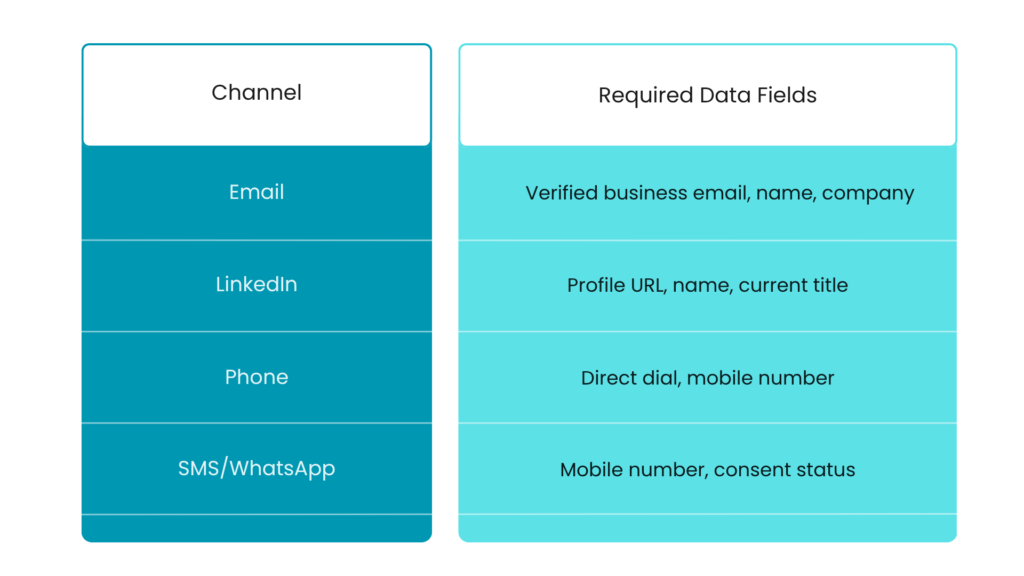
Verified business email
Unverified emails lead to bounces, which damage your sender reputation and reduce deliverability across your entire domain.
Direct dial and mobile numbers
There’s a big difference between a direct dial and a company switchboard. Direct dials connect you to the person. Switchboards connect you to gatekeepers or voicemail trees.
LinkedIn profile URL
Required for LinkedIn outreach automation and manual connection requests. Without it, you’re searching manually for every prospect.
Job title, seniority, and department
Job title, seniority, and department fields enable targeting and personalization. You want to reach the right person with the right message.
Firmographics and technographics
Firmographics include company size, revenue, industry, and location. Technographics reveal the tech stack a company uses. Both help you qualify accounts and tailor messaging.
How to build a multi-channel B2B outreach list step by step
Each step builds on the previous one. Skipping ahead usually creates problems downstream.
Step 1. Define your ideal customer profile
Your ICP describes who you’re targeting by role, industry, company size, and other attributes. Getting this right prevents wasted effort on contacts who will never convert.
Step 2. Source contacts from a B2B database
B2B data platforms let you search and filter by ICP criteria to pull initial prospect lists. ReachStream, for example, offers 20+ filters including role, industry, location, and company size.
Step 3. Capture LinkedIn leads with a Chrome extension
Browser extensions overlay on LinkedIn to capture verified contact data in real time. This eliminates manual data entry and keeps you in your prospecting flow.
Step 4. Enrich incomplete records
Data enrichment fills in missing fields on records you already have. This turns partial data into outreach-ready contacts.
Step 5. Verify emails and phone numbers
Email verification removes invalid addresses before outreach, protecting your sender reputation. A single campaign with high bounce rates can damage deliverability for months.
Step 6. Segment and tag your list
Segmentation means organizing contacts by persona, account tier, campaign, or buying stage. The more specific your segments, the more relevant your messaging.
Step 7. Sync to your CRM and sequencer
Push your list into your CRM and sales engagement platform so reps can act on it immediately. Manual exports and imports create delays and data drift.
How to define your ICP and segment your list
ICP definition and list segmentation separate high-performing outreach from spray-and-pray.
Filter by role, seniority, and department
Targeting by job function ensures you reach decision-makers, not just anyone at the company.
Filter by industry, company size, and revenue
Firmographic filters matter for relevance and deal size qualification. A startup with 10 employees has different needs than an enterprise with 5,000.
Filter by geography and tech stack
Geographic targeting aligns with territory assignments. Technographic filters identify product fit.
Build persona-based sub-lists
Create separate lists for each buyer persona. This enables channel-specific and message-specific sequences.
How to enrich and verify your outreach list for deliverability
Enrichment and verification are different steps, though they’re often confused.
- Enrichment: Adds missing fields like phone, email, firmographics, and technographics to incomplete records.
- Verification: Confirms email addresses are valid and deliverable. Flags risky or catch-all domains.
- Refresh cadence: B2B data decays quickly. Lists benefit from re-enrichment every 30 to 90 days.
ReachStream combines enrichment and verification in one workflow, refreshing contact data regularly.
How to sync your outreach list with your CRM and sales sequencer
Integration matters because reps work inside their existing tools. Manual exports and imports create friction.
- Native CRM integrations: Direct connections to Salesforce, HubSpot, and other CRMs keep records current automatically.
- API sync: For custom workflows, API-based sync offers flexibility and real-time updates.
- CSV export: A fallback option, though it requires manual re-imports.
Best tools to build multi-channel B2B outreach lists
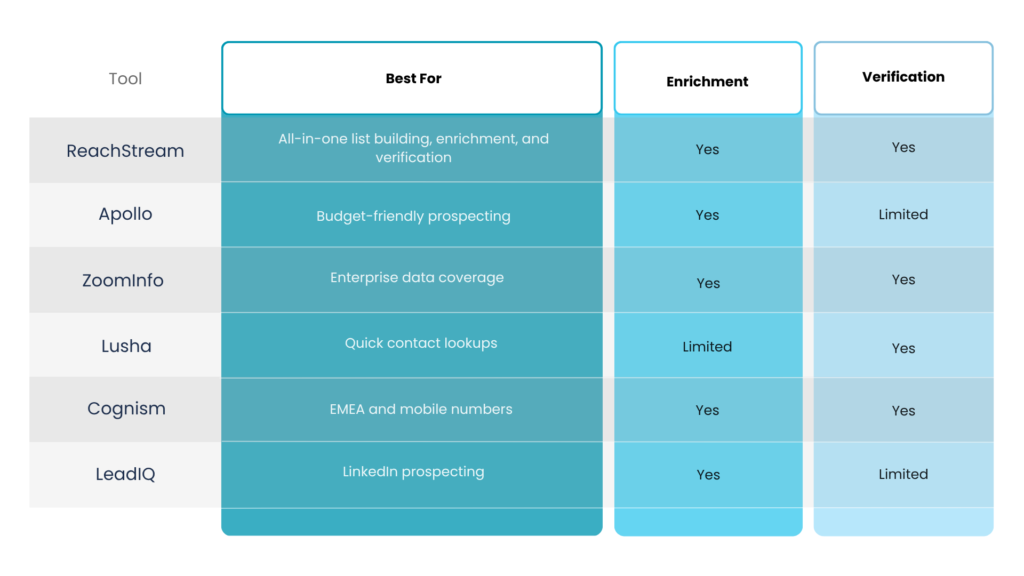
The right platform depends on your team size, budget, and workflow requirements.
ReachStream
A unified platform for list building, enrichment, verification, and CRM sync. The Chrome Extension captures verified contacts directly from LinkedIn, while the API automates workflows for larger teams.
Apollo
Strong for startups and budget-conscious teams. Broad database, though data accuracy can vary.
ZoomInfo
Enterprise-grade data and coverage. Higher price point and more complexity.
Lusha
Quick lookups and ease of use. More limited enrichment and filtering capabilities.
Cognism
Strength in EMEA data and mobile numbers. Strong GDPR compliance focus.
LeadIQ
LinkedIn-first approach. Useful for SDR teams whose prospecting workflow centers on LinkedIn Sales Navigator.
Common mistakes when building multi-channel outreach lists
Even solid processes break down when teams skip critical steps.
- Skipping email verification: Leads to high bounce rates and damaged sender reputation.
- Relying on a single data source: Creates blind spots. Combining sources improves coverage.
- Ignoring compliance and consent: GDPR, CCPA, and CAN-SPAM violations risk fines and brand damage.
- Letting records go stale: B2B data decays rapidly. Outdated lists waste effort.
- Pushing every contact on every channel: Not every prospect benefits from email, LinkedIn, and phone. Match channel to persona.
How AI is changing multi-channel list building
AI is automating and improving list building in practical ways.
- AI-powered ICP matching: Surfaces contacts that look like your best customers.
- Predictive lead scoring: Prioritizes contacts most likely to convert.
- Automated enrichment: Fills in missing fields without manual research.
- Channel recommendations: Suggests optimal outreach channels based on prospect behavior.
Conclusion
Building an effective multi-channel B2B outreach list is about more than collecting contact information—it’s about creating multiple opportunities to connect with the right prospects. By combining verified emails, LinkedIn profiles, direct dials, and enriched company data, businesses can reach buyers through the channels they prefer while improving response rates and reducing reliance on any single outreach method.
The key is maintaining data quality through regular enrichment, verification, and segmentation. As AI continues to enhance prospecting and list-building workflows, teams that invest in accurate, multi-channel data will be better positioned to drive meaningful conversations, generate qualified pipeline, and achieve more predictable outbound results.
Ready to build cleaner, more accurate multi-channel outreach lists?
Frequently asked questions
1. How often should I refresh my multi-channel outreach list?
B2B contact data decays quickly due to job changes and company shifts. Refreshing your list every 30 to 90 days helps maintain accuracy and deliverability.
2. Is building outreach lists from LinkedIn data GDPR compliant?
Scraping LinkedIn directly may violate terms of service and GDPR. Using a compliant data provider that verifies consent and sources is the safer approach.
3. How many contacts should a multi-channel outreach list have to start?
Start with a focused list of contacts that closely match your ICP rather than a large, generic list. Quality outperforms volume in multi-channel outreach.
3. Can I build a multi-channel outreach list without paid tools?
Manual research using LinkedIn and company websites is possible but time-intensive. Paid B2B data platforms accelerate list building and improve data accuracy.
3. What is a good email bounce rate for a B2B outreach list?
A well-verified outreach list typically produces bounce rates below 2%. High bounces signal poor data quality and risk sender reputation damage.
Manohar Devdiga
Marketing professional with a Master’s degree in Marketing, specializing in SEO, content strategy, social media, performance marketing, prospecting, and demand generation.
Share
Table of Contents
Access 200M+ verified business emails and grow your sales pipeline effortlessly.
Power Your Sales
with Targeted Data
Don't forget to share this post!















Check out our other blogs!
How to Build a Targeted Prospect List Using Filters
October 21, 2026

B2B Data for Ed-Tech Companies: Reaching School Decision-Makers
October 21, 2026
Direct Dial Numbers Explained: A Guide for Sales Reps
October 19, 2026