Unlimited Data.
Infinite Possibilities.

Looking for B2B data? Download Unlimited data using our Chrome extension at just $79/month.
Clay API Automation and Data Access
Written by:
Sharanya N K
.

Clay API: Automation and Data Access Explained

>5 Revenue Growth

How to Evaluate B2B Data Vendors for Accuracy and Compliance

Clay API refers to the HTTP API integration within Clay’s data enrichment platform—a system that connects external data sources to your Clay tables rather than offering traditional public REST endpoints. The distinction shapes everything about how you can (and can’t) use Clay for automated workflows.

This guide covers what Clay API actually does, where its limitations show up, and how alternatives like ReachAPI handle the same use cases with more flexibility for developers building outside Clay’s ecosystem.

What Is Clay API?

Clay API is the programmatic interface that connects Clay’s data enrichment platform to external data sources. Instead of offering a traditional REST API that developers can call from anywhere, Clay uses an HTTP API integration that operates within the platform itself. You configure API calls inside Clay, and the system handles requests and responses on your behalf.

The distinction matters because it shapes how you can use Clay in your workflows. The HTTP API pulls data from outside sources into your Clay tables, enriching records with contact details, company information, or technographic data. It works well for users who want to stay inside Clay’s interface, though it limits flexibility for teams building custom applications.
Does Clay Have a Public API

Clay does not offer a standalone public REST API. The HTTP API integration exists, but it’s designed for in-platform use only. If you’re hoping to call Clay’s endpoints from your own application or embed enrichment capabilities into a product you’re building, that option isn’t available through native Clay functionality.

Third-party workarounds have emerged to address this gap. Tools like pipe0 attempt to bridge the divide, though they aren’t official solutions and come with their own constraints. For teams that require true external API access to B2B data, this limitation often becomes a deciding factor when evaluating platforms.

The practical implication is straightforward: Clay works best when you’re operating inside its ecosystem. Step outside that boundary, and you’ll find yourself looking at alternatives.

Where to Find Clay API Documentation

Clay University is the primary resource for HTTP API documentation. The guides cover authentication setup, endpoint configuration, and common integration patterns. You’ll find step-by-step instructions for connecting external APIs to your Clay tables, along with troubleshooting tips for common issues.

A few key resources to bookmark:

  • Clay University docs: Detailed walkthroughs for HTTP API configuration and field mapping
  • Integration templates: Pre-built configurations for tools like Gong, Salesforce, and HubSpot
  • Dashboard references: Endpoint settings and API column options within your Clay workspace

One thing to keep in mind: the documentation focuses on in-platform HTTP API usage. If you’re expecting traditional API docs with public endpoints, authentication tokens, and SDK examples, you’ll want to adjust your expectations accordingly.

How Clay HTTP API Handles Data Enrichment

The enrichment workflow begins when you add an HTTP API column to a Clay table. From there, you specify the external endpoint you want to call, configure headers and parameters, and define how the response data maps back to your table columns. Clay then executes the request for each row, populating your table with enriched information.

Two setup paths are available:

  • AI-assisted configuration: Clay auto-generates the API setup based on your description. This approach works well for quick experiments or users less familiar with API mechanics.
  • Manual configuration: Full control over request parameters, headers, authentication, and response parsing. Better suited for complex integrations or custom endpoints.

Field mapping is where the real work happens. You define JSON paths to extract specific values from API responses, then assign those values to columns in your table. This flexibility lets you pull exactly the data points you care about without cluttering your workspace with unnecessary fields.

Common Use Cases for Clay API Automation

Teams use Clay’s HTTP API to automate repetitive enrichment tasks and reduce manual research across sales and marketing workflows.

Data Enrichment Automation

Sales and marketing teams use the HTTP API to pull verified contact details, firmographics, and technographics into Clay tables automatically. Rather than manually researching each prospect, you configure the enrichment once and let it run across your entire list. With sales reps spending only 28% of their time actively selling, the time savings compound quickly when you’re working with hundreds or thousands of records.

CRM Integration Workflows

Enriched data from Clay can flow into Salesforce, HubSpot, or other CRMs through API connections. This keeps customer records current without manual data entry or repeated CSV uploads—critical given that 37% of CRM users report lost revenue from poor data quality. The workflow typically involves enriching records in Clay, then pushing the updated information to your CRM via a connected integration.

Lead Generation at Scale

Sales teams automate prospect list building by chaining multiple data sources together. You might start with a company domain, then find contacts at that company, then verify email addresses for those contacts. All of this happens in one workflow, with each step feeding into the next.

Custom Sales Intelligence Tools

Internal tools can query external APIs through Clay for real-time insights. Marketing teams sometimes build custom dashboards that pull competitive intelligence or technographic data on demand, using Clay as the orchestration layer between data sources and their internal systems.

What Are the Limitations of Clay API

Understanding Clay API’s limitations is essential before building workflows that depend on external access, bulk processing, or embedded enrichment.

No Native REST API

Clay lacks a traditional developer-facing REST API for external application integration. If your use case involves embedding B2B data directly into a product or calling enrichment endpoints from custom code, you’ll encounter this limitation quickly.

Row-by-Row Processing Only

The HTTP API processes one record at a time. For small lists, this works fine. For thousands of records, processing time adds up. Each row triggers a separate API call, which means large enrichment jobs can take considerably longer than batch-processing alternatives.

Limited Bulk Enrichment Support

Native bulk operations aren’t part of Clay’s current offering. Large-scale batch processing requires workarounds, third-party tools, or simply patience as row-by-row processing completes.

Credit Consumption Constraints

API calls consume credits with each request. Without careful monitoring, costs can escalate faster than expected. This becomes especially relevant when chaining multiple enrichments per record, where a single row might trigger several credit-consuming API calls.

Clay API Alternatives for B2B Data Access

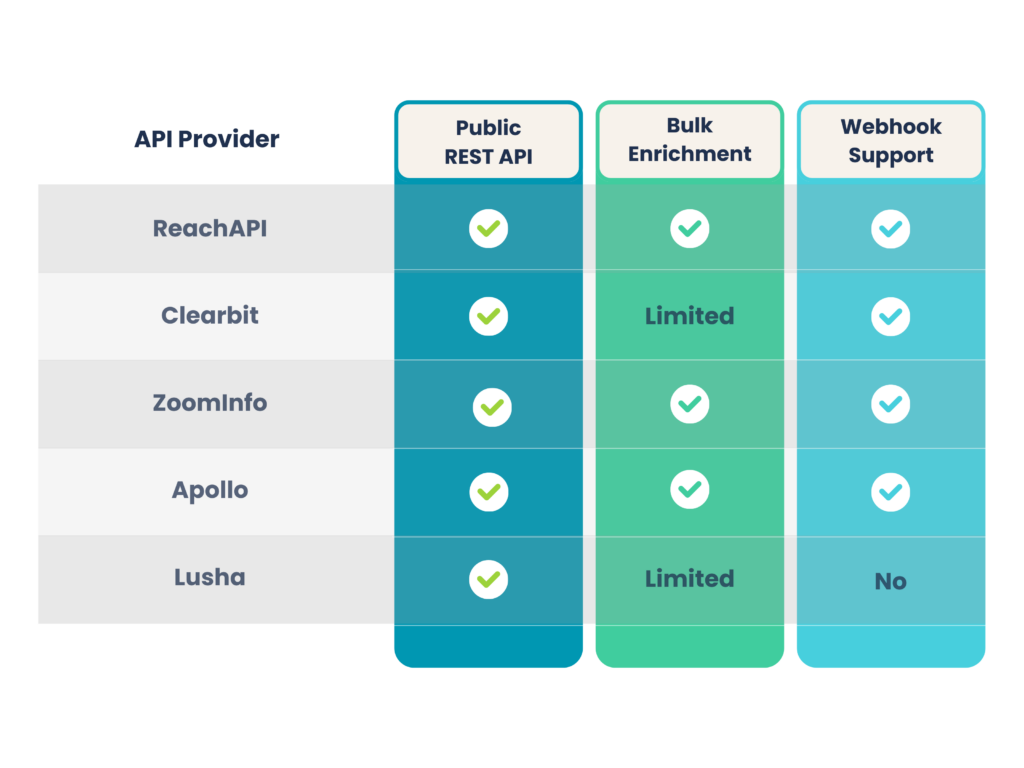
When Clay’s approach doesn’t fit your workflow, several alternatives offer more flexible API access with public endpoints and batch processing capabilities.

1. ReachAPI by ReachStream

ReachAPI provides a developer-first B2B data API with public REST endpoints, async batch enrichment, and transparent credit-based pricing. The platform delivers clean JSON responses with 90% email deliverability and 95% data accuracy across 200M+ contacts. Unlike Clay’s in-platform approach, ReachAPI offers external endpoints that developers can call from any application.

Fuel your automation with ReachAPI

2. Clearbit API

An established option for company and contact enrichment with comprehensive documentation and reliable uptime. Clearbit has been in the market for years and offers a mature API experience.

3. ZoomInfo API

Enterprise-grade API with extensive data coverage. ZoomInfo’s pricing reflects premium positioning, making it better suited for larger organizations with substantial budgets.

4. Apollo API

Popular for sales automation, Apollo combines prospecting and enrichment endpoints in one platform. The API integrates well with common sales workflows.

5. Lusha API

Focused on direct contact data with quick integration setup. Lusha offers straightforward pricing and a simpler feature set compared to more comprehensive platforms.

API Providers

Best Practices for API-Based Data Enrichment

Successful API-based enrichment starts with a structured approach that balances data quality, cost control, and system reliability.

Start with API Documentation

Read the docs before writing any code or configuring any integrations. Understanding authentication methods, rate limits, and response formats prevents frustrating debugging sessions later. Most issues stem from skipped documentation rather than complex technical problems.

Test with Sample Data First

Run test calls with a single row or a small batch to validate your configuration. This catches errors before you burn through credits on a full list. A five-minute test can save hours of troubleshooting and wasted resources. Some providers offer 100 free leads monthly so you can evaluate data quality without spending a credit.

Configure Rate Limits Properly

Prevent API blocks by setting appropriate request intervals. Most providers publish their rate limits in their documentation. Respecting those limits keeps your integrations running smoothly and avoids temporary bans.

Validate Records Before Enrichment

Clean your input data before sending it through enrichment workflows. Deduplication, format standardization, and basic validation prevent wasted credits on bad records. Garbage in, garbage out applies directly here.

Monitor Credit Usage in Real Time

Use credit tracking features to stay within budget. Unexpected overages can derail your workflow mid-campaign, leaving you with partially enriched data and no credits to finish the job.

Security and Compliance for B2B Data APIs

Handling contact and company data responsibly requires clear safeguards, documented compliance standards, and secure authentication practices.

GDPR and CCPA Requirements

Compliant APIs handle data subject rights and consent properly. When evaluating providers, look for clear data processing agreements, documented compliance certifications, and built-in features for handling deletion requests. The regulatory landscape continues to evolve—with cumulative GDPR fines reaching €5.88 billion since 2018—so choosing providers with strong compliance foundations reduces future risk.

API Authentication Standards

Most B2B data APIs use API key authentication, where you include a secret key with each request. Some providers offer OAuth for more granular access control, allowing you to scope permissions and manage access across team members. Either approach works, though OAuth provides more flexibility for larger teams.

Secure API Key Management

Never expose keys in client-side code or public repositories. Use environment variables to store sensitive credentials, rotate keys regularly, and limit access to team members who actually require it. A leaked API key can result in unexpected charges and potential data exposure.

How to Choose the Right B2B Data API

Selecting the right API depends on your specific requirements and technical constraints. A few factors worth considering:

  • Public API access: Does the provider offer external REST endpoints you can call from your own applications, or is access limited to in-platform usage?
  • Bulk processing: Can you enrich records in batches, or does the system process one record at a time?
  • Data accuracy: Look for providers with verified, regularly refreshed data. Deliverability rates above 90% indicate strong email verification processes.
  • Compliance: Confirm GDPR and CCPA readiness before integrating any provider into your workflows.
  • Pricing transparency: Credit-based models with clear usage tracking help you forecast costs accurately and avoid surprises.
Power your workflows with ReachAPI

Frequently asked questions

1. Is Clay API free to use?

Clay offers a free tier with limited credits. Meaningful API functionality typically requires a paid plan to access sufficient volume for real workflows. The free tier works well for testing and evaluation, though production use cases generally exceed its limits.

“Clay API” refers broadly to Clay’s data access capabilities. “HTTP API” is the specific integration feature for connecting external APIs within Clay workflows. The terms are often used interchangeably, though HTTP API is the more technically precise description of what Clay actually offers.

Clay’s HTTP API processes records row-by-row, which limits bulk enrichment speed compared to dedicated batch APIs. For large-scale operations involving thousands of records, processing time can become a significant factor.

Clay supports webhooks for triggering workflows. However, webhook configuration requires additional setup within the platform and isn’t as straightforward as some alternatives that offer native webhook endpoints.

Data freshness depends on the third-party providers Clay connects to. Refresh cycles vary by source, so accuracy can differ across enrichment types. Clay itself doesn’t maintain a proprietary database; it aggregates data from external providers.

Sharanya N K
Sales & Lead Generation Expert skilled in B2B Marketing, Prospecting, and Demand Generation with a Business Administration degree from Al-Ameen Institute of Management Studies.
Share
Table of Contents

Access 200M+ verified business emails and grow your sales pipeline effortlessly.

Power Your Sales with Targeted Data
Sharanya N K
Sharanya N KAuthor

Don't forget to share this post!

Check out our other blogs!