Written by:

Abdul Kareem
Role Based Email Addresses: Should You Send to Them?
How to Evaluate B2B Data Vendors for Accuracy and Compliance
Introduction
You spot info@, admin@, and sales@ contacts in a campaign list. Some might reach the right team. Others may be irrelevant or set aside for a specific operational purpose.
Role based email addresses aren’t automatically unusable. But a valid result alone doesn’t prove relevance or consent. You still need to review the mailbox purpose, verification status, consent, and segmentation. Use this framework to decide whether to keep, segment, suppress, or remove each contact.
Quick answer
Role-based addresses can be useful B2B contacts, but they need review before you send. Check whether the mailbox is valid, relevant to your message, and supported by appropriate consent. Segment shared inboxes from personal contacts, then remove or suppress addresses that don’t fit your campaign.
What Are Role Based Emails?
If you’re asking what are role based emails, they’re inboxes linked to a function, department, or team instead of one named employee. One person may monitor the inbox, or several people may share it. Its owner and purpose can change over time.
Role Based Email Examples
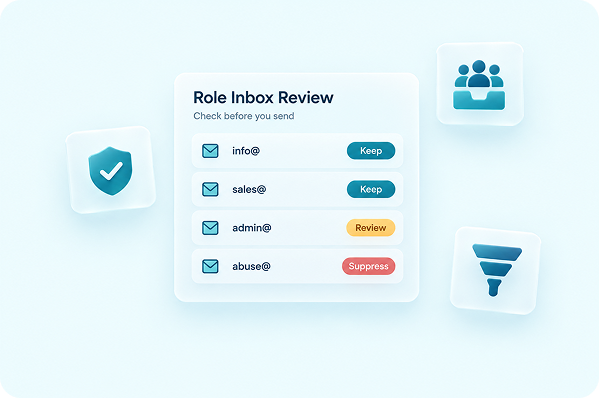
Common role based email examples include info@, admin@, sales@, abuse@, and postmaster@. An info@ email address may receive general inquiries, while sales@ may route messages to a sales team.
The abuse@ and postmaster@ mailboxes have specific operational purposes under IETF RFC 2142. Don’t treat either one as a general marketing contact.
Some teams use “role accounts email” as a CRM category for these inboxes. But the format alone can’t tell you whether an address is relevant, consented, or appropriate for your campaign.
Role Address vs Personal Email for B2B Senders
The main role address vs personal email difference comes down to who the mailbox represents. A personal business email belongs to a named employee. A role address routes messages to a department, function, or shared queue.
Role Accounts, Personal Emails, and No-Reply Addresses
A personal address often uses a format such as name@company.com. A shared address may reach one person or an entire team, depending on how the company manages that inbox.
A no-reply address has a different purpose. It’s generally configured to discourage or prevent replies. A role account may accept replies and be actively monitored.
Role accounts aren’t automatically invalid, unsuitable, or spam traps. Start by reviewing how you obtained the address and who’s expected to receive the message. Then check whether your content fits the mailbox purpose and whether your consent or lawful-basis process supports the campaign.
Should You Email Role Based Addresses?
“Role based email addresses need a verification status and a consent decision before they belong on your mailing list.”
Use that principle when reviewing role based emails B2B teams have collected through forms, events, inquiries, or other sources. Technical validity is only one part of the decision.
Four Checks Before You Send
Run each role-based address through four checks
- Validity: Check whether the address exists and can receive mail.
- Relevance: Decide whether your message fits the mailbox. A partnership message may suit a monitored sales inbox, but it won’t suit an abuse mailbox.
- Consent and policy: Review consent, lawful basis, suppression records, and your internal sending policy.
- List action: Retain the address in a separate segment, suppress it, or remove it.
Verification doesn’t establish consent or legal compliance. The compliance section below links to official U.S. and UK guidance. Seek appropriate legal review for your own process.
Why Role Based Emails Can Affect Deliverability
The connection between role based emails deliverability and sender reputation depends on the context. A correctly formatted, valid address can still be the wrong recipient for your campaign.
When a message is irrelevant, the recipient may ignore it, complain, or suppress future emails. Validity’s 2025 Email Deliverability Benchmark Report covers spam complaints, inbox placement, and sender reputation risks. Google’s email sender guidelines also tell senders to keep spam rates low.
Unwanted messages may increase complaints. They can also affect how mailbox providers handle your future mail.
This doesn’t mean you must avoid role based emails in every campaign. The risk from role based email addresses depends on your list quality, the relevance of the message, recipient expectations, and sending practices. Functional mailboxes such as abuse@ and postmaster@ rarely fit a marketing purpose.
Keep shared inboxes in a separate segment. Review them regularly instead of treating them like named contacts.
How to Segment or Remove Role Based Emails
A consistent review process helps you make the same type of decision across different campaigns.
Build a Reviewable Role Based Email Address List
Create a separate role based email address list during list intake. For each address, record its source, verification result, mailbox purpose, consent evidence, and review date.
Keep a shared inbox when it’s valid and relevant, expected to receive the message, and supported by your consent and compliance process.
Suppress or remove an address when it’s invalid, irrelevant, unsupported by your permission process, or intended for complaint or technical handling. If you remove role based emails from list records, document the reason and add the address to the correct suppression list.
That record stops the same contact from returning during a later import. You don’t need to avoid role based emails that pass every review. You do need to separate role based email addresses from named contacts.
For older lists, follow a consistent process to clean old lists and document these decisions.
Use Email Verification Before the Final Call
Once you detect role based emails during list intake, ReachStream Email Verifier can assess individual addresses and uploaded lists before a campaign. Its results can support your review of role based email addresses.
You’re still responsible for relevance, consent, and compliance.
Check One Address or Review a Full Campaign List
Instant Email Check assesses one address in real time. For a full campaign, Bulk Email Verifier accepts CSV uploads of up to 25,000 emails per batch (10MB per file), removes duplicates automatically, and gives you a full status breakdown.
Results use six statuses. Each one points to a list action:
| Status | What it means | Suggested list action |
|---|---|---|
|
Valid |
Active and deliverable. |
Keep in a separate segment if relevant and consented |
|
Invalid |
The mailbox does not exist. |
Remove and add to suppression |
|
Catch-All |
The domain accepts all mail, so delivery to that specific address isn’t guaranteed. |
Review, or run the Catch-All Resolver |
|
Risky |
Deliverability is uncertain due to inconsistent mailbox behavior. |
Review, or run the Catch-All Resolver |
|
Unknown |
Deliverability is uncertain, so review the address before sending. |
Review before sending |
|
Do Not Mail |
High risk or a potential spam trap. Exclude it from sending. |
Exclude from sending |
Use Verification Results to Support Segmentation
These statuses help you separate usable shared inboxes from invalid or higher-risk results. Verification uses SMTP-level validation in real time without ever sending an email to the address. Multi-attempt verification is designed to retry complex domains and reduce false negatives.
A Catch-All result needs closer review. The Catch-All Resolver is designed to run a deeper check on Catch-All and Risky results and sort them into likely deliverable or invalid.
Verification can’t establish consent, guarantee inbox placement, or make an unsolicited campaign compliant.
Status results can guide your list decisions. They can’t make those decisions for you. Verification history, status-wise counts, and easy re-verification help your team manage recurring campaign lists.
ReachStream Email Verifier offers up to 99.8% verification accuracy. On the Pro plan and above, you can also connect verification to existing systems through the Email Verification API.
“It helps me find valid leads fast and ensures emails reach them.”
John W., Head of Marketing
Keep Compliance Separate From Verification
When deciding should you email role based addresses, keep technical status separate from your legal and policy review. CAN-SPAM, GDPR, and other rules may apply differently depending on the recipient, location, message, and lawful basis.
A valid info@ email address isn’t proof of consent. It doesn’t make an unsolicited campaign compliant either.
Review the FTC CAN-SPAM compliance guide and the ICO direct marketing guidance. Seek legal advice suited to your locations and campaign process.
Verify Role-Based Addresses Before Your Next Campaign
The Bottom Line on Role Based Email Addresses
Role based email addresses aren’t automatically safe, unsafe, valid, invalid, or suitable for every B2B campaign. Base each decision on verification status, mailbox purpose, campaign relevance, consent, and segmentation.
ReachStream Email Verifier offers a 30-day free trial with 100 credits and no credit card required. One credit covers one verification.
Try ReachStream Email Verifier With 100 Free Credits
Frequently Asked Questions
What Are Role-Based Email Addresses?
Role-based email addresses are function-based or shared inboxes rather than addresses tied to one named employee. Examples include info@, admin@, and sales@. Whether one suits your campaign depends on the mailbox purpose, message relevance, verification status, and consent process. The address format alone can’t tell you if you should send to it.
Should you avoid sending to role-based email addresses?
Not automatically. A role-based address can be a valid, relevant B2B contact when the mailbox is monitored and your message fits its purpose. Review verification status, relevance, and consent before you send, and keep shared inboxes in a separate segment rather than treating them like named contacts.
Do Role-Based Emails Hurt Deliverability?
Not on their own. The risk comes from sending an irrelevant message to a shared inbox, which can raise complaints and affect how mailbox providers handle future mail. Keeping role-based addresses in a reviewed, relevant segment helps limit that risk.
Which Role-Based Addresses Are Most Common?
Common examples include info@, admin@, sales@, abuse@, and postmaster@. The abuse@ and postmaster@ mailboxes have defined technical roles under IETF RFC 2142 and generally shouldn’t be treated as marketing contacts.
How Do I Remove Role-Based Emails From My List?
Run each address through a verification check, then record its status, purpose, and consent basis in a separate role-based list. Suppress or remove addresses that are invalid, irrelevant, or unsupported by your consent process, and document the reason so the contact doesn’t reappear on a later import.
Are Role-Based Emails the Same as No-Reply Addresses?
No. A no-reply address is generally configured to discourage or block replies, while a role account such as info@ or sales@ may accept replies and be actively monitored by a person or team.
Can Role-Based Emails Be Spam Traps?
Some can be, particularly addresses that are no longer monitored or were never meant to receive outreach. That’s one reason to run role-based addresses through email verification and treat a Do Not Mail or Risky result as a signal to exclude or review the contact rather than send anyway.
Is It Legal to Email info@ and sales@ Addresses?
Verification status alone doesn’t establish legal compliance. Rules such as CAN-SPAM and GDPR can apply differently depending on the recipient, location, and lawful basis, so keep that review separate from technical verification and check current guidance such as the FTC’s CAN-SPAM compliance guide.
How Does Verification Help Review Role Accounts?
ReachStream Email Verifier checks a single address or an uploaded list and returns one of six statuses, including Catch-All and Do Not Mail, with up to 99.8% verification accuracy. Verification doesn’t establish consent or legal compliance; it’s one input into the broader review of each role-based contact.
Abdul Kareem
Author
Abdul Kareem

Abdul Kareem writes about B2B sales prospecting, email deliverability, and cold outreach for ReachStream, focusing on practical guidance that sales and marketing teams can put to use right away.
Share
Table of Contents
Check every address with up to 99.8% accuracy using SMTP-level checks that never send an email.
Verify Emails Before You Send
Abdul Kareem writes about B2B sales prospecting, email deliverability, and cold outreach for ReachStream, focusing on practical guidance that sales and marketing teams can put to use right away.
Don't forget to share this post!















Check out our other blogs!
How to Check Email Sender Reputation
November 17, 2026
Email Bounce: What It Means (Hard Bounce vs Soft Bounce)
November 17, 2026
How to Personalize Cold Emails at Scale
November 16, 2026