

Unlimited Data.
Infinite Possibilities.

Looking for B2B data? Download Unlimited data using our Chrome extension at just $79/month.

Wiza Pricing: Plans, Credits, and Usage Limits [2026]

Wiza Pricing Plans, Credits, and Usage Limits

Best Tips on Lead Generation for Technology Companies

Wiza charges between $0 and $399+ per month depending on your plan, with credits that don’t roll over and a LinkedIn Sales Navigator subscription required on top. That pricing structure catches many buyers off guard when they realize the true cost of prospecting through the platform.

This guide breaks down each Wiza plan, explains how email and phone credits actually work, and covers the usage limits and hidden costs that affect your total spend.

What is Wiza

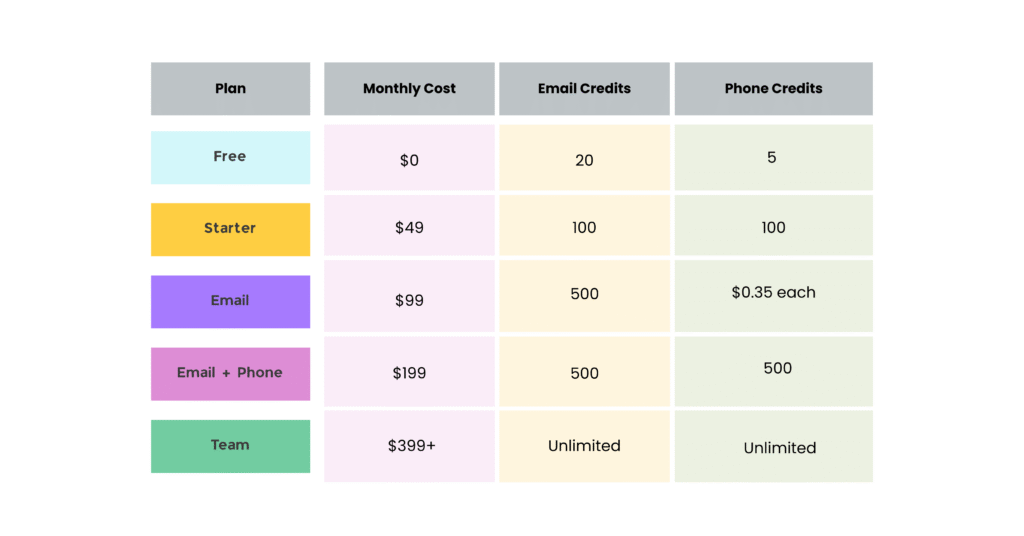
Wiza offers tiered, per-user LinkedIn prospecting pricing that starts with a free plan at $0 for 20 emails and 5 phone numbers monthly. From there, the Starter plan runs $49/month for 100 credits, the Email plan costs $99/month for 500+ emails, and the Email+Phone plan sits at $199/month for 500 of each. Team plans begin around $399/month for organizations that want unlimited access across multiple users.

The platform works as a LinkedIn-focused email finder and lead generation tool. Its main job is pulling verified contact data—email addresses and phone numbers—directly from LinkedIn and LinkedIn Sales Navigator searches.

One thing worth knowing upfront: Wiza’s full functionality depends on having an active LinkedIn Sales Navigator subscription. That’s a separate cost not included in any Wiza plan, and it often surprises new users when they realize they’re paying for two tools instead of one.

Wiza pricing plans overview

Wiza structures its pricing across five tiers, each built for different prospecting volumes and team sizes. The credit mechanics change depending on whether you choose monthly or annual billing, so understanding the differences matters before you commit.

Free plan

The Free tier gives you 20 email credits and 5 phone credits each month. That’s enough to test whether Wiza’s LinkedIn extraction approach fits your workflow, but not nearly enough for consistent prospecting. Think of it as a sandbox rather than a working solution.

Starter plan

Best for: Solo users, freelancers, or small business owners with light prospecting volumes.

At $49/month, you get 100 email and 100 phone credits. This tier opens up features beyond the free plan while keeping costs manageable for individuals running smaller lead generation campaigns.

Email plan

The $99/month Email plan focuses entirely on email address extraction with 500 monthly credits. Phone numbers cost an extra $0.35 each, which makes this tier a poor fit for multi-channel outreach strategies that rely on direct dials.

Email and phone plan

Best for: Sales teams running multi-channel outreach via both email and phone.

At $199/month, you receive 500 email credits plus 500 phone credits. The phone number access is the key difference from the Email plan, though both credit types get consumed separately.

Team plan

Starting at $399/month, the Team plan offers multi-seat access with unlimited email and phone usage. However, “unlimited” typically requires annual billing commitments and may still include total export caps. Clarify the exact terms before signing anything.

How Wiza credits work

Credits function as Wiza’s core currency, and they limit your prospecting output based on your plan tier. Getting the mechanics right helps you avoid unexpected costs and manage campaign volume more effectively.

Email credits

One email credit equals one contact export with a verified email address. Wiza generally deducts credits only for valid, verified emails, which helps prevent waste on bounced or inaccurate data. That said, the timing of verification can still result in occasional invalid exports.

Phone credits

Phone credits operate as a separate currency from email credits and only appear on the Email+Phone and Team plans. Each phone number extraction consumes one phone credit, regardless of whether you also export the contact’s email.

Export credits on annual plans

Annual billing introduces a different metric altogether: export credits. Instead of separate email and phone allowances, annual plans often feature “unlimited” emails and phones capped by total exports.

Here’s how it works: one export credit covers each contact you extract, whether you get an email, phone, or both. So while the emails and phones themselves are unlimited, the number of contacts you can pull is not.

Credit expiration and rollover policy

Wiza credits do not roll over month-to-month. Any unused credits expire at the end of each billing cycle.

This “use it or lose it” policy creates a real cost consideration. You cannot bank credits during slow months for high-activity periods, which can lead to wasted budget if your prospecting volume fluctuates throughout the year.

Wiza usage limits by plan

Beyond credit allowances, each plan includes hard caps on monthly activity that determine your maximum prospecting volume.

  • Email limits: Maximum verified emails you can find per month
  • Phone limits: Maximum phone numbers you can find per month
  • Export limits: Total contacts you can export (primary cap on annual plans)
1

Monthly plan limits

Monthly billing cycles come with specific, strict caps that reset at each billing period. The allowances tend to be more restrictive than annual plan equivalents, though they offer greater flexibility for teams with unpredictable prospecting needs.

2

Annual plan limits

Annual plans advertise “unlimited” email and phone finding, but a total annual export limit governs actual usage. In practice, “unlimited” means you can find as many emails or phones as you want for contacts you choose to export—but you’re still capped by total export volume over the year.

3

What happens when you exceed your limit

Hitting your plan’s limits typically freezes your ability to export new contacts until the next billing cycle. Some plans offer overage credits at higher per-credit costs, which can lead to unexpected expenses during large campaigns if you miscalculate your needs.

Monthly vs annual billing differences

The choice between billing structures involves trade-offs between flexibility and cost savings.

Monthly vs annual billing differences

Monthly billing works well for teams with fluctuating needs or those wanting to test the platform without long-term commitment. Annual billing makes more sense for established teams with predictable, high-volume prospecting who can benefit from lower per-month costs and larger export allowances.

Ready to see accurate prospecting data in action?

Test ReachStream’s ESP-verified emails with no risk.

Features included in each Wiza plan

Beyond credits, Wiza plans include functionality that directly affects your prospecting workflow.

Data fields and contact information

Wiza provides several key contact data points:

  • Verified email addresses
  • Phone numbers (higher-tier plans only)
  • Job titles, company information, and location
  • LinkedIn profile URLs

Chrome extension capabilities

Wiza’s browser extension serves as the primary interface for extracting contacts from LinkedIn. It supports both single-profile exports for targeted prospecting and bulk-export functionality from Sales Navigator search results, which lets you build larger lists more quickly.

CRM and integration options

Native integrations with Salesforce, HubSpot, and Outreach are available, though lower-tier plans may limit these connections or require additional fees. Higher-tier plans typically include full integration capabilities.

LinkedIn Sales Navigator requirements

Here’s a critical cost consideration: unlocking Wiza’s full functionality—particularly bulk exports—requires a separate LinkedIn Sales Navigator subscription. That adds $79-$139/month or more to your total cost, and it’s not included in any Wiza plan.

Hidden costs and overages to watch for

Several expenses beyond the advertised plan price can impact your total cost of using Wiza:

  • LinkedIn Sales Navigator: A required subscription adding significant monthly expense
  • Overage fees: Higher per-credit charges when exceeding limits
  • Integration add-ons: Some CRM connections may cost extra on lower tiers
  • Wasted credits: Invalid exports may still consume credits depending on verification timing

How Wiza pricing compares to alternatives

When evaluating Wiza competitors, the key factors are true cost per contact, credit policy flexibility, and data accuracy guarantees.

Wiza vs Apollo

Apollo offers a more generous free tier and broader feature set, but its credit mechanics differ. Apollo counts email opens and engagement activities against your allowance, while Wiza’s credits tie directly to contact exports. That makes cost-per-lead calculations more straightforward with Wiza.

Wiza vs Lusha

Both tools excel at providing direct dials, though their pricing tiers and credit values differ significantly. Comparing data verification accuracy and reliability for your target industry helps determine which delivers better value for your specific use case.

Wiza vs ReachStream

Wiza’s LinkedIn-dependent model contrasts with ReachStream’s standalone B2B database approach, creating several practical differences:

  • No LinkedIn dependency: Access millions of contacts without a costly Sales Navigator subscription
  • Credit efficiency: Pay only for verified, valid emails, eliminating waste on bad data
  • Unlimited views: Search, filter, and explore the entire database before spending a single credit
  • 95%+ accuracy: ESP-verified emails with credits charged only on valid addresses
Build a precise B2B target list

How to choose the right Wiza plan

Use this guidance to match your use case with the appropriate tier:

  • Choose Free if: You’re testing the tool with minimal volume
  • Choose Starter if: You’re a solo user needing basic email extraction for a small number of leads monthly
  • Choose Email if: You run consistent email-only campaigns requiring reliable monthly email addresses
  • Choose Email+Phone if: Multi-channel outreach is essential and you want both emails and direct dials
  • Choose Team if: You have multiple sales team members or require high-volume prospecting capabilities

Test your options with a monthly plan before committing to annual billing. This approach lets you verify that credit limits and features align with your actual workflow before locking into a longer contract.

Final Thoughts

Wiza can be a powerful LinkedIn prospecting tool, but its real cost goes beyond the advertised monthly price. Non-rolling credits, separate charges for phone numbers, export caps on annual plans, and the required LinkedIn Sales Navigator subscription all affect your total spend. Choosing the right plan means realistically estimating your monthly volume and deciding whether email-only or multi-channel outreach fits your strategy. Test with a monthly plan first, track your actual credit usage, and compare alternatives to ensure you’re getting the best value for your prospecting budget.

FAQs

Is there a free trial for Wiza?

Wiza offers a free plan with limited credits rather than a time-bound trial. You can test basic functionality indefinitely, though the 20 email and 5 phone credit monthly limits restrict serious prospecting.

Can you switch between Wiza plans mid-billing cycle?

Upgrades typically take effect immediately, but downgrades and refunds for unused credits usually apply only at the next billing renewal. Check current terms before assuming mid-cycle flexibility.

Does Wiza offer refunds for unused credits?

Wiza does not refund unused credits, and credits do not roll over. Any unused allocation expires at the end of your billing period, making accurate volume forecasting important for budget management.

How does Wiza data accuracy compare to other prospecting tools?

Wiza claims high email verification rates, though accuracy ultimately depends on the quality of underlying LinkedIn data and how recently a user updated their profile information.

What CRM integrations does Wiza include at no extra cost?

Basic integrations with Salesforce and HubSpot are included on paid plans. Advanced workflow integrations may require higher tiers or add-on fees depending on your specific needs.

Is Wiza compliant with GDPR and CCPA?

Wiza states compliance with major data privacy regulations, though users remain responsible for ensuring their use of exported contact data aligns with applicable laws in their specific context.

Can you use Wiza without LinkedIn Sales Navigator?

Wiza’s core functionality requires LinkedIn access, and full bulk export features depend on an active Sales Navigator subscription. That’s a separate cost that significantly impacts total prospecting budget.

Table of Contents

Access 200M+ verified business emails and grow your sales pipeline effortlessly.

Claim Your 100 Free Export Credits Today!

Power Your Sales with Targeted Data

Don't forget to share this post!

Check out our other blogs!