Written by:

Abdul Kareem
Bulk Email Verifier: Upload Your List and Remove Invalid Emails
How to Evaluate B2B Data Vendors for Accuracy and Compliance

TL;DR
- A bulk email verifier lets you verify emails in bulk instead of testing addresses one at a time.
- Upload a CSV email list and the tool checks syntax, domain, MX records, and mailbox status for every address.
- Results typically fall into valid, invalid, and risky (catch-all) buckets, and a valid result still is not a delivery guarantee.
- Removing invalid emails before you send lowers your bounce rate and helps improve email deliverability.
- Look for a tool that handles disposable emails, duplicates, spam traps, and role-based addresses in the same pass.
- A free bulk email verifier or trial credits are common for testing before you commit to a paid plan.
- ReachStream Email Verifier runs SMTP-level checks on bulk CSV uploads with up to 99.8% accuracy.
What Is a Bulk Email Verifier?
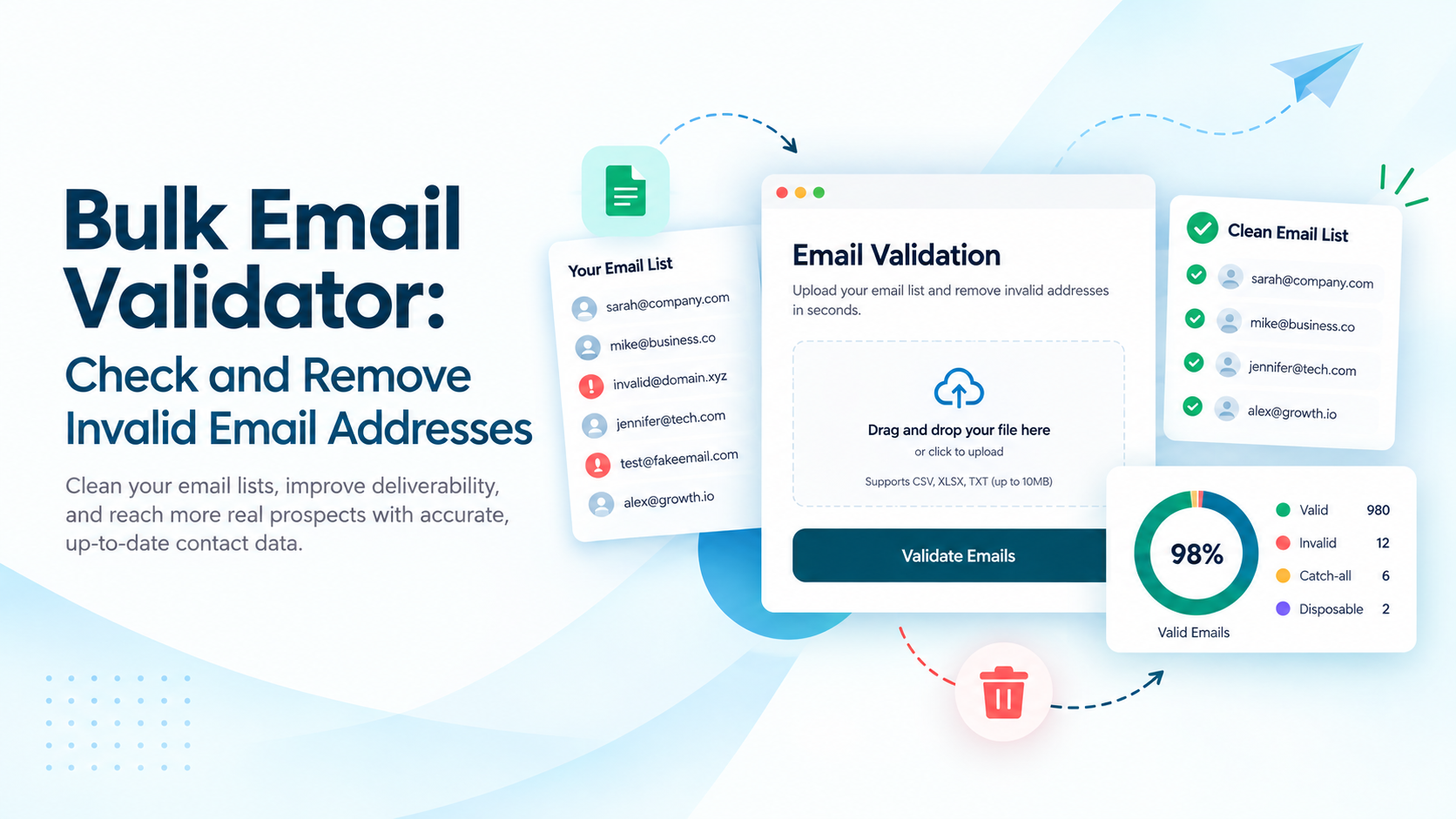
A bulk email verifier checks an entire list of email addresses at once, rather than making you test each one by hand. Instead of sending real messages, it runs a series of checks, syntax, domain, MX records, and mailbox-level verification, against every address in a CSV file and returns a status for each one.
For B2B sales teams, SDRs, and marketers who import contacts from multiple sources, a bulk email verifier is usually the fastest way to catch a batch of stale or fabricated addresses before a campaign goes out and damages deliverability.
A List That Looked Fine Last Quarter
Email lists decay fast. People change jobs, companies merge domains, and addresses that were deliverable six months ago can bounce today. If your list has not been verified since the last campaign, a few hundred new bounces can show up before you notice anything is wrong.
How to Verify a Bulk Email List, Step by Step
Most bulk email verifiers follow the same basic steps:
- Export your contacts into a CSV email list, the format most bulk email checkers require.
- Upload the file to your bulk email verifier of choice. Some tools, including ReachStream Email Verifier, also let you upload directly without extra formatting.
- The system automatically runs syntax, domain, and mailbox checks.
- Once processing finishes, download a cleaned list with only the addresses worth keeping.
What Happens During Bulk Email Verification
When you verify an email list in bulk, each address runs through several layers of checks. A syntax check confirms the address is formatted correctly, and a domain check with an MX record lookup confirms the domain can receive mail at all.
From there, an SMTP-level check connects to the receiving mail server and asks whether the specific mailbox exists, without ever sending an actual email. ReachStream Email Verifier combines these bulk email validation checks with multi-attempt SMTP verification, retrying complex domains intelligently rather than giving up after a single failed attempt, which helps reduce false negatives on tricky mail servers.
Valid, Invalid, and Risky Results Explained
Bulk email verification results typically group into a handful of categories: valid addresses that are active and deliverable, invalid addresses where the mailbox does not exist, and a middle ground of risky or catch-all addresses where deliverability is uncertain.
ReachStream Email Verifier also flags a do-not-mail category for high-risk addresses, including likely spam traps, so teams can exclude them outright rather than guessing. A valid result improves your odds of delivery, it does not guarantee it, since mailbox status can change between the moment you verify and the moment you send.
Catch-All and Accept-All Addresses
Catch-all, sometimes called accept-all, addresses belong to domains configured to accept mail for any address at that domain, whether or not a real mailbox exists behind it. That makes them genuinely hard to verify conclusively with a standard SMTP check, since the server will not reject anything outright.
ReachStream Email Verifier’s Catch-All Resolver is designed to help resolve more of these addresses into a likely deliverable or invalid status, so teams can recover usable contacts from catch-all domains instead of discarding them wholesale or sending blind.
Disposable Emails, Duplicates, Spam Traps, and Role-Based Addresses
Disposable email addresses, created to receive a single message and then disappear, add noise to a list and rarely convert. Duplicate records waste verification credits by checking the same address twice, and role-based addresses, like info@ or sales@, often route to a shared inbox rather than a specific decision-maker.
ReachStream Email Verifier includes automatic email deduplication as part of a bulk run, and its status categories are built to surface disposable and high-risk patterns alongside standard valid and invalid results.
Why ‘Valid Last Time’ Does Not Mean Valid Now
Verification is a snapshot, not a permanent status. A mailbox that accepted mail during your last verification run can be deactivated, full, or blocked by the time you send again, especially for lists older than three or four months. Re-verifying before each major send catches this kind of drift.
See How a Bulk Email Verifier Handles Your List
Upload a CSV and get a full status breakdown, valid, invalid, risky, catch-all, and do-not-mail, before you send a single campaign.
What to Do With Invalid and Risky Addresses
Invalid addresses should come out of your list entirely; there is no scenario where mailing a mailbox that does not exist helps you. This is the core of good email list cleaning.
Risky and catch-all addresses need a judgment call: some teams exclude them by default, others send to them cautiously in a separate, smaller batch and watch bounce rates closely. What you should not do is treat a bulk email verifier’s valid status as a guarantee of inbox placement; verification reduces bounces, but it does not control spam filtering or inboxing decisions made by the receiving mail server.
| Method | Best for | Time for 10,000 Emails | Accuracy | Scalability |
|---|---|---|---|---|
|
Manual spot-checking |
Testing a handful of addresses before a send |
Several hours |
Inconsistent, depends on reviewer judgment |
Does not scale past a few hundred emails |
|
One-by-one free checkers |
Verifying single emails as they come in |
Days for a large list |
Varies by tool, no bulk reporting |
Impractical for lists over a few thousand |
|
Bulk email verifier |
Cleaning a CSV email list before any campaign send |
Minutes to a few hours, depending on list size |
Up to 99.8% accuracy with ReachStream Email Verifier’s SMTP-level checks |
Built for lists from a few hundred to tens of thousands of emails |
Bounce Rates, Sender Reputation, and Deliverability
Every hard bounce tells a mailbox provider that you sent to an address that does not exist, and enough of them in a short window signals a sending problem rather than bad luck. Bounce rate is one of the clearest signals mailbox providers use when deciding how much of your mail reaches the inbox versus the spam folder.
A bulk email verifier will not guarantee better deliverability on its own, but removing invalid and known-bad addresses before you send is one of the more reliable ways to improve email deliverability and keep bounce rates down.
When Bounce Rates Spike After a List Import
A sudden jump in bounces right after importing a new list is almost always a verification problem, not a content problem. Run the new batch through a bulk verifier before it ever reaches your sending tool, rather than troubleshooting deliverability after the damage is done.
Bulk Verification APIs for Larger Workflows
Teams verifying emails inside a CRM, a lead form, or an internal tool usually outgrow manual CSV uploads fairly quickly. A bulk email verification API lets you send addresses for verification programmatically and get status results back in your own workflow, whether that is blocking bad data at the point of entry or cleaning existing contacts in bulk on a schedule.
ReachStream Email Verifier’s API supports both real-time and async bulk verification with secure API key authentication, and ships with HubSpot and Salesforce integrations for teams that want verification built into their CRM rather than run as a separate step.
Is a Bulk Email Verifier Free to Use?
Most bulk email verification providers, including ReachStream Email Verifier, offer some free access so you can test before you commit. ReachStream’s free trial includes 100 bulk email verifier free credits over 30 days, no credit card required, enough to run a real test batch and see how the results map to your list.
If you only need to check a handful of addresses, the separate Free Email Verifier tool offers 5 credits per user, which is a different thing from a bulk, credit-based plan meant for verifying thousands of addresses at once. Paid plans scale up from there based on how many emails you need to verify each month.
Dedupe First, Verify Second
Running duplicates through a bulk verifier wastes credits on the same address twice. Clean obvious duplicates out of your export before uploading, and let the verifier’s automatic deduplication catch anything your spreadsheet missed.
Where ReachStream Email Verifier Fits In
ReachStream Email Verifier is built as a standalone bulk email verification tool: upload a CSV of up to 25,000 emails per batch, and it runs SMTP-level checks with multi-attempt retry logic, automatic deduplication, and its Catch-All Resolver to sort results into valid, invalid, risky, catch-all, unknown, and do-not-mail categories.
Verification history and reporting keep a record of past uploads and status-wise counts, so re-verifying an older list does not mean starting from scratch. It runs on infrastructure covered by ISO 27001:2022, SOC 2 Type II, GDPR, CCPA, PIPEDA, and DPDPA, and it does not send any actual email to the addresses it checks.
Test Your List Before You Commit to a Plan
Run a sample batch through ReachStream Email Verifier and see your valid, invalid, and risky breakdown firsthand.
Conclusion
A bulk email verifier earns its place in your sending workflow by catching the addresses that quietly damage deliverability: invalid mailboxes, disposable domains, duplicates, and the catch-all addresses that are genuinely hard to call. None of that replaces good list-building habits, but it does mean fewer bounces, a steadier sender reputation, and fewer surprises the next time you hit send on a list you have not touched in a while.
Ready to Clean Your Next List?
Compare ReachStream Email Verifier’s plans and find the credit volume that fits your sending schedule.
Frequently Asked Questions
What is a bulk email verifier?
A bulk email verifier checks a whole list of email addresses at once instead of one at a time. It runs syntax, domain, and mailbox-level checks on every address in a file and sorts the results into categories like valid, invalid, and risky, so you know which contacts are safe to email before you send.
How do I verify a list of email addresses in bulk?
Export your contacts to a CSV file and upload it to a bulk email verifier. The tool checks every address automatically and returns a status breakdown you can download as a cleaned list.
Can an email marked valid in a bulk verifier still bounce?
Yes. A valid result reflects the mailbox’s status at the moment of verification, not a permanent guarantee. Mailboxes can be deactivated, filled, or blocked after verification and before you send, which is one reason re-verifying older lists before a major campaign is worth doing.
What does accept-all or catch-all mean in bulk results?
Accept-all, or catch-all, means the receiving domain is configured to accept mail for any address, whether or not a real mailbox exists behind it. That makes these addresses genuinely hard to verify with a standard check, since the server never rejects anything outright.
Is the bulk email verifier free to use?
Most providers offer some free access for testing. ReachStream Email Verifier, for example, gives new users 100 free credits over 30 days with no credit card required, enough to run a real sample batch before committing to a paid plan.
What file formats can I upload to a bulk email verifier?
This varies by provider. ReachStream Email Verifier accepts CSV files for bulk uploads, up to 25,000 emails per batch and 10MB per file. Check your specific tool’s supported formats and limits before preparing your export.
How long does bulk email verification take?
Processing time depends on list size and the provider’s infrastructure, ranging from a few minutes for smaller batches to a few hours for larger ones. High-throughput providers with distributed server infrastructure generally process large batches faster than tools built around single-address checks.
How accurate is bulk email verification?
Accuracy depends on the provider’s verification methods. ReachStream Email Verifier combines AI-powered validation with multi-attempt SMTP checks for up to 99.8% accuracy, though no verifier can promise perfect results on catch-all domains where the server itself will not confirm or deny a specific mailbox.
What should I do with risky emails after verification?
Many teams exclude risky and catch-all addresses from their main send and either drop them or test them cautiously in a small, separate batch while watching bounce rates. A tool with a resolver feature, like ReachStream Email Verifier’s Catch-All Resolver, can also help convert some of these into a clearer valid or invalid status before you decide.
Abdul Kareem
Author
Abdul Kareem

Abdul Kareem writes about B2B sales prospecting, email deliverability, and cold outreach for ReachStream, focusing on practical guidance that sales and marketing teams can put to use right away.
Share
Table of Contents
Catch invalid and risky emails before they hurt your sender reputation. Try ReachStream Email Verifier free.
Clean Your List Before You Hit Send
Abdul Kareem writes about B2B sales prospecting, email deliverability, and cold outreach for ReachStream, focusing on practical guidance that sales and marketing teams can put to use right away.
Don't forget to share this post!















Check out our other blogs!

How to Build a Targeted Prospect List Using Filters
October 21, 2026

B2B Data for Ed-Tech Companies: Reaching School Decision-Makers
October 21, 2026

Direct Dial Numbers Explained: A Guide for Sales Reps
October 19, 2026