
Never Run Out Of Buyers To Sell To.
500M+
Contacts
60M+
Mobile Numbers
50M+
Companies
verify email addresses before cold email
Written by:
Abdul Kareem

How to Verify Email Addresses Before Cold Email Campaigns

The checks to run, the statuses to act on and how to test your list before you send

TL;DR

Why Verify Email Addresses Before Cold Email?

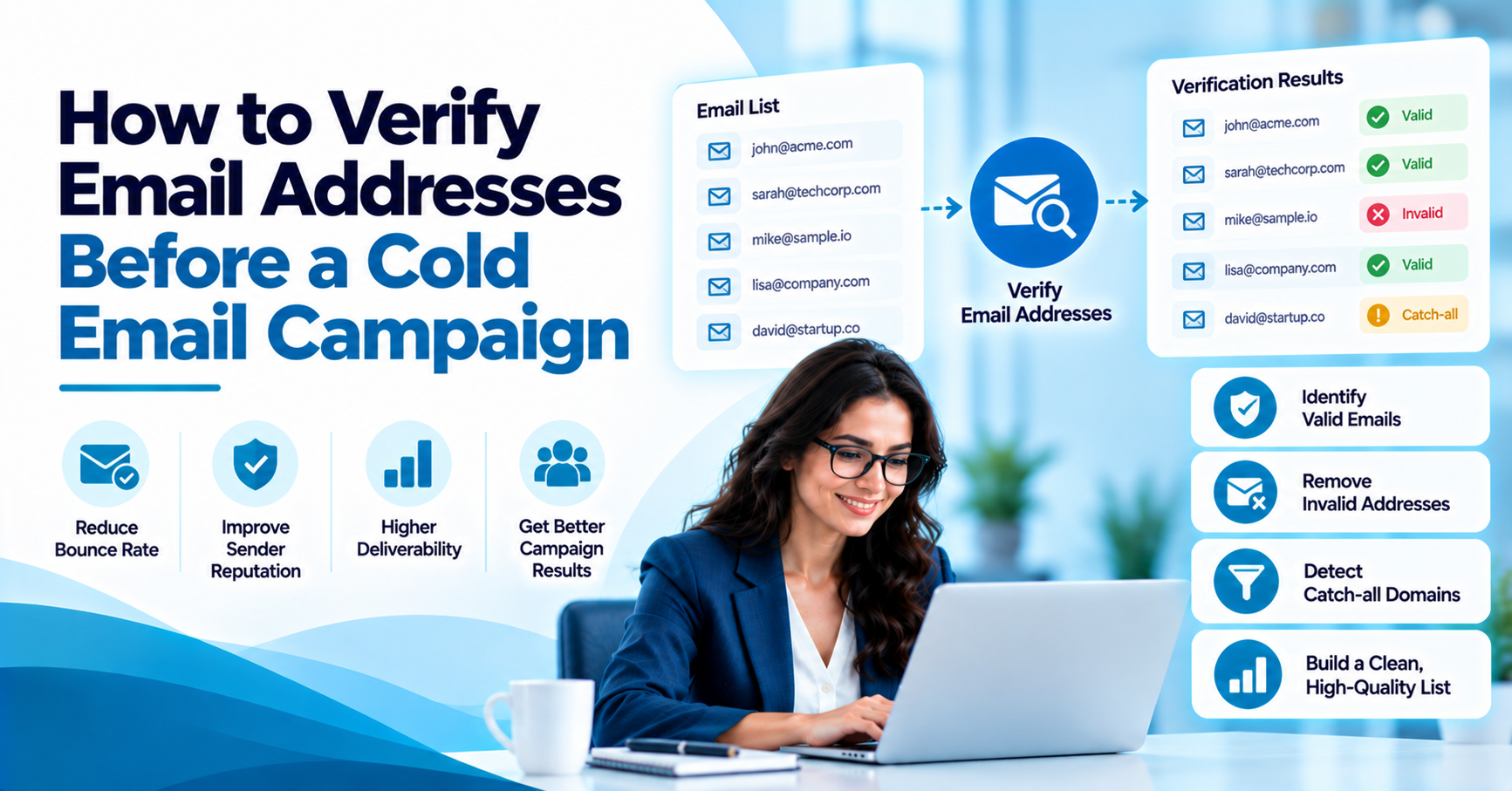
To verify email addresses before cold email, run every address through syntax, domain and mailbox checks, remove the invalid ones, and treat risky and catch-all results with care before you send. Doing this first protects your sender reputation, keeps your hard bounce rate low and gives your message a better chance of reaching the inbox.

It is written for B2B sales and marketing teams, SDRs, email marketers, lead generation specialists and business owners. Verification reduces bounces but cannot guarantee inbox placement, which also depends on your domain setup, message content and sending habits.

How Do You Check If an Email Address Is Valid?

The quickest way to check if an email address is valid is to run it through a verifier that tests the format, the domain and the mailbox itself. A single address can be checked in seconds, and a whole list can be checked in one upload. Sending a test message to find out is a poor shortcut, since it puts your sender reputation at risk and tells you little.

For one-off checks, a real-time tool is enough. For a campaign list, you need bulk email address verification so every row gets a status before the first send. Our guide on how to verify an email address covers the basics, and the free Email Verifier lets you try a few addresses first.


What Does Email Verification Actually Check?

Good verification works in layers. Email syntax validation catches typos and malformed addresses. Domain and MX record checks confirm that the domain exists and can receive mail. SMTP email verification then asks the receiving server whether the mailbox exists, without sending a message, and this mailbox existence check is what separates a real inbox from a dead one.

Beyond that, disposable email detection flags throwaway addresses, and role-based email addresses are usually marked because they reach a shared inbox rather than a named person. Catch-all email detection spots domains that accept every address, which makes a clean result impossible to promise. Email risk scoring then turns all of this into a status. Our guide on how email verification works goes deeper.

How Do You Verify Business Email Addresses at Scale?

To verify business email addresses at scale, work in batches and keep the file clean. Remove duplicates, upload the list as a CSV and review the status breakdown before you export. ReachStream Email Verifier accepts CSV uploads of up to 25K emails per batch and up to 10MB per file, and it deduplicates automatically, so large lists can be split into a few clean runs.

Teams that verify B2B email addresses on a regular schedule keep their data healthier, since contacts change jobs and companies change domains. If you work through an API or a CRM, verify at the point of entry so bad addresses never reach your sequence. API access starts on the Pro plan. Our Bulk Email Verifier guide shows the upload steps, and our email list cleaning guide covers what to do with the results.

How Do Catch-All and Risky Emails Affect Campaigns?

Catch-all and risky results are where many teams slip. A catch-all domain accepts mail for any address, so the server cannot confirm that a specific mailbox exists. A risky or unknown result means the mailbox behaved inconsistently during the check. Neither is a clear yes or no, and sending to all of them at once can push your hard bounce rate up.

A careful approach is to send valid addresses first, hold catch-all and risky ones for a smaller test batch and exclude anything marked Do Not Mail. ReachStream Email Verifier also offers a Catch-All Resolver, which is designed to help teams sort catch-all and risky results into likely deliverable or likely invalid instead of discarding them all. Results vary by domain, so watch your bounces on each batch.

Can Verification Reduce Cold Email Bounce Rate?

Yes, verification can reduce cold email bounce rate, and it does so before the damage is done. A hard bounce happens when an address does not exist, and mailbox providers read a steady stream of hard bounces as a sign of poor list quality. Removing invalid addresses first keeps that signal low and protects your sender reputation.

Verify email addresses before cold email goes out and you lower the odds of hard bounces, but it will not fix everything. Inbox placement also depends on authentication, sending volume, message content and how recipients react. Think of verification as the first gate, not the only one. Our guide on how email verification improves deliverability explains the link in more detail.

Check a whole list in one upload
Upload a CSV and see the status of every address before you send.

Which Verification Checks Catch Which Problems?

The table shows what each verification check looks for and what it cannot tell you. Use it to see why one check alone is rarely enough.

Check What it tests What it catches What it cannot tell you Where it fits
Syntax validation
Address format
Typos and missing symbols
Whether the mailbox exists
First pass on any list
Domain and MX checks
Domain and mail records
Dead or misspelled domains
Whether a person uses the mailbox
After syntax checks
SMTP mailbox check
The mailbox on the server
Addresses that do not exist
Behaviour of catch-all domains
Core step before sending
Disposable and role checks
Address type
Throwaway and shared inboxes
Whether the contact is a good fit
Before CRM import
Risk scoring
Overall status
Uncertain and Do Not Mail results
Final inbox placement
Final review before export

How Do You Verify a Cold Email List in 6 Steps?

  1. Clean the file: Remove duplicates and obvious typos.
  2. Run bulk verification: Upload the list as a CSV.
  3. Review statuses: Sort into valid, invalid, risky and catch-all.
  4. Remove bad addresses: Delete invalid and Do Not Mail results.
  5. Test the uncertain ones: Send a small batch to catch-all and risky addresses.
  6. Re-verify on a schedule: Check older contacts again before each campaign.


What Are Email Deliverability Best Practices?

Email deliverability best practices start with the basics: authenticate your sending domain, warm up new mailboxes slowly and keep volume steady. Verification then sits on top of that foundation. Cold email deliverability suffers when a fresh domain sends to a list full of bad addresses, because the first impression with mailbox providers is a high bounce rate.

Send in small batches, watch replies and bounces, and pause a campaign if hard bounces climb. Keep your messages relevant, make opting out easy and honour unsubscribe requests quickly. Our pre-send deliverability guide lists the setup steps, and you can run your domain through the Email Authentication tool.

What to Look For in Email Verification Tools

  1. Accuracy: Look for a clear accuracy claim and how it is tested.
  2. SMTP checks: Ask whether it verifies mailboxes without sending mail.
  3. Catch-all handling: Check how uncertain results are resolved.
  4. Statuses: Look for more than a simple pass or fail.
  5. Bulk and API options: Confirm CSV limits and API access.
  6. Security: Look for recognised certifications and privacy controls.

How Does ReachStream Email Verifier Help?

ReachStream Email Verifier helps sales and marketing teams check email addresses before launching cold email campaigns. It is designed to reduce invalid addresses, minimize bounce risks, and support better email deliverability. The tool checks email addresses without sending actual emails, allowing teams to validate individual addresses or upload CSV lists for bulk verification.

It provides clear verification statuses, including Valid, Invalid, Risky, Catch-All, Unknown, and Do Not Mail, helping teams decide which addresses to use, review, or exclude. Features such as deduplication, verification history, reporting, and Catch-All Resolver support more organized email list management. API access, HubSpot and Salesforce integrations to help teams incorporate verification into their existing workflows.

Before choosing a plan, verify the current availability of features, accuracy claims, batch limits, security certifications, and compliance details on ReachStream’s official pages.

You can explore the ReachStream Email Verifier features or try the Instant Email Check to learn how email verification works before your next cold email campaign.

Test it on your own list first
Get 100 free credits for 30 days. No credit card needed.

Cold Email Verification: The Short Version

Email verification before cold email means checking format, domain and mailbox, removing invalid addresses and testing risky ones in small batches. Cold email list verification is not a one-off job, so repeat it before each campaign, and pair it with email list cleaning for cold email so old contacts do not drag down your results. If you want to verify email addresses before sending cold emails, ReachStream Email Verifier offers a free trial so you can test your own list.

For your next read, see our guides to the best bulk email verifier and email verification best practices.

Pick a plan when your list grows
See plans and pricing for ReachStream Email Verifier.

Frequently Asked Questions

1. How do I verify emails before cold emailing?

To verify email addresses before cold email, upload your list to a verifier that checks the format, domain and mailbox of each address. Remove everything marked invalid or Do Not Mail, then send a small test batch to risky and catch-all results. Repeat the check before each new campaign.
Run the address through a verifier that checks syntax, domain records and the mailbox itself. A valid result means the mailbox appears active and deliverable, while invalid means it does not exist. For B2B contacts, also look at catch-all and role-based flags, since those can hide uncertain addresses.
Look for strong accuracy, SMTP-level checks, clear statuses, catch-all handling and CSV or API options. ReachStream Email Verifier offers these, with a free trial of 100 credits so you can test it on your own list. Compare a few tools on the same sample before you commit.
Use bulk verification with a CSV upload and check the status breakdown before exporting. ReachStream Email Verifier accepts up to 25K emails per batch, so a large list can be split into runs. Remove duplicates first and keep a record of each run.
Invalid addresses cause hard bounces, and a high hard bounce rate can damage your sender reputation. Over time that can push your messages toward spam folders, even for good addresses. It also wastes sending volume and skews your campaign numbers.
Re-verify before every major campaign, and regularly for lists you use often. B2B contacts change jobs and companies change domains, so addresses decay over time. Older records deserve a check first.
No. Verification lowers bounces by removing addresses that do not exist, but inbox placement also depends on domain authentication, sending volume, content and recipient behaviour. Treat verification as one important step, not a guarantee.
Valid means the mailbox appears active and deliverable. Invalid means the mailbox does not exist, so remove it. Risky means the result was uncertain because the mailbox behaved inconsistently, so test those in small batches and watch bounces.
Abdul Kareem

Author

Abdul Kareem
Abdul Kareem writes about B2B sales prospecting, email deliverability, and cold outreach for ReachStream, focusing on practical guidance that sales and marketing teams can put to use right away.
Share
Table of Contents
Verify your cold email list before you send. Start with 100 free credits.
Send Only to Addresses You Have Checked
Abdul Kareem
Abdul KareemAuthor
Abdul Kareem writes about B2B sales prospecting, email deliverability, and cold outreach for ReachStream, focusing on practical guidance that sales and marketing teams can put to use right away.


Don't forget to share this post!

Check out our other blogs!