Written by:

Abdul Kareem
How to Warm Up a New Domain for Cold Email: Full Guide 2026
How to Evaluate B2B Data Vendors for Accuracy and Compliance
Introduction
Buying a new domain and connecting it to Google Workspace or Microsoft 365 doesn’t mean it’s ready for high-volume cold outreach.
If you go from almost no email activity to hundreds of cold emails in a day, that sudden change can make delivery more difficult. That’s why businesses need to warm up email domain infrastructure before they start scaling outbound campaigns.
Think of it like a new credit card. You don’t get one and immediately max it out. You use it normally, build a history, and increase your activity over time. Email infrastructure works in a similar way.
This cold email warmup guide explains what to set up first, how to create a practical sending plan, what to monitor, and when it’s sensible to increase volume.
The goal isn’t to trick spam filters. It’s to build sender reputation, establish domain reputation, and create a consistent sending pattern with good-quality contacts.
What Does It Mean to Warm Up an Email Domain?
To warm up email domain infrastructure means gradually introducing sending activity on a new domain or mailbox instead of starting with a large outreach campaign on day one.
Receiving systems look at many signals when evaluating email, including authentication, sending behaviour, reputation, spam complaints, delivery failures, and recipient activity.
Warm-up is therefore less about hitting a particular number of emails and more about building a reasonable history. This is also why domain aging cold email is not the same thing as warming a domain. What matters is how the domain is configured and how it behaves once you start sending.
Why Domain Warm-Up Matters for Cold Email
Build Sender Reputation
Your sending history can influence how receiving providers treat your messages. For sender reputation cold email campaigns, consistency matters.
A domain that suddenly sends a large volume of poorly targeted messages gives providers very different signals. The warm-up period gives you time to identify issues before they become expensive problems.
Improve Inbox Placement
Email deliverability is not simply about whether a message was accepted by the receiving server. You also care about inbox placement: whether the message reaches the inbox rather than the spam folder.
Gmail says high-reputation senders are more likely to reach users’ inboxes, while poor domain or IP reputation can negatively affect delivery. No warm-up plan can guarantee that emails will land in the primary inbox. Content, authentication, and other signals still matter.
Give Your Domain a Sending History
A new domain has no meaningful track record. Gradually increasing activity gives your email service provider and receiving systems more information about how that domain is being used.
That history becomes especially important once you start increasing outreach volume.
Clean Your List Before You Scale Your Sending
How to Warm Up a New Email Domain Step by Step
If you’re figuring out how to warm up new email domain step by step, start with the infrastructure rather than the campaign.
Step 1: Choose Your Domain and Mailbox
Decide which domain you’ll use for outbound email.
Some teams send from their main domain, while others create separate domains or subdomains for specific types of outreaches. Microsoft recommends avoiding the primary email domain for bulk email and suggests using dedicated subdomains for bulk or marketing traffic, with SPF, DKIM, and DMARC configured.
Whichever setup you choose, make sure the domain clearly represents your business. Don’t create a domain that looks suspicious or misleading.
Then set up the mailbox in your provider, such as Google Workspace or Microsoft 365.
Step 2: Set Up SPF, DKIM, and DMARC
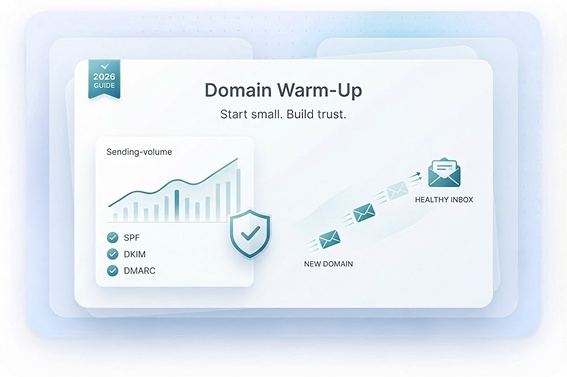
Your SPF DKIM DMARC warmup setup should be completed before you begin increasing volume.
These are forms of email authentication:
- SPF identifies authorized sending servers.
- DKIM adds a signature that helps verify the message.
- DMARC tells receiving systems how to handle messages that fail authentication and helps align the visible from domain with authentication.
Gmail currently requires SPF or DKIM for all senders to Gmail and has additional requirements for senders reaching about 5,000 or more messages per day, including SPF, DKIM, and DMARC.
Yahoo also requires authentication and, for bulk senders, SPF, DKIM, and a valid DMARC policy. It recommends keeping spam rates below 0.3%.
Step 3: Start with Low Sending Volume
Once the technical setup is complete, begin with a small volume.
The exact number will depend on your provider, mailbox configuration, audience, and planned campaign size. There isn’t one official warm-up number that applies to every sender.
The important principle is to ramp up slowly.
You might start with a few dozen messages a day, monitor the results, and then increase from there. Some practical warm-up guides recommend beginning around 30–50 emails per day, but these are vendor recommendations rather than universal Gmail or Microsoft requirements.
Step 4: Monitor Deliverability and Engagement
Don’t judge your warm-up by send volume alone.
Track:
- delivery and rejection rates
- bounce rate
- spam complaints
- replies
- unsubscribe activity
- domain reputation
- inbox placement
Gmail’s Postmaster Tools provides dashboards for spam rate, domain reputation, IP reputation, authentication, and delivery errors.
A practical internal rule many teams use is to keep bounce rate under 2%. That’s an operational benchmark, not a Gmail rule. If your bounce rate starts climbing, stop increasing volume and investigate your list.
That’s where email verification and list hygiene become important. Warm-up cannot fix a database full of invalid or outdated contacts.
Step 5: Increase Volume Gradually
Once your initial sending is stable, start increasing volume.
This is where your email volume ramp up schedule becomes useful.
For example:
| Stage | Operational approach |
|---|---|
|
Initial phase |
Keep volume low and consistent |
|
Early increase |
Add volume in small steps |
|
Mid warm-up |
Continue increasing while monitoring results |
|
Pre-scale |
Move closer to your planned daily volume |
|
Full activity |
Maintain stable volume instead of making sudden jumps |
There is no benefit in rushing this stage. If something changes after an increase, you’ll want to know exactly what caused it.
Domain Warmup Schedule: A Practical 3–6 Week Framework
A domain warmup schedule is useful as a planning framework, but it shouldn’t be treated as a hard rule.
A 3–6 weeks to full volume window can work as a practical planning range for many teams. A smaller setup may need less time, while a larger or more sensitive sending operation may need longer.
Week 1: Get the Basics Right
Focus on setup rather than volume.
Check:
- SPF
- DKIM
- DMARC
- mailbox configuration
- DNS records
- tracking configuration
- email verification
- list quality
You can also send normal, legitimate messages to establish basic mailbox activity.
Week 2: Start Building Sending History
Begin your gradual outreach volume. Keep the audience small and relevant. Monitor the sender score, bounce rate, spam complaints, and delivery behaviour.
The goal this week is consistency, not scale.
Week 3–4: Increase Volume Carefully
If delivery remains stable, continue the gradual volume increase. At this point, you should have enough data to identify whether your setup is behaving normally.
Keep watching for sudden changes in inbox placement or complaints. If something moves in the wrong direction, slow the ramp rather than pushing through it.
Week 5–6: Move Toward Your Normal Volume
If the previous stages are stable, you can move closer to your planned campaign volume. Once the warm-up period is complete, continue increasing your volume at a steady pace rather than making a sudden jump and keep monitoring results.
For larger teams, it can also make sense to reserve 20–30% for warmup and testing capacity instead of treating every available sending slot as campaign volume.
How Long to Warm Up an Email Domain?
There isn’t a universal answer.
A practical warm-up might take a few weeks, with three to six weeks serving as a planning window for teams that want to ramp carefully. But the right answer depends on the domain’s history, the mailbox provider, your campaign volume, list quality, and delivery performance.
Before you increase volume, check whether:
- authentication is passing
- bounce rate is stable
- spam complaints are low
- sending behaviour is consistent
- contacts are verified
- inbox placement is healthy
- your domain reputation is holding steady
The quality of those signals matters more than simply saying, “We’ve warmed it up for 21 days.”
Better Deliverability Starts with Better Prospect Data
Email Warmup Tools and Automation
There are plenty of email warmup tools that promise to simplify the process. These tools can help automate sending schedules, manage multiple mailboxes, and track activity. They’re useful when you’re managing several outbound accounts.
Email Warmup Automation
Email warmup automation can remove some manual work from your daily routine. You can set a gradual sending plan and let the platform manage the schedule while you monitor delivery and reputation.
The important distinction is between automating the process and blindly automating volume. A tool shouldn’t keep increasing sends when your bounce rate or spam complaints are rising.
Automated Warmup Network: What to Know
Some automated warmup network services connect participating mailboxes and generate automated interactions between them. Before using one, understand how the network works and what type of activity it creates.
Artificial engagement is not the same as genuine recipient behaviour, and your goal should ultimately be real messages reaching real prospects. A warmup network can be part of an operational toolset, but it shouldn’t be your only deliverability strategy.
Inbox Warmup Gmail and Other Providers
If you’re specifically researching inbox warmup Gmail, start with Gmail’s own sender guidance rather than relying entirely on a third-party warm-up service.
Also remember that Gmail’s current sender requirements focus on authenticated sending, low spam rates, and appropriate sender practices not on completing a particular third-party warm-up program.
Common Mistakes to Avoid When Warming Up a Domain
Don’t Increase Your Volume
The biggest mistake is going from a small test volume to a large campaign overnight.
Receiving systems monitor sending behaviour, and Gmail specifically advises senders to increase sending volumes gradually. So don’t increase your volume just because your campaign is ready.
Don’t Ignore List Hygiene
Poor data can undo a good infrastructure setup.
Remove invalid contacts, keep records current, and use email verification before sending at scale. Good list hygiene helps reduce your bounce rate and limits unnecessary spam complaints.
Don’t Send Unverified Contacts
A warm domain paired with a poor-quality database is still a poor sending setup.
Before scaling, make sure the people you’re contacting are relevant and the addresses are valid.
Don’t Scale Too Quickly
A domain can look healthy at one volume and struggle at a much higher one.
That’s why email deliverability warmup should continue as you grow. Keep monitoring reputation and inbox placement instead of treating warm-up as something that ends permanently after a fixed number of days.
Warm Up Before Scaling Cold Email
The most useful rule here is simple: warmup before scaling cold email.
Don’t build a campaign for 5,000 prospects and then worry about the sending infrastructure afterward. Set up your domains and mailboxes first, test your deliverability, verify your list, and then scale.
Your cold outreach infrastructure should be able to handle the volume. And remember the simple rule behind the entire process: treat your domain like a new credit card. Start with normal activity, watch what happens, and increase your usage as the sending pattern proves stable.
Conclusion
To warm up email domain infrastructure properly, don’t think of warm-up as a magic setting you switch on and forget about.
Start with the basics: choose the right domain, configure email authentication, set up the mailbox, verify your contacts, and begin with a manageable volume. Then ramp up slowly while watching the signals that matter.
A practical step-by-step guide may take three to six weeks for a cautious ramp, but your actual timeline should depend on your sending behaviour and results rather than a fixed calendar.
The real goal is to build sender reputation, establish domain reputation, maintain strong email deliverability, and give your outreach a stable foundation.
Once that foundation is in place, you can scale with much more confidence—and spend your time improving the emails themselves instead of wondering why they’re ending up in spam.
Ready to Scale Cold Outreach with Cleaner Data?
Frequently Asked Questions
How quickly can I warm up a new email domain?
There is no universal timeline. A few weeks can be a reasonable starting point, while larger or more complex setups may need longer. Use your delivery and reputation signals to decide when to increase volume.
Do email warm-up tools guarantee inbox placement?
No. Warmup tools can automate activity and scheduling, but they cannot guarantee that messages will reach the inbox. Authentication, list quality, complaints, content, engagement, and domain reputation still matter.
Is domain aging enough for cold email?
Just having a domain for a few weeks doesn’t mean it’s ready for cold email. You still need to set it up properly and build up your sending gradually.
Should I use a secondary domain for cold outreach?
It can be an option for separating outbound infrastructure from your main corporate mail environment. However, the secondary domain still needs proper authentication, clean data, and its own sending history.
What should I monitor during warm-up?
Watch your delivery failures, bounce rate, spam complaints, domain reputation, sender score, authentication, and inbox placement. For Gmail traffic, Postmaster Tools provides several of these signals for eligible domains and messages.
Abdul Kareem
Author
Abdul Kareem

Abdul Kareem writes about B2B sales prospecting, email deliverability, and cold outreach for ReachStream, focusing on practical guidance that sales and marketing teams can put to use right away.
Share
Table of Contents
Access 200M+ verified business emails and grow your sales pipeline effortlessly.
Power Your Sales with Targeted Data
Abdul Kareem writes about B2B sales prospecting, email deliverability, and cold outreach for ReachStream, focusing on practical guidance that sales and marketing teams can put to use right away.
Don't forget to share this post!















Check out our other blogs!
Catch-All vs Invalid vs Risky Emails: Which Should You Send To?
November 18, 2026

What Is a Catch-All Email? How to Check and Verify One
November 18, 2026

Customer Stories: How Teams Cut Bounce Rates with ReachStream
November 18, 2026