

How to Evaluate B2B Data Vendors for Accuracy and Compliance
B2B sales software is a category of tools used to find and research prospects, enrich contact records, manage opportunities, automate sales activities, and measure pipeline performance. It includes prospecting, sales intelligence, CRM, lead enrichment, email verification, sales engagement, marketing automation, and sales analytics platforms. This guide compares the main categories and selected products by use case so you can build a practical sales stack rather than buy tools based on feature lists alone.
Consideration | Quick answer |
Definition | Software that supports prospect discovery, data management, selling activities, and pipeline analysis. |
Main use cases | Prospecting, account research, enrichment, verification, CRM, outreach, marketing automation, and reporting. |
Major categories | Sales intelligence, prospecting, CRM, enrichment, email verification, sales engagement, marketing automation, and analytics. |
Common integrations | CRM, email, calendars, marketing automation, sales engagement, APIs, and data warehouses. |
Pricing models | Per user, per seat, usage-based credits, tiered subscriptions, add-ons, or custom quotes. |
Typical users | Founders, SDRs, account executives, revenue operations, marketing teams, and sales leaders. |
Key selection criteria | Data quality, use-case fit, integrations, security, implementation effort, support, scalability, and total cost. |
B2B sales software consists of tools that help business-to-business teams identify prospects, research accounts, enrich contact information, manage leads and opportunities, communicate with buyers, verify email addresses, automate repeatable activities, and measure sales performance. One platform may cover several of these functions, but no single tool should be assumed to replace an entire sales technology stack without checking its documented capabilities.
The right category depends on the bottleneck in your sales process. A team that cannot identify relevant accounts needs a different product from a team that has enough leads but struggles with follow-up or pipeline visibility.
Sales intelligence software helps teams research companies, contacts, roles, buying signals, and account context. It is commonly used by SDRs, account executives, revenue operations teams, and marketers who need to prioritize accounts before outreach. Evaluate coverage in your target markets, data freshness, filtering, export rules, user permissions, and whether the provider explains how records are sourced and maintained.
For a broader category comparison, review these sales intelligence platforms alongside the vendor documentation for any product under consideration.
Prospecting software helps users discover potential accounts and contacts that match defined criteria such as industry, location, company size, technology use, or job title. Strong prospecting workflows make it easy to save searches, create lists, export permitted records, and pass qualified data into a CRM or engagement platform. Buyers should confirm whether the tool supports their geography and ideal customer profile before judging the size of its database.
A dedicated prospect list builder can be useful when list creation, filtering, and segmentation are the immediate priority rather than full opportunity management.
CRM software is designed to manage leads, accounts, contacts, opportunities, activities, and pipeline stages in one operational record. It helps teams preserve account history, assign ownership, forecast work, and report on movement through the funnel. A CRM is usually the system of record; prospecting and engagement tools often feed it rather than replace it.
When comparing CRM software for B2B, look at workflow flexibility, duplicate handling, permissions, reporting, native integrations, API access, and the effort required to keep records complete.
Lead enrichment software adds or updates information about people and companies. Depending on the product, enrichment may include firmographic fields, role information, company attributes, technologies, or other supported data points. Ask how matches are made, what happens when records cannot be matched, how changes are handled, and whether enrichment can run before data enters the CRM.
For enrichment workflows, compare how matches are made, which fields are returned, and how changes are handled before selecting a provider.
Email verification software checks whether an email address appears deliverable or presents a risk such as invalid syntax, a known bounce condition, or a disposable address. Verification is not a substitute for permission-based outreach, and no tool should be treated as a guarantee of inbox placement. Look for batch processing, API access, suppression controls, reporting, and clear treatment of uncertain results.
Teams with an established list should evaluate an email verifier against their volume, workflow, and compliance requirements.
Sales engagement software organizes sequences, tasks, follow-ups, templates, call activities, and other seller workflows. It is most useful when a team needs consistent execution after target accounts and contacts have been selected. Compare channel support, sequencing controls, opt-out handling, personalization, CRM synchronization, reporting, and safeguards against excessive or poorly timed outreach.
Marketing automation software manages recurring marketing workflows such as form responses, nurture programs, audience segmentation, and campaign triggers. It can support sales by passing qualified activity or lead records into the CRM, but marketing automation and sales engagement are not interchangeable. Define ownership, lifecycle stages, consent rules, and handoff conditions before connecting the systems.
Sales analytics software measures activity, conversion, pipeline movement, forecast inputs, and—in systems with suitable data—revenue attribution. The most useful reports answer operational questions: which sources create qualified opportunities, where deals stall, how long stages take, and which activities correlate with progression. Confirm the underlying data definitions before comparing dashboards or benchmarks.
The products below are organized by primary use case, not ranked from best to worst. Product capabilities, packaging, integrations, and pricing can change; confirm current details on each vendor’s official product, pricing, documentation, and security pages before purchase. For a separate review-oriented perspective, consult the sales software reviews page and apply the same use-case criteria.
| Software | Best Suited For | Category | Starting Pricing | Documented Capabilities to Compare | Key Limitation or Qualification |
|---|---|---|---|---|---|
| ReachStream | B2B prospect discovery and contact-data workflows | Prospecting, Data, Enrichment, Verification | $0/month Free and paid plans starts from $39/month monthly | Prospect discovery, contact data, list building, data enrichment, and email verification workflows | Coverage, usage limits, integrations, and available features can vary by plan and market; confirm current terms |
| Salesforce Sales Cloud | Organizations needing a highly configurable CRM | CRM | $25/user/month | Lead and opportunity management, reporting, workflows, automation, and ecosystem integrations | Extensive configuration and administration may require dedicated resources and implementation effort |
| HubSpot Sales Hub | Teams seeking CRM and sales workflows in one ecosystem | CRM and Sales Engagement | $10/seat/month monthly* | CRM records, sales tools, reporting, automation, and connected HubSpot products | Costs can increase with additional seats, advanced features, and other HubSpot hubs |
| Microsoft Dynamics 365 Sales | Organizations operating within the Microsoft ecosystem | CRM | $65/user/month | Account and opportunity management, sales automation, reporting, and Microsoft integrations | Fit depends on existing Microsoft infrastructure, configuration requirements, and implementation capacity |
| Zoho CRM | Small and growing teams seeking configurable CRM functionality | CRM | ₹800/user/month | Lead, contact, account, pipeline, workflow, reporting, and broader Zoho ecosystem capabilities | Features vary by edition, and integration requirements should be reviewed before selection |
| Apollo.io | Teams combining prospecting and sales engagement workflows | Prospecting and Sales Engagement | $0/month; paid plans from $49/user/month annually | Prospect discovery, contact workflows, sequences, enrichment, and sales engagement activities | Data coverage, credits, export limits, and feature availability vary by plan |
| LinkedIn Sales Navigator | Account and relationship research on LinkedIn | Sales Intelligence | $119.99/license/month for Core | Prospect and account search, saved leads, InMail, buyer signals, and LinkedIn-based research | It is primarily a prospecting and relationship-research platform, not a standalone CRM or email-verification system |
| Outreach | Organizations running structured sales engagement programs | Sales Engagement | Custom pricing | Sequencing, tasks, engagement workflows, sales execution, and reporting | Requires defined sales processes, CRM integration, governance, and implementation planning |
| Gong | Teams focused on conversation and revenue intelligence | Sales Analytics and Intelligence | Custom pricing | Conversation analysis, sales insights, coaching, forecasting, and revenue intelligence | Pricing depends on team requirements; implementation, data requirements, integrations, and privacy should be evaluated |
| NeverBounce | Teams focused specifically on email verification | Email Verification | Usage-based pricing | Email-list verification, email validation, bulk processing, and verification workflows | Costs depend on verification volume; verification does not replace consent and proper email-list management |
This shortlist is a starting point for commercial investigation, not an endorsement or universal ranking. The most suitable option depends on your target market, sales process, existing systems, data requirements, and budget.
This editorial comparison uses publicly available product, pricing, documentation, and security information available at the review date. It is not a claim of hands-on testing, benchmark performance, or independent verification of every vendor statement. The evaluation framework considers core functionality, prospecting capabilities, data coverage and freshness, email verification, enrichment, CRM features, integrations, API access, automation, security, privacy, compliance documentation, implementation effort, customer support, pricing, scalability, and total cost of ownership.
Use the same framework in a live evaluation. Ask each vendor to demonstrate the workflows your team actually needs, provide documentation for material claims, and explain what is included in the plan you would buy.
Integrations matter because sales software rarely works alone. A practical stack may connect a prospecting or data source to a CRM, then send selected records to a sales engagement platform while returning activity and outcome data to reporting systems. Check native connectors for your CRM, email and calendar environment, marketing automation platform, and data warehouse where applicable. If no native connector exists, review API limits, authentication, webhooks, field mapping, retry behavior, and ownership of failed syncs.
Teams that need to connect data workflows programmatically should review the email verification API requirements before committing to a process. If technology-based account targeting matters, also assess the technographic data workflow. Confirm whether the integration creates, updates, or only reads records, and how opt-outs and suppression lists are synchronized.
Evaluate data quality with a representative sample from your target market rather than relying only on a vendor’s headline database size. Test accuracy, freshness, match rates, duplicate rates, job changes, company changes, invalid-email rates, geographic coverage, and industry coverage. Record the date of each test and define what counts as a usable record before comparing suppliers.
Ask how records are sourced, refreshed, corrected, suppressed, and removed. A result marked as valid by an email verifier does not prove that the recipient wants outreach, that the contact still holds the role, or that the record can be used lawfully in your jurisdiction. Avoid unsupported claims such as “100% accurate,” “real-time data,” or “guaranteed deliverability.”
For broader list-building context, compare the requirements in this contact database guide with the fields and coverage your team actually needs.
Before procurement, review the vendor’s privacy policy, data-processing terms, security documentation, access controls, authentication options, API security, user permissions, auditability, data retention, deletion workflows, and suppression or opt-out handling. Ask where data is processed, what subprocessors are used, how incidents are communicated, and whether the vendor can support your organization’s contractual and regulatory requirements.
Do not treat a logo or general compliance statement as proof that a product satisfies your specific obligations. Have legal, privacy, and security stakeholders review the relevant documentation, especially when the platform processes personal data, synchronizes CRM records, or automates communications. For product-specific implementation questions, consult the ReachStream help center rather than relying on assumptions about current functionality.
Implementation effort varies by team and workflow. A small team using one CRM and a simple prospecting process may start quickly, while a larger organization may need data migration, deduplication, field mapping, API work, security review, administrator training, and change management. Count the systems involved, the number of users, the number of historical records, and the workflow exceptions before estimating time or cost.
A sensible rollout starts with one defined use case, a clean field model, documented ownership, and measurable success criteria. Pilot the process with a limited group, monitor sync errors and record quality, then expand only after users can follow the workflow consistently.
Small teams generally benefit from low setup effort, essential prospecting, straightforward CRM integration, transparent pricing, and manageable administration. Avoid buying a full suite before identifying the first process to improve. A focused combination of prospect discovery, CRM, and basic verification may be enough to begin; a Chrome prospecting extension can also suit a browser-led workflow when its documented capabilities match the team’s process.
Growing teams usually need stronger enrichment, automation, reporting, integration controls, and workflow management. Standardize definitions for lead, qualified account, opportunity, and disqualification before adding more tools. At this stage, duplicate prevention and reliable CRM synchronization often matter more than another isolated feature.
Larger organizations should prioritize governance, security review, role-based access, APIs, data coverage, advanced analytics, regional requirements, and scalable administration. Procurement should include operations, security, legal, and frontline users. A product that looks inexpensive per seat can have a high total cost if it requires extensive customization or manual data maintenance.
If you need to… | Consider… |
Find new prospects | Prospecting or sales intelligence |
Research accounts | Sales intelligence |
Manage opportunities | CRM |
Improve contact records | Lead enrichment |
Validate email addresses | Email verification |
Automate follow-ups | Sales engagement |
Automate marketing workflows | Marketing automation |
Measure pipeline performance | Sales analytics |
Start by identifying your sales priorities, such as generating qualified leads, automating workflows, improving prospecting, or enhancing customer relationship management. This ensures you select software that aligns with your business needs.
For lead generation software, data quality directly affects campaign success. Look for platforms that provide accurate, regularly updated contact and company information supported by reliable verification processes.
The best sales software integrates seamlessly with CRM systems, marketing automation platforms, email providers, and reporting tools. Connected systems eliminate duplicate work and create a smoother workflow across departments.
Software should be intuitive enough for sales teams to adopt quickly. Consider the user interface, onboarding resources, customer support, and implementation process before making a decision.
Choose solutions that fit your current budget while supporting future business growth. Scalable software reduces the need for frequent platform changes as your sales team expands.
Business Goals | Does it solve our sales challenges? |
Data Quality | Is the data accurate and frequently updated? |
Integrations | Does it connect with our existing tools? |
Ease of Use | Can the team adopt it quickly? |
Reporting | Does it provide actionable insights? |
Scalability | Will it support future growth? |
Start with the business problem, not the category label. If the issue is poor targeting, a CRM upgrade may not help. If the issue is missed follow-ups, buying another data source may create more records without improving execution.
For teams that want to explore the full lead generation guide, map each recommended activity to one owner, one system, and one measurable outcome.
A long feature list does not show whether the product solves your workflow. Test the specific process from record creation through qualification, outreach, handoff, and reporting.
A tool that cannot reliably exchange data with your CRM may create duplicate work. Confirm field mapping, sync direction, limits, and error handling before signing.
A large database is not automatically a useful database. Test records in the industries, regions, and roles you actually target.
Include implementation, administration, credits, add-ons, migration, training, support, and the cost of unused or duplicated tools.
Bring privacy and security reviewers into the process before personal data is imported or automated outreach is enabled.
Multiple prospecting, enrichment, and engagement products can create conflicting records and unclear ownership. Define the system of record first.
Choose measures such as usable-record rate, duplicate rate, speed to lead, qualified-opportunity rate, stage conversion, or pipeline coverage—not vague promises of productivity.
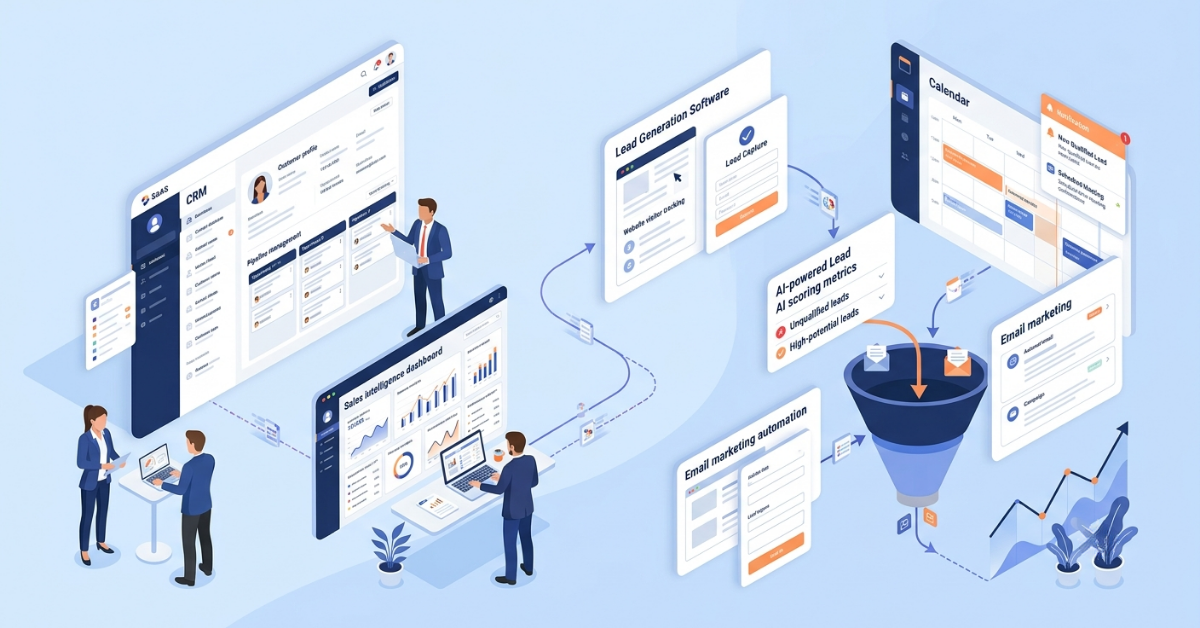
A common workflow is Prospecting → Enrichment → Verification → CRM → Sales Engagement → Analytics. The sequence is flexible: some businesses enrich records before CRM entry, while others enrich only when an opportunity reaches a defined stage. The important principle is to document which system owns each field and event.
Companies do not need every category. A small team may use a CRM plus one data or verification tool. A larger organization may require separate systems for data, engagement, analytics, and governance. Review the sales tools comparison as a related resource, but keep this article focused on category selection and the evaluation framework rather than duplicating a general tools list.
ReachStream can be evaluated as part of the prospecting and B2B data layer, including workflows related to contact data, company intelligence, filtering, enrichment, email verification, and supported integrations. Its role should be matched to the gaps in your existing stack; it should not be treated as a replacement for every CRM, engagement, analytics, or marketing automation function.
Teams can review the ReachStream prospecting platform and data enrichment product to understand the first-party capabilities and plan details documented by ReachStream. Confirm current availability, usage limits, coverage, integration behavior, and applicable terms before publishing or purchasing.
The best B2B sales software is the product or combination of products that fits your sales process, data requirements, existing systems, team capacity, and governance needs. Start by identifying whether the primary problem is prospect discovery, data quality, opportunity management, follow-up, or measurement. Then compare products using documented functionality, integration behavior, security requirements, implementation effort, and total cost—not database size or unsupported rankings.
B2B sales software includes digital tools that help businesses find prospects, manage customer relationships, automate sales activities, and measure performance throughout the sales cycle.
There is no single solution. Prospecting tools, CRM software, business contact databases, and email verification software work together to generate and qualify high-quality leads.
Small businesses can start with essential solutions such as a CRM, prospecting platform, and email verification software, then expand their technology stack as their sales operations grow.
CRM software stores customer information, tracks interactions, manages opportunities, and helps sales teams maintain organized pipelines and timely follow-ups.
Sales intelligence platforms help identify and research potential customers, while CRM software manages customer relationships and sales activities after leads enter the pipeline.
Businesses can improve ROI by choosing software that aligns with their goals, maintaining accurate data, integrating platforms, training users, and regularly monitoring performance metrics.
Key considerations include business objectives, data quality, integration capabilities, ease of use, scalability, reporting features, and long-term value.
Businesses should review their sales technology stack at least once a year or whenever there are significant changes in sales strategy, business growth, or operational requirements.
Marketing professional with a Master’s degree in Marketing, specializing in SEO, content strategy, social media, performance marketing, prospecting, and demand generation.
Access 200M+ verified business emails and grow your sales pipeline effortlessly.
Don't forget to share this post!















Check out our other blogs!
How Many Follow-Ups Should a Cold Email Sequence Have?

How a Medical Device Company Can Reach Hospital Decision-Makers
What Data Fields Should a Healthcare Marketing Database Include?
ReachStream Prospect vs Prospeo: Who Delivers Accurate Data?