


> Sales
How to Evaluate B2B Data Vendors for Accuracy and Compliance

Finding a professional email address should not take a sales rep through five tabs, three guesses, and a spreadsheet full of uncertain contacts. Yet that is still how many teams handle prospect research. They search LinkedIn, inspect a company website, test an email pattern, and hope the address is current.
Hunter email finder brings that process into one workflow. It helps users discover professional email addresses, search a company domain, and verify an address before outreach. The real question is whether it is the right fit for your volume, targeting needs, and broader sales process. This guide explains how Hunter works, where it performs well, and when a larger B2B data platform may make more sense.
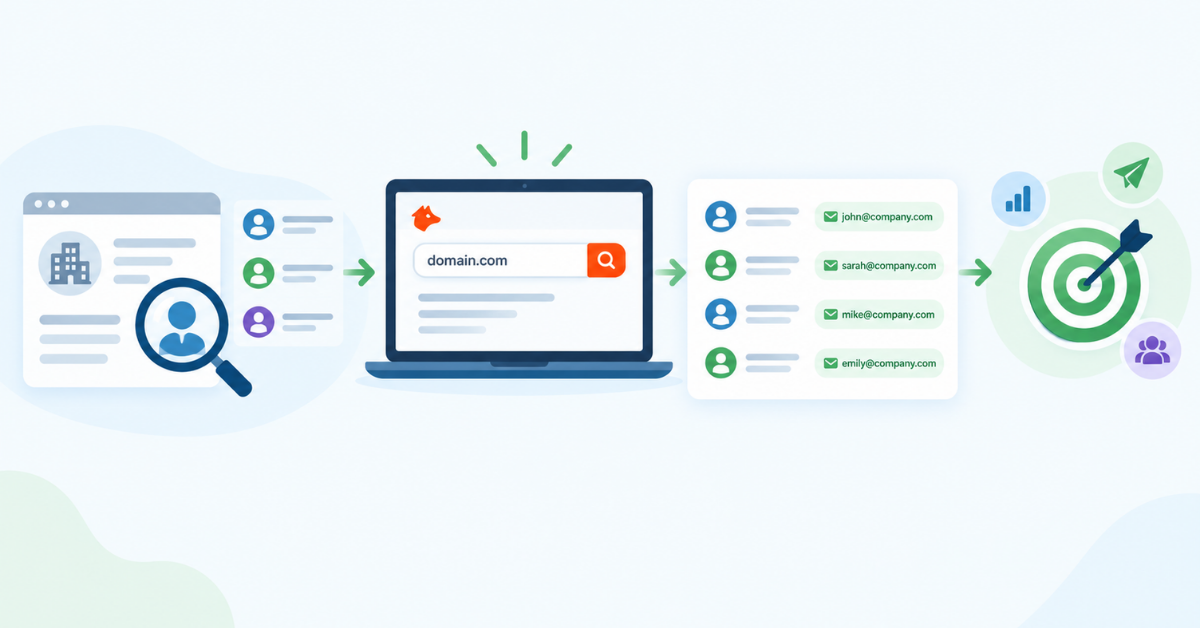
Hunter is an email discovery and outreach platform for finding, verifying, and managing professional contacts. Its Email Finder lets a user enter a person’s name and company domain to identify a likely work address. Its Domain Search works from the other direction: enter a company website and review associated contacts and email patterns.
The Hunter.io email finder is useful for targeted prospect research. A sales representative might know the company and decision-maker but lack a direct business email lookup. A recruiter may have a candidate’s name and employer. A founder may want to contact a small set of potential partners. Hunter contact finder tools address these focused situations without requiring a full enterprise sales-intelligence system.
Teams evaluating broader sources can also review a B2B data buyer guide before choosing a provider.
That distinction matters. A basic email lookup usually returns one possible address. Hunter adds supporting signals, such as sources, patterns, and verification results, to help a user judge whether the address is suitable for outreach. It does not remove the need to check role fit, consent, relevance, or complianc
Hunter email finder generally follows a straightforward process:
This is faster than guessing an address from a company’s naming convention. It is also more consistent because the same process can be applied to every prospect on a small list.
Hunter domain search starts with a company domain, such as example.com, rather than a person’s name. The tool can show professional addresses associated with that domain, names, job titles, email patterns, confidence indicators, and available sources.
Suppose you want to contact the head of partnerships at a target software company. You can search the company domain, scan the listed roles, identify the relevant contact, and then use the result for targeted outreach. Domain Search is most useful when account research comes before contact research.
Finding an email and verifying an email solve related but different problems. Finding asks, “What address is likely to belong to this person?” Verification asks, “Does this address appear able to receive mail, and does it show risk signals?”
The Hunter email verifier checks an address using signals such as syntax, domain configuration, and mailbox-related checks. A successful result still does not guarantee a reply or permission to contact someone. People change jobs, domains change, and some servers accept mail for invalid addresses. Treat verification as a risk-reduction step, not a promise of engagement.
Hunter’s core features cover the main stages of focused email discovery:
The value comes from combining these features. A rep can find a company, identify a relevant person, check the address, and send it to the next system without rebuilding the record from scratch.
Hunter does not make email accuracy a guarantee. A found address can be wrong because a person changed jobs, a company changed domains, an old source was reused, or the address belongs to a generic mailbox rather than the intended contact.
For teams comparing verification approaches, ReachStream’s sales data comparison provides another reference point.
Verification improves the decision, but it cannot predict whether a recipient will engage. Deliverability also depends on sender reputation, message content, authentication, mailbox policy, and campaign practices. Teams should test a small sample before scaling. Review bounce results, role relevance, and duplicate records instead of judging the tool from one successful lookup.
A sensible workflow is to use Hunter for discovery, verify important results, and keep contact records current. For larger programs, compare results against another reliable source before committing budget or building a campaign around the data.
Pros
Cons
Manual research often begins with LinkedIn, a company website, Google, a contact page, and an email-pattern guess. One prospect may take only a few minutes. A list of 200 contacts is different: the process becomes inconsistent, sources are hard to track, and verification gets skipped when the deadline moves closer.
Hunter compresses those steps into a repeatable workflow. A rep can search by name and domain, review the result, verify it, and export the record. The trade-off is usage credits. Manual research spends staff time; Hunter spends credits. The better option depends on which resource is more limited and how much consistency the team needs.
For example, a founder contacting ten partnership prospects may prefer Hunter’s focused lookup. A demand-generation team creating several segmented lists each month may need a database with filtering and enrichment from the start.
Hunter is a good fit for people who need targeted contact discovery rather than an enormous prospecting database.
Teams focused on specific owner-led markets can compare a business owner list with a person-by-person finder workflow.
Yes. Hunter currently offers a Free plan with no stated time limit and 50 credits per month. Those credits are shared across core activities such as Email Finder, Email Verifier, and Domain Search. The plan also includes access to email finding, verification, bulk functionality, one connected email account, sequences, Discover, Leads, API access, integrations, and CSV exports with limits.
The Free plan is useful for learning the interface, testing a small sample, or handling occasional prospect research. It is unlikely to suit a team that needs consistent high-volume list building. Hunter’s current paid plans start at $49 per month when billed monthly for Starter, with a lower displayed monthly rate for annual billing. Pricing and inclusions can change, so check the official pricing plans before purchase.
The important question is not simply whether Hunter email finder free access exists. Ask how many searches and verifications your workflow needs, how many people share the credits, and whether you need full exports, advanced filters, enrichment, or multiple connected accounts.
This balance makes Apollo attractive for teams that want a broad prospecting workflow. It may be less suitable for a buyer who wants a simple, predictable contact-data subscription with minimal engagement features.
The right comparison depends on whether you need a focused finder, a database, or a prospecting workflow with enrichment.
For a broader shortlist, review database comparisons alongside each vendor’s coverage and usage rules.
Feature | Hunter | ReachStream | Other email finder |
Email discovery | Strong focus on name-and-domain discovery | Available within broader contact-list workflows | Varies by provider |
Email verification | Core feature | Available as part of data-quality workflows | Often available, but scope varies |
Contact database | Useful discovery data and leads | Large B2B contact database | Depends on vendor |
Company data | Present, with depth depending on plan | Built for company and contact segmentation | Varies widely |
Advanced filters | Basic or advanced filters by plan | Designed for targeted list building | Depends on vendor |
Bulk list building | Available with credit limits | Core use case | Varies |
Chrome extension | Available | Available through relevant prospecting workflows | Some providers offer one |
Enrichment | Available on paid Hunter plans | Part of broader data workflows | Varies |
Best use case | Focused email finding and verification | Scaled, filtered B2B prospecting | Specific niche or workflow |
A contact database guide can help teams compare vendors by coverage, filters, verification, export rules, and intended use rather than by contact count alone.
Choose Hunter when your main need is a focused email discovery and verification workflow. It is a sensible option for smaller prospect sets, domain-led research, and teams that want a simple route from a person’s name to a work address.
Readers who need a more specific segment can also examine a US owner database before selecting a data source.
Choose ReachStream when the work starts with a market segment rather than a known person. For example, a team may need to find marketing leaders at software companies in specific regions, filter accounts by size, and build a larger verified contact list. A broader sales intelligence platform can support that type of account and contact selection.
ReachStream is not automatically better for every lookup. Hunter may be faster for one prospect. ReachStream may be more efficient when list scale, filters, company data, and repeatable exports matter. The practical choice is the one that matches the starting point of your workflow.
A practical email verification guide can help teams create checks before addresses enter an outreach sequence.
A suggested address may be outdated or risky. Verify important records before adding them to a campaign, and remove addresses that show unacceptable risk.
A valid email is still a poor lead if the company, market, or role is wrong. Define the account and contact criteria before spending credits.
The right company does not guarantee the right person. Compare the contact’s title and responsibilities with the decision-maker profile for the offer.
Run a small batch first. Check accuracy, duplicates, role fit, and bounce results before purchasing more credits or launching a large campaign.
Email discovery answers one part of prospecting. It does not automatically provide complete firmographic data, buying signals, enrichment, or territory planning.
A typical workflow looks like this:
ICP → Account research → Contact discovery → Email verification → CRM → Campaign or follow-up → Performance tracking
Hunter is strongest at contact discovery and email verification. It can also connect with spreadsheets, CRMs, APIs, and outreach tools, depending on the current plan and integration. Teams that begin with a large market segment may prefer a lead generation platform for account selection before moving to verification and outreach.
For list projects that depend on data enrichment, a data enrichment resource can help clarify which fields should be added before a contact reaches the CRM. The goal is to prevent the email address from becoming the only useful field in the record.
Hunter email finder is a strong choice when the job is focused professional email discovery. It helps users search by name and domain, inspect company contacts, verify addresses, and move selected records into a sales or marketing workflow. The simple process suits SDRs, founders, recruiters, researchers, and small B2B teams.
Its limits become clearer when the requirement shifts from finding a few people to building large, segmented contact lists. Advanced company filters, broader business contact data, enrichment, and repeatable bulk exports may justify a dedicated B2B data platform. Start with your actual workflow: use Hunter for targeted lookups, and compare ReachStream when you need a broader B2B prospecting solution for list creation and scale.
Access 400M+ verified business emails and grow your sales pipeline effortlessly.
Hunter email finder is a tool for discovering professional email addresses from a person’s name and company domain. It can also support domain-based contact research and email verification, helping users move from account research to a more informed outreach decision.
Enter a prospect’s name and company domain, or search a company website with Domain Search. Hunter returns an available address and related signals. Review the result, verify it when necessary, and then save or export it for your chosen workflow.
Hunter offers a Free plan with 50 credits per month. Those credits are shared across core finding and verification activities. The plan is useful for occasional research and testing, while higher-volume prospecting generally requires a paid plan or another data source.
Accuracy varies by company, role, source age, and whether the person still works at the organization. Hunter’s verification checks can reduce risk, but no finder guarantees delivery or engagement. Test a sample and monitor bounce results before scaling.
Domain Search starts with a company website rather than an individual’s name. It can show associated professional addresses, people, roles, patterns, and supporting signals. It is useful when you know the account but need to identify relevant contacts.
The finder estimates which professional address belongs to a person. The verifier assesses whether an existing address appears valid and able to receive mail. Use the finder for discovery and the verifier for quality checks before outreach.

Author
Marketing professional with a Master’s degree in Marketing, specializing in SEO, content strategy, social media, performance marketing, prospecting, and demand generation.
Access 400M+ verified business emails and grow your sales pipeline effortlessly.
Don't forget to share this post!















Check out our other blogs!
Email Verification Tools: 15 Ways to Check Business Emails
B2B Data Providers: How to Compare Contact Data Platforms
CRM Data Enrichment: How to Improve Incomplete Contact Records
How to Know Your Sales Team Needs a Better Contact Database